cardo69
Addict
 Is it possible to connect x box live using a 3g data card?? or does 1 have to use the ethernet cable??
 Is it possible to connect x box live using a 3g data card?? or does 1 have to use the ethernet cable??


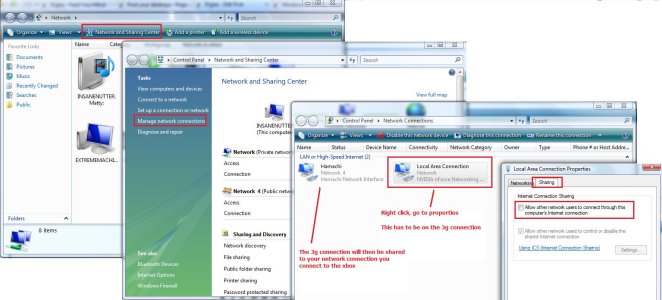
perfect!!! Thanks so much!!!!yes you can connect to xbox live using a 3g data card, you need to connect to the internet using the 3g data card on your pc then use internet connection sharing to share the internet to the xbox using the ethernet cable.
perfect!!! Thanks so much!!!!

and to view all other things on my pc, such as videos, music and pics, will the ethernet cable work some what like a usb connection to my x box from the pc?Nope it will not auto run, basically connect the Ethernet cable to the pc’s Ethernet port and then to the Xbox’s Ethernet port and connect to the internet using the 3g modem, you then need to share the internet like in the image i posted up, after you have shared it you might need to re start the Xbox but after it should be able to sign on to live.
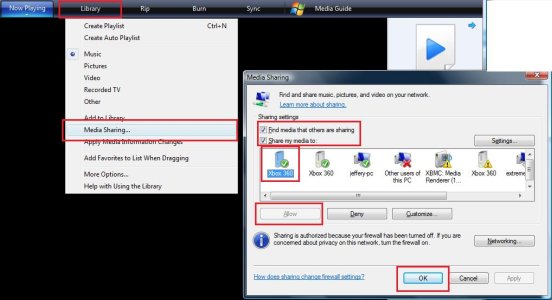
But now im having abit of a problem, i've succesfully linked my pc to my x box (via ethernet), and now even when its not linked, my pc name stays there, but when i try linking my laptop, it does not pick up my laptop or laptop name, just my pc name that stays there (shaded grey)? do i have to de link it from my pc before attempting any other connections?You need to share the media on your pc using Windows Media Player or another compatible program, once your xbox is connected to your pc if you go to the video section on the dash you should see your pc’s name there and be able to view any media it has shared.
Look at the example attached for how to share media using Windows Media Player.
It does recognise the connection between the 2, but i havent checked my firewall settings, ill be sure to do that, aswell as i realised abit late that i was still running windows media 9 on that laptop, i think i need to update that, then ill give it a try again! thanks again for all your help!Are you using the NXE? If you go to Music, Video and Pictures on the console it should remember the last console it was connected it but list other computers below that are sharing media.
Is the laptop sharing media and have any firewalls turned off? I presume windows recognises the Ethernet connection between the laptop and 360?
oh and yes, it is NXE.It does recognise the connection between the 2, but i havent checked my firewall settings, ill be sure to do that, aswell as i realised abit late that i was still running windows media 9 on that laptop, i think i need to update that, then ill give it a try again! thanks again for all your help!