


InsaneNutter
Resident Nutter
When creating a background for the Xbox One you do have to keep in mind that a large part of the image you’re using will be obscured by tiles and menus, so you might need a few tries before you find an image that fits. Here’s a Photoshop template of the Xbox One dashboard to help you resize or create the perfect background image.
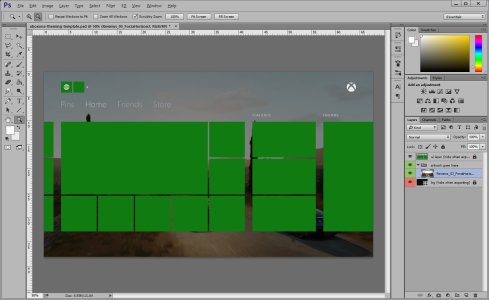
Download:
Download Xbox One Photoshop Dashboard Template
How to set a custom Background on the Xbox One:
Share your Backgrounds / Themes:
We have a new section dedicated to Xbox One backgrounds, please contribute here.
Download:
Download Xbox One Photoshop Dashboard Template
How to set a custom Background on the Xbox One:
- Make sure you have the latest build of the Xbox OS available
- Make sure you have the latest build of Media player installed
- Connect a USB stick to the console/ Connect to a PC through DLNA
- Find the source file you wish to use and open it full screen
- Hit menu button
- Select “Set as Background”
- All Done.
Share your Backgrounds / Themes:
We have a new section dedicated to Xbox One backgrounds, please contribute here.





