
• Welcome to the Digiex Download Center, you are welcome to download anything you like here, no registration is required! We offer direct download links with no captchas or wait times.
    We do our best to ensure no content infringes copyrights, and provide a DMCA Takedown Request Form to request the removal of content from Digiex

Costume changer + full unlocker for super street fighter 4 aracde PC

LordDaMan

Active Member
Costume changer + Full unlocker for Super Street fighter IV Arcade Edition for the PC

After posting a lengthy guide on how to enable alternative costumes in SSF4ae, I came across a program that automates all of this and even gives picture previews of the changes.

Also included is an unlocker for all colors, taunts, etc

How to use

Costume changer:
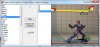
Untitled.jpg

1) Extract the file into the super street fighter 4 arcade edition folder. Do not extract into a new folder. The "SF4AECostumeChanger.exe" file has to be in the same folder as "SSFIV.exe". Also make sure the image folder was extracted too, as that's needed

2) Run "SF4AECostumeChanger.exe" and click the Init button on top. Now wait a few minutes for it to read all the files and set some things up.

3) After it's fully loaded you'll see a list of character names on the left. Simply click the desired character then choose the costume on the right. Click apply to apply it, or restore to go back to the original costume


Unlocker:
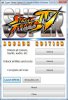
unlocker.jpg

1) Extract the unlocker into your super street fighter 4 arcade edition folder

2) Make sure explorer is open to the super street fighter Iv arcade folder

3) run super street fighter IV arcade edition.

4) hit ALT-TAB on your keyboard once. This should bring you back to explorer

5) run "Super Street Fighter IV Arcade Edition Unlocker (Retail + Steam).exe" and click on either the the retail or steam version button depending on what one you have

6) click whatever you want to unlock, then alt-tab back into ssf4ae and test to see if it unlocked


Note: you should run both in administrator mode in vista/win 7. Also the costume changer needs .net 2.0 or better


Credit goes out to emapr for the orginal program and somebody2978 for the suggested fixes. Source for the costume changer is available upon request
 

Attachments

Last edited:
I've followed the instructions but the unlocker doesn't work for me. Must my SSFIV folder be vanilla and clean? Untouched by custom mods and such for it to work?
 
It works well, but there are some problems with Balrog (boxer) and M. Bison (Dictator), change a character's costumes and activated in the other character, or are not activated directly.
Surely it is because there are errors in the codes for the names of the directories are the Japanese.

Also when I activate the costume "01" of any character, the Costume Changer will crash.
 
LordDaMan really thanks unlocker worked for me but when i click the SSF4AECostumeChanger.exe the window you said first comes with init button
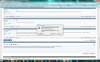
When i click the init button it says C:\Program Files\Capcom\Super Street Fighter IV\resource\battle\chara\ADN\ADN_1.bsrBKP waypoint access denied or something like that
and when i change the ADN_1.bsr to ADN_1.bsrBKP it doesn't error for this it errors for the following file(ADN_01.nml.emb) and says ADN_01.nml.embBKP waypoint access denied what should i do please help
 

Attachments

  • Adsız.png
    Adsız.png
    373.1 KB · Views: 8,292
I've followed the instructions but the unlocker doesn't work for me. Must my SSFIV folder be vanilla and clean? Untouched by custom mods and such for it to work?

Are you running the latest patch? Also running as admin in vista/win 7? As far as I can tell it doesn't matter if you had mods installed
 
It works well, but there are some problems with Balrog (boxer) and M. Bison (Dictator), change a character's costumes and activated in the other character, or are not activated directly.
Surely it is because there are errors in the codes for the names of the directories are the Japanese.

Also when I activate the costume "01" of any character, the Costume Changer will crash.

I have no problems with it myself. You are running this when ssfIV is not running right?
 
LordDaMan really thanks unlocker worked for me but when i click the SSF4AECostumeChanger.exe the window you said first comes with init button
When i click the init button it says C:\Program Files\Capcom\Super Street Fighter IV\resource\battle\chara\ADN\ADN_1.bsrBKP waypoint access denied or something like that
and when i change the ADN_1.bsr to ADN_1.bsrBKP it doesn't error for this it errors for the following file(ADN_01.nml.emb) and says ADN_01.nml.embBKP waypoint access denied what should i do please help

Are you running it as an admin?
 
I solved the problem of costumes Balrog, Vega and M. Bison.
I have renamed JPG files from the "\Images" directory to the following:

"VEG*.jpg" to "BLR*.jpg"
"BLR*.jpg" to "BSN*.jpg"
"BSN*.jpg" to "VEG*.jpg"

Now change the costumes properly. Although the names are like the japanese version of the game, but the JPG images make it easy to change ;).

The crash when apply a "01" custome continues... 8-)... but the "Restore" function work fine and performs a similar function, so it's not a serious problem :).
 
I have the same problem here, the problems Bison-Vega-Balrog-Bison

When i change the costume from Bison change the from Vega Vega - Balrog - and Balrog- Bison.
 
The problem of Balrog / Vega / Bison are here:

CostumeChanger.cs file (source):
using System.Collections.Generic;

namespace SF4AECostumeChanger
{
public class CostumeChanger
{
public List<Character> CharList = new List<Character>();

public CostumeChanger()
{
CharList.Add(new Character("Adon", "ADN"));
CharList.Add(new Character("C.Viper", "AGL"));
CharList.Add(new Character("Blanka", "BLK"));
CharList.Add(new Character("Balrog", "BLR"));
CharList.Add(new Character("Seth", "BOS"));
CharList.Add(new Character("Bison", "BSN"));
CharList.Add(new Character("Cody", "CDY"));
CharList.Add(new Character("Rufus", "CHB"));
CharList.Add(new Character("Cammy", "CMY"));
CharList.Add(new Character("ChunLi", "CNL"));
CharList.Add(new Character("Dan", "DAN"));
CharList.Add(new Character("Dudley", "DDL"));
CharList.Add(new Character("Deejay", "DJY"));
CharList.Add(new Character("Dhalsim", "DSM"));
CharList.Add(new Character("Feilong", "FLN"));
CharList.Add(new Character("Gen", "GEN"));
CharList.Add(new Character("Akuma", "GKI"));
CharList.Add(new Character("Gouken", "GKN"));
CharList.Add(new Character("Oni", "GKX"));
CharList.Add(new Character("Guile", "GUL"));
CharList.Add(new Character("Guy", "GUY"));
CharList.Add(new Character("Hakkan", "HKN"));
CharList.Add(new Character("Honda", "HND"));
CharList.Add(new Character("T.Hawk", "HWK"));
CharList.Add(new Character("Ibuki", "IBK"));
CharList.Add(new Character("Abel", "JHA"));
CharList.Add(new Character("Juri", "JRI"));
CharList.Add(new Character("Ken", "KEN"));
CharList.Add(new Character("Makoto", "MKT"));
CharList.Add(new Character("El Fuerte", "RIC"));
CharList.Add(new Character("Rose", "ROS"));
CharList.Add(new Character("Ryu", "RYU"));
CharList.Add(new Character("Evil Ryu", "RYX"));
CharList.Add(new Character("Sagat", "SGT"));
CharList.Add(new Character("Sakura", "SKR"));
CharList.Add(new Character("Vega", "VEG"));
CharList.Add(new Character("Yan", "YAN"));
CharList.Add(new Character("Yun", "YUN"));
CharList.Add(new Character("Zangief", "ZGF"));

CharList.Sort((a, b) => a.Name.CompareTo(b.Name));
}
}
}
The code is indicated for the original names (Japanese) characters in relation to directories. Codes should be:

CharList.Add(new Character("Balrog", "BSN"));
CharList.Add(new Character("Bison", "VEG"));
CharList.Add(new Character("Vega", "BLR"));

With those changes may "Customer Changer" to work correctly with the names as American/European game.
The thing is I do not know how to recompile an application :(.
 
I managed to edit the source code (it was opensource afterall). Put in somebody2978's fixes. Credits go out to emapr for the original tool. If everyone could test this so i know it's working right. If everything is fine, I'll update the orgianl post with the updated tool


Just rewrite the old files with the new ones. make sure to do the images also!


Don't ask me about the sometimes problem with clicking on costume 1 as that's way past my knowledge level! :D
 

Attachments

Works fine now. There was an error with Balrog but I corrected. I took the opportunity to make a quick uninstaller (clean it completely of the game ) and update the version info file naming it 1.1 ;).

Although it has been imperfect because the bug "01 costume" continues to appear...
 

Attachments

Works fine now. There was an error with Balrog but I corrected. I took the opportunity to make a quick uninstaller (clean it completely of the game ) and update the version info file naming it 1.1 ;).

Although it has been imperfect because the bug "01 costume" continues to appear...

What was wrong with balrog?
 
Hello! Thanks very much for these tools. I was wondering though, is it possible to modify the character names that show up in the Changer's selection list? For instance:

Akuma - I'd prefer it to say "Gouki" if possible.
Yan - "Yang" is how you usually see his name spelled.
Evil Ryu - I'd like it to say "Satsui" instead of "Evil", again if it's not too much trouble to do such changes. I'd even appreciate it if somebody could show me how to do them myself if these are relatively simple fixes. Thanks again for sharing. Very awesome and I haven't had any problems with it thus far.
 
You know it's possible to extend the changer tool to switch between custom costumes also.

Basically you get a custom costume and make note of what costume it replaces . then you go into that charter's folder and copy out all files that belong that that noted costume to another folder. Now merge in the edits. the trick is to rename all of them to the next available number for costumes (5 in most cases) i.i agl_05*.*. Now copy all those files back to the original charter folder. Then go into the images folder and copy a image over to the new naming scheme (agl05.jpg for example). now run the tool and run it, the next skin should come up.

Then later just play ssf4ae and make a screen shot of the skin and save it as that jpg (agl05.jpg to use the same example)
 
Hello! Thanks very much for these tools. I was wondering though, is it possible to modify the character names that show up in the Changer's selection list? For instance:

Akuma - I'd prefer it to say "Gouki" if possible.
Yan - "Yang" is how you usually see his name spelled.
Evil Ryu - I'd like it to say "Satsui" instead of "Evil", again if it's not too much trouble to do such changes. I'd even appreciate it if somebody could show me how to do them myself if these are relatively simple fixes. Thanks again for sharing. Very awesome and I haven't had any problems with it thus far.
But if we do that, return to the starting point, since the objective was to correct the names as version American / European.

There was not paying attention, but it's true, there are many incorrect names in the "Costume Change".

Correct names:

CharList.Add(new Character("Chun-Li", "CNL"));
CharList.Add(new Character("C. Viper", "AGL"));
CharList.Add(new Character("Dee Jay", "DJY"));
CharList.Add(new Character("E. Honda", "HND"));
CharList.Add(new Character("Fei Long", "FLN"));
CharList.Add(new Character("Hakan", "HKN"));
CharList.Add(new Character("M. Bison", "VEG"));
CharList.Add(new Character("T. Hawk", "HWK"));
CharList.Add(new Character("Yang", "YAN"));
 
Top Bottom