
You are using an out of date browser. It may not display this or other websites correctly.
You should upgrade or use an alternative browser.
You should upgrade or use an alternative browser.
Hack a 250gb, 320gb or 500gb Sata harddrive to work in the Xbox 360 and Xbox 360 Slim
- Thread starter InsaneNutter
- Start date

Rick
Veteran
If the drive shows up as 12gb are you able to format it with the xbox 360?So My hardrive is done can't use it anymore?
Looks like the flash drive wasn't selected for booting. You will need to connect the flash drive with dos & hddhackr on it and connect the the hard drive internally. To select the usb drive for booting press the button for selecting boot device or you can change it in the bios.
When you're done you can change the boot priority(if you changed it) after you have hacked the hard drive.
I connected the hdd internally but it still tells me there are no ATA devices present...
Rick
Veteran
Is there any sata or raid settings in the bios that you can change?

jdog3634
Member
- Joined
- Mar 17, 2014
- Messages
- 8
Nope it gives me a red ring when i plug it in and turn it on, but works fine without.If the drive shows up as 12gb are you able to format it with the xbox 360?
Rick
Veteran
Usually hddhackr doesn't corrupt hard drives unless you undo the hdd with a wrong undo file. If the drive wasn't operating right before you used hddhackr you may be able to get a replacement.Nope it gives me a red ring when i plug it in and turn it on, but works fine without.
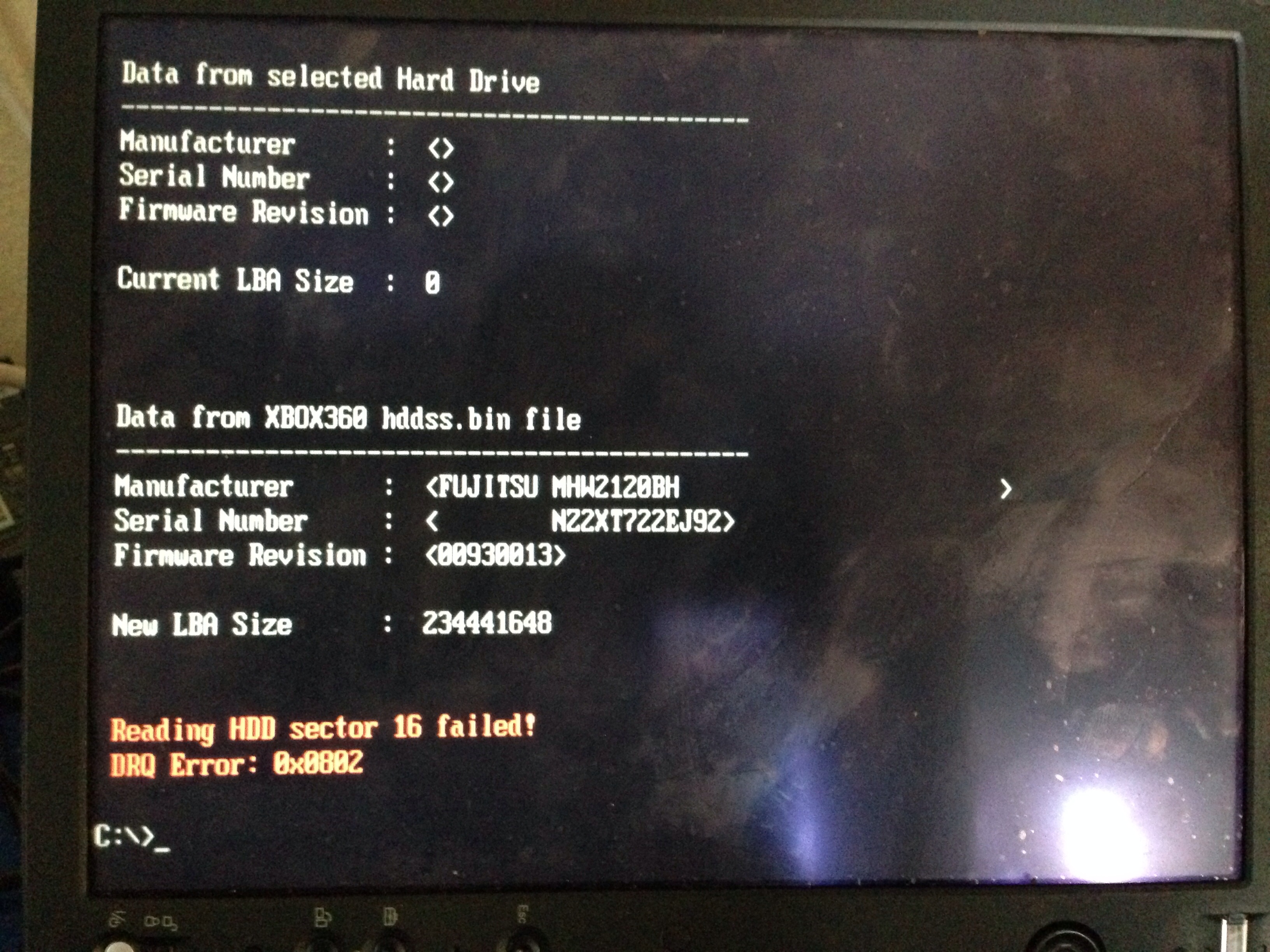
In this image you provided before, was it the first time you used hddhackr with this drive? It does look like it was dead from the manufacturer.
https://digiex.net/attachments/guid...rddrive-work-xbox-360-xbox-360-slim-image.jpg
I'm about to upgrade my Xbox 360 HDD to 500 gb, because my 250 hdd is not big enough, looking to my local IT store I have 2 models, which I can buy it's the Black 500 GB WD5000BPKX with 7200 rpm, faster and the WD7500BPVT 750 GB with 5400 rpm, the same speed as the default Xbox HDD, can I make a backup of the HDD prior to installing the hacked bios?
Btw the new WD5000BPKX are compatible with this hack? On the first post only the BPVT are fully compatible with this
Btw the new WD5000BPKX are compatible with this hack? On the first post only the BPVT are fully compatible with this
I think it would be a waste to get the 750gb drive. As you would only end up with 460GB of free space after. I went with the 7200RPM 500GB Western Digital Black (WD5000BPKX-22HPJTO) myself. I had no issues modding this drive with hddhackr. It will create a undo.bin file for you when you go to mod it. If your getting the same model drive as mine. I posted my undo file if you need it.
You end up having more speed, since it's 7200 RPM, my concern was if it could be modded with HddHackr, hence wasting money for nothing, the main advantage of buying a bigger HDD is that, if Ms releases another official HDD you only need to flash it again, and use all the available HDD, in the future.
So I can buy the WD5000BPKX with no problems, I will do it next week

jdog3634
Member
- Joined
- Mar 17, 2014
- Messages
- 8
Yay it was working before but what i did was used a false undo bin file. It is broken now as you said. Well thank you for trying. I will just see if i can get my money back. Shoulkd I try or not?Usually hddhackr doesn't corrupt hard drives unless you undo the hdd with a wrong undo file. If the drive wasn't operating right before you used hddhackr you may be able to get a replacement.
In this image you provided before, was it the first time you used hddhackr with this drive? It does look like it was dead from the manufacturer.
https://digiex.net/attachments/guid...rddrive-work-xbox-360-xbox-360-slim-image.jpg
Rick
Veteran
You could return it if you want. Just don't tell them you messed it up.
My guess is that it was dumped from an XBox One.You are right, that's really interesting. I can see 500gb drives for non modded consoles on sale on Amazon / Ebay, and videos of them in stock Xbox 360's connected to Xbox Live.
Hddhackr supports 500gb drives, however we have never had the security sector to flash on to a 500gb drive, so only 320gb has ever been usable. As to how people have got a 500gb security sector i dont know.
Skull_crusher
Member
- Joined
- Feb 27, 2014
- Messages
- 5
A person is selling a 320 gig toshiba drive flashed for 360. Will I get banned from live by using it. Help please. ASAP.
Rick
Veteran
It should work fine and won't get you banned.A person is selling a 320 gig toshiba drive flashed for 360. Will I get banned from live by using it. Help please. ASAP.
Using the official xbox 360 transfer cable is easier.Just a question, after I have done with the new 500 Hdd, what is the easiest method of transferring all my data to the new one?
This method works also but it's not as easy as using the cable with the xbox 360.
You can use the xplorer 360 120gb edition to transfer your files to your computer then use this https://digiex.net/downloads/downlo.../4487-xplorer-360-500gb-edition-download.html
This new security sector must come from the HDD of the new XBOX one, I have read that we can use the USB Stick to transfer files, but it will take some time, I guess I will move my saved games to the cloud, move all the dlc to the USB Stick, and download again all my games from Xbox Live
savedbyhim01
New Member
- Joined
- Mar 25, 2014
- Messages
- 2
Thanks for this tutorial. I have Windows 8 and a WD Scorpio Blue 250GB BEVT hard drive. I have already created the USB disc with the necessary files on it. But I have a couple of questions before flashing my hard drive.
1. Can I use a USB to Sata cable for hooking my hard drive up to the laptop? The hard drive slot seems to be deep inside the laptop and fairly inaccessible.
2. If I can use a USB to Sata cable, how do I ensure that I am flashing that hard drive and not my laptop's internal hard drive? I definitely would not want to destroy that one.
3. The hard drive I have has files on it from when I used it in my old laptop. Do I need to delete the files or format the hard drive at all prior to flashing it or will flashing it do this and erase the data (I don't need the data)?
4. If USB to Sata cable cannot work, is it possible to use a normal PC or would that not have the proper SATA connections?
Thanks a lot!
1. Can I use a USB to Sata cable for hooking my hard drive up to the laptop? The hard drive slot seems to be deep inside the laptop and fairly inaccessible.
2. If I can use a USB to Sata cable, how do I ensure that I am flashing that hard drive and not my laptop's internal hard drive? I definitely would not want to destroy that one.
3. The hard drive I have has files on it from when I used it in my old laptop. Do I need to delete the files or format the hard drive at all prior to flashing it or will flashing it do this and erase the data (I don't need the data)?
4. If USB to Sata cable cannot work, is it possible to use a normal PC or would that not have the proper SATA connections?
Thanks a lot!
savedbyhim01
New Member
- Joined
- Mar 25, 2014
- Messages
- 2
I ended up using my PC to flash it and it worked! Thanks!