Hack a 250gb, 320gb or 500gb Sata harddrive to work in the Xbox 360 and Xbox 360 Slim

See if you can disable ahci then try hddhackr again. If it works then you will have to revert the setting afterwards so you can boot into windows again.
Yes, I am running it on ATA mode.
the problem is that my laptop doesn't recogonize the hdd. How do I resolve this issue.
PS is the WD3200LPVX compatible with hddhackr.
 
Yes, I am running it on ATA mode.
the problem is that my laptop doesn't recogonize the hdd. How do I resolve this issue.
PS is the WD3200LPVX compatible with hddhackr.
It should be compatible. Try any other sata settings and see if it makes a difference.
 
AWESOME!!! I am currently updating my newly flashed 500GB Scorpio Black on a stock Xbox 360 system, on Xbox LIVE!!!

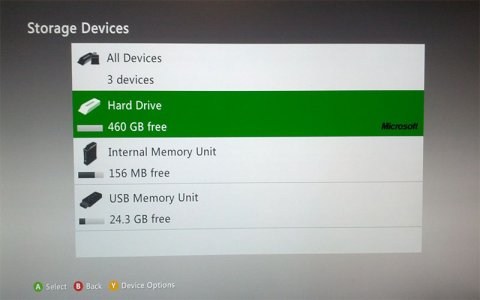
DING!!! Just finished adding avatars and kinect data to the latest dash, and now I'm on Xbox LIVE with 460GB free of storage! W00T W00T!!!

I'll PM you a mediafire link, InsaneNutter, and let you take it from there.

Hmmm, I didn't see the PM under 'sent messages', so just in case I'll post the file address on Mediafire directly in here. I won't leave it up for too long though, as I'd like to delete the account as soon is the joy is spread.
 
I have been following the tutorial and everything seems to be working ok. I have started from scratch with a new drive WD 500GB (I had flashed it with the 320gb .bin but went back and reflashed with the recently posted HDDSS500.bin (Thanks TalonII).
However, I wanted to include the XBOX1 emulator. I downloaded the Partition 2 bin and load up Xplorer360 Extreme 2 and all it locates is Partition 1 (I assume this is my working Windows 7 hard drive partition?). I don't see any Partitions 0, 2, or 3. Should I partition with HDDHackr or put it in the console and let it format it?

Thanks.
 
I went ahead and partitioned 0,2, & 3 with HDDHackr 1.4 and then Xplorer360 Extreme 2 saw the three partitions. I loaded the Partition2.bin and then plugged in the drive to my Slim. ( I didn't run the Xplorer 360 320GB edition. I wasn't sure what that was for.)

The console showed me 460GB of hard drive and I was able to transfer everything from my 16 GB USB drive and run Halo 2 (Xbox1) so it looks, for right now anyway, that everything is working great!
Thanks again for the tutorial!
 
Download: Xbox 360 500GB Hard Drive Security Sector (HDDSS.BIN) (HDDSS500GB.BIN)

Confirmed working by two people, i hope to confirm myself within the next few days once i receive my 500gb drive. Thanks to TalonII for dumping the security sector from his 500GB drive.

I have also updated the tutorial a little, i plan to give it a nice update and make it read a bit better over the next few days, along with including some better tools to help with various parts of the tutorial.
 
Thanks insanutter and rick .. i was able to flash my drive WD 320BPVT series with 320GB bin file......... Previously i tried Wd 500 LPVT series did not work but now that we have the 500HDDS bin file .. i think might try it again
 
this is an amazing guide thank you very much

P.S on a side note iv sucessfully flashed the 320gb security secter to a 320gb "WD3200BUCT" (these are not listed as compatible maybe due to them being a newer model but they work) hard drive that i took out of my talktalk recordable freeview box
 
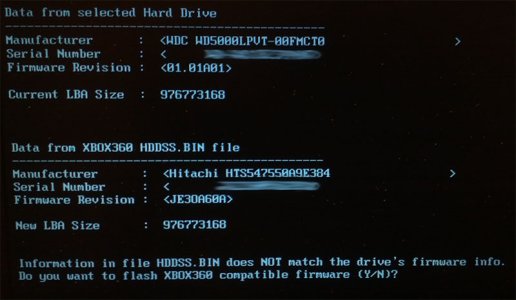
Just hacked a 500gb Western Digital Scorpio Blue WD5000LPVT with the 500gb security sector from TalonII. Everything went fine with hddhackr, I hacked the drive and then ran hddhackr again to create the partitions.

500gb-xbox360-1.jpg

Everything works great in a stock Xbox 360, 460gb of usable space.

500gb-xbox360-2.jpg

I have done some new images of the hacking process as i realise hddhackr has changed a bit since i created the tutorial all these years ago, i shall update that in the coming weeks. A massive thanks once again to TalonII, this 500gb drive is a nice upgrade from the 250gb drive i hacked all those years ago!
 
Do you think these 500gb drives are live safe? I believe that microsoft would be able to block these drives(500gb+) with an update though.
 
I would think so, i mean a 500gb drive doesn't allow you to pirate games or have any unfair advantage over anyone else. You can simply install more games, or buy more games / dlc from Xbox Live. If anything its in Microsoft's best interest for people to have larger drives for that reason.

Put it this way we have had all these user created 120gb, 250gb and 320gb hard drives on Xbox Live for years, all with the same serial number and nothing has ever come of it.

At this point in the 360's life cycle i dont think Microsoft really care either way, they have basically stopped banning people for burned games unless that person plays the game early from what i gather. I personally cant see a larger hard drive been of interest either way.

I intend to use mine as normal in my main 360, if anything ever happens because of that i'll report back.
 
Do you think these 500gb drives are live safe? I believe that microsoft would be able to block these drives(500gb+) with an update though.

I really doubt anything bad would come of it honestly. As people have been selling 500GB hard drives that work on consoles so if Microsoft were to block all these drives, they'd probably have some pretty pissed off customers on their hands. The console accepts it because of their doing, so it'd be stupid for them to take it away.
 
I will most likely upgrade to a 500gb drive. With all of these free games and other games i purchased during the sales have filled up my 250gb drive.
 
Could someone please help me ?

I have successfully flashed my WD-5000-BPVT scorpio blue drive thanks to this excellent guide !!!

But i lost the UNDO.BIN file to restore it back . could someone please share their undo.bin with me ?!?!
My drive is a WD-5000-BPVT - 08HXZT1 and the date on it is 16 August 2011 ?!?!

Also while flashing I had the sector 16 error , I fixed it by formatting the drive in windows , I then got a different error on the next step and so i tried again and hey presto it worked !!!!
 
Could someone please help me ?

I have successfully flashed my WD-5000-BPVT scorpio blue drive thanks to this excellent guide !!!

But i lost the UNDO.BIN file to restore it back . could someone please share their undo.bin with me ?!?!
My drive is a WD-5000-BPVT - 08HXZT1 and the date on it is 16 August 2011 ?!?!

Also while flashing I had the sector 16 error , I fixed it by formatting the drive in windows , I then got a different error on the next step and so i tried again and hey presto it worked !!!!

If you have recently flashed it, You should be able to retrieve it with this program Download Recuva 1.50.1036 - FileHippo.com
 
Thank you for your quick , reply i have been searching the web for hours and i already came across this Recuva program !!!
but i can not locate the undo.bin file using it , in fact there was only 11 items that i was able to recover ,
the rest where red and it couldn't retrieve them .
Hopefully with this new 500gb method someone may soon use the same drive as i did and upload the undo.bin here :)
 
Did you enable deep scan then scan your flash drive?

yes mate !!! the problem is i totally forgot about the undo.bin and used the usb stick to move profiles and game saves around !!

I have tried about 5 different recover programs but none seem to find it !!!
 

About Digiex

Digiex is a technology and gaming forum, founded in 2004 by InsaneNutter and Nimrod. Digiex has served the internet community with breaking news, detailed guides, exclusive downloads and a popular discussion forum. A small, friendly community of like‑minded people has developed over the years. People are encouraged to register and participate in on‑going discussions.

Get Social

Back
Top Bottom