


Nimrod
Dev Ops
- Joined
- Jun 1, 2007
- Messages
- 1,514
If you run a forum you've probably seen these. An account registers, never posts anything, but its profile has a website link to a casino or some shop, and the about you is full of the same. They're not there to talk, they just want the link on a page Google will find.
The obvious fix is to hide the website and about you boxes from new members, but that doesn't really stop them. The bots don't fill in the form, they send the fields straight to the server, and XenForo saves whatever it gets. Registration takes a location too, even if your form doesn't ask for one.
So we made this. It adds three permissions, one each for website, location and about you. If a group doesn't have one, its members don't see the box, and the server ignores that field even if it gets sent anyway. We use it here so new members can't set them until they've made a few posts.
Free, change it however you like.
Download Digiex-ProfileFieldPermissions-1.0.0.zip
WHAT IT DOES
Adds a "Profile field permissions" section to the permission screens with:
Without one of them, the box isn't shown under Account details, and that field is ignored if it's posted to the page anyway. A location sent at registration is dropped, and the API (POST me/ with a user key) won't change it either.
Whatever is already in a locked field is left alone. The member can't change or clear it, and the rest of their account settings still save normally. You can still edit any profile yourself from the Admin CP.
It only decides who can set the fields. Who can see them doesn't change.
SETTING IT UP
Installing it changes nothing on its own. Every group with "Edit profile" gets all three permissions, so it's up to you who loses them. Go to Admin CP -> Groups & permissions -> User group permissions and:
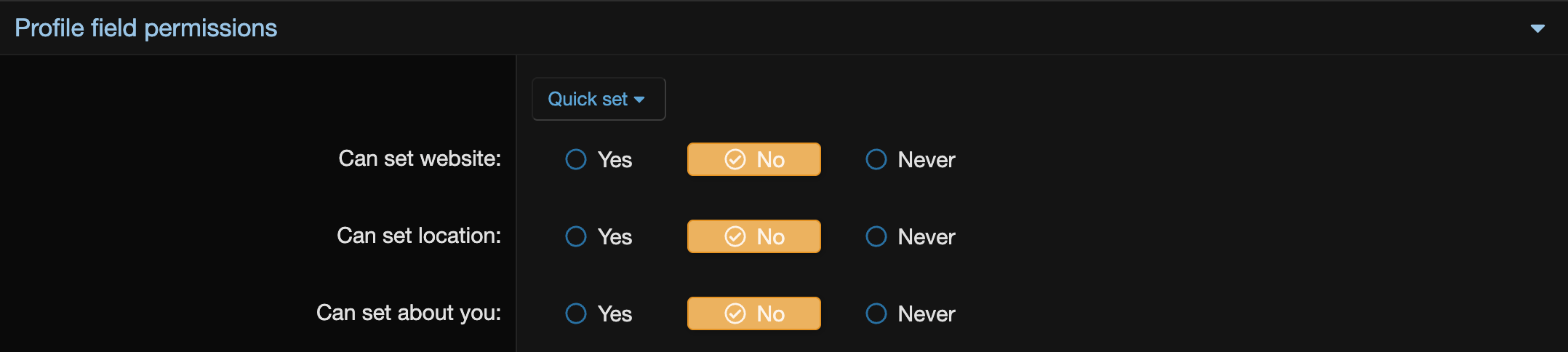
Use No on Registered, not Never. Never beats Yes from any other group, so promoted members would still be locked out.
They're separate, so you can lock just the website if that's all that bothers you.
INSTALL
XenForo 2.3 only, PHP 8.0 or newer.
Admin CP -> Add-ons -> Install/upgrade from archive, and upload the zip. Or copy the upload folder into your XenForo root and install it from the add-ons list, or from the command line:
To check it's working, log in as someone in a group set to No and open Account details. Website, Location and About you should be gone.
WORTH KNOWING
If you have "Require location" turned on for registration, location can always be set, so nobody gets stuck unable to register or save their account.
Custom user fields aren't covered, they have their own "editable by user" setting.
The boxes are hidden by editing XenForo's default account_details template. If your style has a heavily changed copy of it the boxes might still show, but the server still ignores anything a locked member sends.
Uninstalling removes the permissions and everything set for them. There are no tables to leave behind.
There's more detail in the README.md inside the zip. Questions or improvements, post them here.
The obvious fix is to hide the website and about you boxes from new members, but that doesn't really stop them. The bots don't fill in the form, they send the fields straight to the server, and XenForo saves whatever it gets. Registration takes a location too, even if your form doesn't ask for one.
So we made this. It adds three permissions, one each for website, location and about you. If a group doesn't have one, its members don't see the box, and the server ignores that field even if it gets sent anyway. We use it here so new members can't set them until they've made a few posts.
Free, change it however you like.
Download Digiex-ProfileFieldPermissions-1.0.0.zip
WHAT IT DOES
Adds a "Profile field permissions" section to the permission screens with:
- Can set website
- Can set location
- Can set about you
Without one of them, the box isn't shown under Account details, and that field is ignored if it's posted to the page anyway. A location sent at registration is dropped, and the API (POST me/ with a user key) won't change it either.
Whatever is already in a locked field is left alone. The member can't change or clear it, and the rest of their account settings still save normally. You can still edit any profile yourself from the Admin CP.
It only decides who can set the fields. Who can see them doesn't change.
SETTING IT UP
Installing it changes nothing on its own. Every group with "Edit profile" gets all three permissions, so it's up to you who loses them. Go to Admin CP -> Groups & permissions -> User group permissions and:
- Registered - set all three to No.
- Unregistered / Unconfirmed - No as well, and don't skip this one. Until someone clicks the link in their confirmation email, XenForo gives them this group's permissions, not Registered's. Leave it on Yes and a bot can fill in its website in the few seconds before it confirms. This group also decides the location at registration.
- A group your members get moved into once you trust them (User group promotions, after a few posts for example) - set all three to Yes. Your staff groups already have them.
Use No on Registered, not Never. Never beats Yes from any other group, so promoted members would still be locked out.
They're separate, so you can lock just the website if that's all that bothers you.
INSTALL
XenForo 2.3 only, PHP 8.0 or newer.
Admin CP -> Add-ons -> Install/upgrade from archive, and upload the zip. Or copy the upload folder into your XenForo root and install it from the add-ons list, or from the command line:
php cmd.php xf:addon-install Digiex/ProfileFieldPermissionsTo check it's working, log in as someone in a group set to No and open Account details. Website, Location and About you should be gone.
WORTH KNOWING
If you have "Require location" turned on for registration, location can always be set, so nobody gets stuck unable to register or save their account.
Custom user fields aren't covered, they have their own "editable by user" setting.
The boxes are hidden by editing XenForo's default account_details template. If your style has a heavily changed copy of it the boxes might still show, but the server still ignores anything a locked member sends.
Uninstalling removes the permissions and everything set for them. There are no tables to leave behind.
There's more detail in the README.md inside the zip. Questions or improvements, post them here.




