• Welcome to the Digiex Download Center, you are welcome to download anything you like here. No registration is required! Digiex offers direct download links with no captchas or wait times.
    The team do our best to ensure no content infringes copyrights and provide a DMCA Takedown request form to request the removal of content from Digiex.

    Notable sections: Pokemon Archives | Xbox Archives | Xbox 360 Archives

Driver for ISSCEDRBTA Bluetooth Dongle in Windows XP SP2 and SP3

Hi there,

Just registered to let you know the driver works fine on my OS Windows XP 64 bit. I'll check back in case theres any extra information you require.

Cheers though,
you saved me installing sony ericsson pc suite...life saver.
 
Isscedrbta

Help!~

I have done everything word for word on how to load the driver, however, my computer is still not recognizing the dongle and and I get a "?" device in my device manager. Is there anything else I can do?
 
Help!~

I have done everything word for word on how to load the driver, however, my computer is still not recognizing the dongle and and I get a "?" device in my device manager. Is there anything else I can do?

Try removing the driver and re-installing it.
 
Just got these drivers working on XP SP2 for a LASER USB Bluetooth Dongle. Had to edit .inf PID and VID. Working sweet now. You rock!
 
Where do you get the hardware ID? I have looked in the device manager and found nothing in regards to bluetooth. I upgraded from SP2 to SP3 of Windows XP and now my bluetooth doesn't work...the files are still hidden on my PC and after a very exaustive search I was able to locate them but they just don't work...I bought a generic dongle and tried your advice by downloading and installing the drivers but so far I cannot get them to install or get my dongle installed and I didn't know what hardware ID to use to get them to install...can someone please help me?
 
Hey guys. If you experience problems with drivers posted here here is the trick:

I use XP 64 and these XP 64 drivers have not worked fine for me. So what i've done...
In the zip archive you will find file bth.inf - this is the main thing you will need.
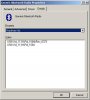
Now right-click on My computer (dongle is already inserted) -> Hardware -> Device Manager. In the device manager window found your ISSCEDRBTA device and double click on it then select Details tab. Select property Hardware Ids. This will look smthing like this:
1.JPG
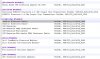
Here you need this info: USB\Vid_1131&Pid_1004. Copy it with Ctrl+C. Now go open that bth.inf file and find there descriptions of devices. This looks like:
2.JPG
Now find similar row and copy it and at last paste your dongle Hardware Id in there. That's it!
Now follow the instructions in the first post by Nimrod.

Hope this will help someone and excuse my english ;)
 
i have good idea

hi,
go to bluetoothinstaller.com and download the bluetooth driver..
i am sure 100% work!!!
my bluetooth on my computer is working!!
 

About Digiex

Digiex is a technology and gaming forum, founded in 2004 by InsaneNutter and Nimrod. Digiex has served the internet community with breaking news, detailed guides, exclusive downloads and a popular discussion forum. A small, friendly community of like‑minded people has developed over the years. People are encouraged to register and participate in on‑going discussions.

Get Social

Top Bottom