
Guide to Jailbreak the PS3 with a iPhone 3G/2G running PSFreedom

I could possibly be doing something wrong but I am definitely hitting the power and eject right after each other like all of the videos show.

Unplug the iPhone and then switch the PS3 off and then back on. Make sure no USB devices of any kind are in there and then plug in the iPhone then press power and then eject.
 
Hi guys. Im following the abowe steps and its seems to be working but its not. I have an Iphone 3G with 4,0 software and got it jailbreaked with redsn0w0 .9.5b5-5.. Im installing psfreedom already patched and when installation is compleated on the screen appear boot menu so Im choing Install option and then something is happend there, after few minutes I can see text on left side of the screen "INIT" so switching console on with no cd inside and just after that keep pressing eject button.
Just after that my ps3 stays with black screen, when restart it no files are shown in games tab. What's wrong with that?

ps3 firmware 3,41
IPhone firmware 4,0
 
Hi,
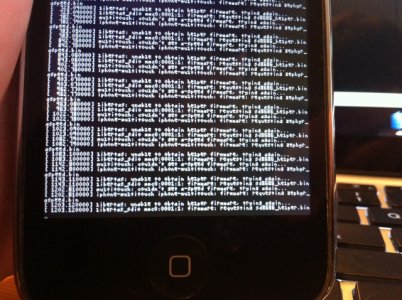
everything worked fine, till this moment:
img0438h.jpg
I don't know what is wrong, I tried two times and the result was the same.
My devices:
-iPhone 3G 3.1.2 redsn0w
-PS 3 FAT 40GB 3.4.1
I hope that somebody will help :)
 
Hi guys. Im following the abowe steps and its seems to be working but its not. I have an Iphone 3G with 4,0 software and got it jailbreaked with redsn0w0 .9.5b5-5.. Im installing psfreedom already patched and when installation is compleated on the screen appear boot menu so Im choing Install option and then something is happend there, after few minutes I can see text on left side of the screen "INIT" so switching console on with no cd inside and just after that keep pressing eject button.
Just after that my ps3 stays with black screen, when restart it no files are shown in games tab. What's wrong with that?

ps3 firmware 3,41
IPhone firmware 4,0

Hi,
everything worked fine, till this moment:
View attachment 5486
I don't know what is wrong, I tried two times and the result was the same.
My devices:
-iPhone 3G 3.1.2 redsn0w
-PS 3 FAT 40GB 3.4.1
I hope that somebody will help :)

You're both waiting to long. if you notice, that doesn't even display on my iPhone. So check to make sure you pressing everything when you're suppose to and that you've removed all other usb cables from the device. Plus unplug it or hit the switch. Then turn it on after it begins displaying INIT. I don't understand how people are having issues here, this is the easiest part!

INIT is displayed right after it says ****************************LOADING FIRMWARE************************************
 
When I get home, I'll try once again, but was doin that yesterday for two hours with no success. :(
 
Success with jailbreaking!! But I dont have PS3 ftp server and backup manager, what should I do then? Now each time I power on my console I have to jailbreak it?
 
Yes, you still have to do it each time you power on. Though I hear Custom Firmware is in the works. So shouldn't be to much longer till you can stop doing that. ;)
 
Success with jailbreaking!! But I dont have PS3 ftp server and backup manager, what should I do then? Now each time I power on my console I have to jailbreak it?

Same situation.
I do not have Backup Manager, that is way this JB sucks, I can not backup my BR games to my HDD in order not to change disc all the time, which is very annoying.
 
Same situation.
I do not have Backup Manager, that is way this JB sucks, I can not backup my BR games to my HDD in order not to change disc all the time, which is very annoying.

Then install it using a FAT32 formatted USB flash or HDD. Download it from here and go to install_package_files on you're ps3 to install it! You must place this file in the root of you're FAT32 formatted device.
 
Thanks for guide me mate. Now all works fine. Im backupin my game into HDD now :) u got big beer from meh ;)

Just one more question. If I gor an ISO immage on my komputer to load it into ps3 HDD fist I have to burn it on disc?
 
It doesn't work each time :( I cant do it now don't know why. Can my iphone be unlocked as well or only jailbroken? Im keep pressing that button and when everything is compleated still black screen stays ;/
 
Backup Manager

This may be a stupid question but I have psfreedom installed and I have installed backup manager and the ftp program BUT i cant get any game to run. Here is my question is there a backup manager that doesnt run backups and one that does?(I tried it with games that are compatible Mafia and Infamous)? If so where can I get the backup manager that does run backups via psfreedom on iphone? Or is there a version of psfreedom thats patched to run backups and one thats not?
 
It sounds like you have a version of PSFreedom that doesn't support game backups as its the payload of PSFreedom (or what ever payload you're using) that decides whether BD emulation works or not. Are you using the payload (PSFreedom) from this site?
 
This may be a stupid question but I have psfreedom installed and I have installed backup manager and the ftp program BUT i cant get any game to run. Here is my question is there a backup manager that doesnt run backups and one that does?(I tried it with games that are compatible Mafia and Infamous)? If so where can I get the backup manager that does run backups via psfreedom on iphone? Or is there a version of psfreedom thats patched to run backups and one thats not?

Make sure you have a disc inserted to emulate the process. The only way to do it without a disc is using the Hermes payload.

If nothing, make sure the jailbreak has been executed. It must be used upon every boot. Its NOT a simple install and done. You must repeat the final step's over. A quick way of finding out if the jailbreak hasn't been executed properly is to look for the two folders under game or try to load up backup manager.

And it could be what Dark Scyth suggests as well, did you use the files found here? If you did then backup manager support is included.


I've also added the Hermes V3 Payload for PSfreedom, available in either the pre-patched method or the I'll do it myself (SSH) method!
 
Dont work for me

Im using Iphone 3G, Firmware 3.1.3, Win 7 32 and the versions patched (with and without hermes). I run as admin and all steps running ok, but at finish the iphone show Recovery screen. I open Iphodroid again and click "exit recovery mode" and the iphone reboot in IOS normally. I cant see the installation screen. Any help?
Tks
 
When it shows the recovery screen you are suppose to wait, shortly after it will load up the iphodroid menu. Not kick it out of recovery.
 
is Already Patched with PSFreedom and Contain's the Hermes V3 Payload - No Disc Required compatible with open backup manager v 1.16 ?
thank you
 
the Hermes V3 Payload

Question: my ps3 is jailbroken already i did it with my iphone all is working well. I dont have the hermesv3 payload so how do i install this. i still have to use a disc when i want to play my back ups. i'd like to have hermes v3 payload so i dont have to use a disc, but i dont want to mess up my good working jailbroken ps3.
 

About Digiex

Digiex is a technology and gaming forum, founded in 2004 by InsaneNutter and Nimrod. Digiex has served the internet community with breaking news, detailed guides, exclusive downloads and a popular discussion forum. A small, friendly community of like‑minded people has developed over the years. People are encouraged to register and participate in on‑going discussions.

Get Social

Back
Top Bottom



