Its hard to believe this thread was posted over 6 and a half years ago… where has the time gone?!
I’m excited to preview what I’ve been working on recently!
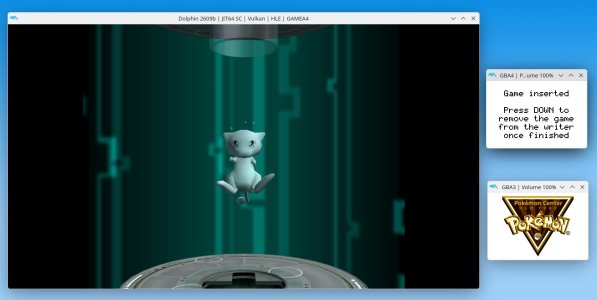
PCNY Gen 2 campaigns distributing using a Wii & GBA:
To be totally upfront I did use Ai to reverse engineer this. I was inspired seeing
@Nimrod's
Jazz Jackrabbit 2 decomp / port progress over recent months, that got me thinking some progress could finally be made with this... and it could! Used correctly I do feel Ai is an incredible tool for obscure digital content preservation efforts.
So how does this work?
The Gen 2 Pokemon Center New York Distribution Machine (PCNY) is known internally as the Pokemon Vending Machine, was the more difficult one to get working.
The Gen 2 distribution makes use of the Altera chip which sites between the GBA and its cartridge slot, enabling the actual writer hardware to interface with Gold, Silver and Crystal game cartridges. The GameBoy Advanced doesn’t have this chip, meaning we can’t directly distribute to genuine Gold, Silver and Crystal cartridges at home.
With that in mind a minimal GBA rom for Gold, Silver and Crystal has been created that doesn’t contain any game data, just the header the writer looks for, with the ability to mount your Gold, Silver or Crystal save for the distribution machine to interface with.
This is loaded from a GBA flashcard (tested on an Everdrive GBA Mini) and essentially becomes a workaround for not having the unique writer hardware that only existed in the PCNY.
These minimal roms can mount your Gen 2 saves dumped from real cartridges, the 3DS VC games or even from emulators, allowing the PCNY distribution machine to distribute directly to the save game. You can then restore the save to your genuine cartridge, 3DS or simply use with an emulator.
Once the save is mounted you hold start + select to reboot the GBA, so it can receive the writer multiboot from the GameCube / Wii running the Gen 2 distribution iso.
The writer.bin in the Gen 2 ISO has also been patched, so pressing up on the GBA D-pad simulates the cartridge been inserted and pressing down on the D-pad simulates the cartridge been removed. Allowing the distribution process to start and finish successfully.
Quality of life improvements:
Once I had this working on my Wii / GBA I soon realised it became quite tedious to test and use, I found it annoying having to set the date on my Wii for every campaign (or swap memory cards for the Gen 3 campaigns). So that set me down the path or working on some custom ISO’s for each campaign. These start distributing from the first day each campaign would have originally.
The next annoyance was by default you can only distribute the Silver / Union Cave (Eggs) once per day, or with the Johto Legend and Celebi SP campaigns once per week, which was the duration of the campaign. The custom ISOs will ignore this and distribute regardless, providing you have space in the party.
The TV used in the Pokemon Centre New York was tilted on its side, so by default everything is shown on the TV is rotated 90°, which is not ideal for anyone using at home. On the custom ISO the “cam-rotate” setting in pvm.ini was changed, so everything displays correctly on a normal TV.
Although the original writer hardware is essentially a GBA internally, it had no screen. As we are using an actual GBA for our writer we can also make use of the screen to provide visual feedback, so the process is more user friendly. Text on the writers GBA screen will indicate if your game is perceived as inserted or not.
Finally the disc name in the ISO header was changed so it was easy to identify the distribution to use when all the ISO are on your Wii’s SD card.
The end result is you can simply load the desired campaigns ISO to distribute to your Gen 2 saves on a GBA flash card.
It would be nice to be able to distribute to actual Gen 2 cartridges, however I don’t perceive that will happen unless someone actually builds custom writer hardware like what was used at PCNY. This (in my opinion) is a good software solution anyone can use with hardware they likely already own.
Dolphin can emulate these modified ISO’s perfectly fine also, I just find using this on real hardware far more interesting:
View attachment 23077
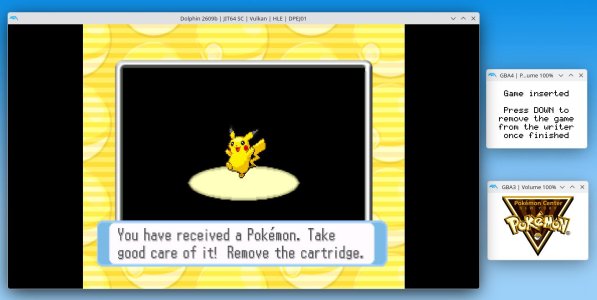
PCNY Gen 3 campaigns distributing using a Wii & GBA:
The Gen 3 Pokemon Center New York Distribution Machine I actually got working first, this required the writer.bin to be patched so it could provide feedback to the GameCube on if the Ruby or Sapphire cartridge was inserted or not. After this it just worked as it would have done in the Pokemon Center New York. This was done by using up and down on the D-pad to simulate a cart been inserted and removed.
Providing you have space in the party, you can just distribute Gen 3 campaigns as you please, none of the preserved campaigns have any sort of restrictions like with Gen 2 campaigns it seems.
Quality of life improvements:
Like with Gen 2 I have built custom ISOs that will distribute each campaign in a more user friendly way, each campaign will:
Start on the first day of that campaigns distribution date, so you don’t have to alter the date on your GameCube / Wii.
The writer will provide the same visual feedback on the GBA like with Gen 2, to let you know if the cart is inserted or not.
The disc name in the ISO header is changed to reflect the campaign it will distribute.
Finally a unique change for Gen 3 is disc serial is also modified in the iso header, doing this allows for all the different memory cards to coexist on the Wii’s SD card at the same time. Without doing this if using Nintendont to run these ISO’s, you’d have to take the SD card out your Wii to copy a different memory card across, depending on the campaign you wish to distribute.
Campaigns that use the same memory card all share one ID (Campaign 3-4-5-6), then other campaigns have a different unique id. These been Campaign 1, the Evolution Stone Campaign and the Monster Week 1 Campaign.
Dolphin can also emulate the modified Gen 3 ISO’s:
View attachment 23078
Something to note is for both Gen 2 and Gen 3, an ISO with the absolute minimal amount of modifications possible for this to work on a GameCube / Wii with a GBA will be released, to keep things as authentic as possible. The ISO’s with QOL improvements are totally optional, I feel people will appreciate them from an usability point of view however, especially for use on real hardware.
To use on real hardware you will need a Wii with the homebrew channel installed and the Nintendon’t Homebrew app, along with at least one GameCube controller and a GameCube to GBA link cable, two of these if you want the full experience. Of course using on emulators will be perfectly possible also, so the choice will be yours.
It will be nice for people to be able to use this before the Pokebank shutdown at the end of February next year, so stay tuned for what was historically a traditional Christmas release while things are finished up.




 Hopefully more updates to come in the next few months, and ideally a video to share about it as well.