InsaneNutter
Resident Nutter
Before going ahead and installing Windows 7 on my Ferrari 4000 I did a quick Google search to see if anyone else had already done so, I couldn’t find anything so I thought I would write a post up about my experience and hopefully answer any questions some on looking in the future might have.
I could just write it’s the best thing you could do for your Ferrari 4000 and it would be true, but I’ll go in to a bit more detail than that
Installing Windows 7
You shouldn’t have any problems getting the 32bit or 64bit version of Windows 7 running on the laptop, unlike with Windows Vista you don’t need to install hacked graphics / chipset drivers to get the laptop to successfully go to sleep and resume from sleep or hibernation. Everything really does work out the box, Windows 7 has drivers for most of hardware in the laptop and anything it doesn’t have drivers for can be simply downloaded and installed by doing a Windows Update.
The only thing you won’t have drivers installed for after a Windows Update is the card reader, don’t worry though the Windows XP drivers for the card reader work perfectly fine in Windows 7.
Download 32bit card reader drivers for Windows 7
Download 64bit card reader drivers for Windows 7
To install: unzip the drivers then go to device manager (click the windows logo in the bottom left, right click on computer, click properties then device manager in the top left)
Right click on the card reader or unknown device and click update drivers, point it to the folder you unzipped the drivers to and they will install.
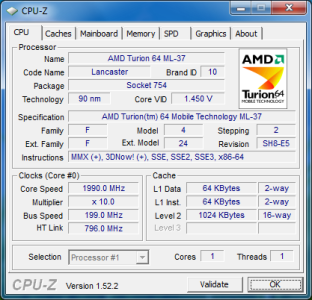
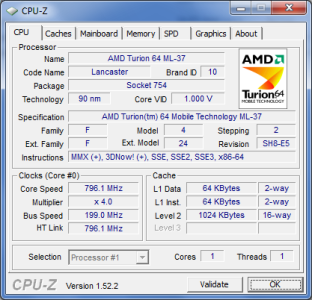
Hardware:
Everything installed and working fine.

If you have had Vista installed on the laptop you will notice the Windows experience rating is exactly the same.

Something I quite liked in Windows 7 was the fact it can detect your battery has had it and you need a new one.

When I got the laptop in 2005 the battery lasted for around 3 hours 15 mins, it now lasts for about 15mins if I’m lucky.
Speed improvements
Compared to Windows Vista SP2 the laptop feels so much more responsive with Windows 7 installed, I’m sure you will notice a significant speed improvement.
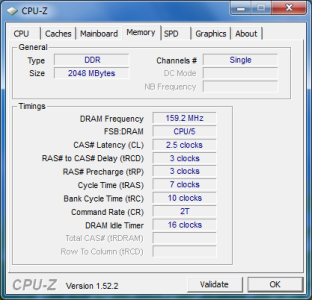
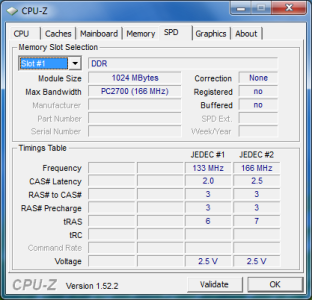
It might be worth mentioning I upgraded the laptops 1gb of ram to 2gb when I got Vista but by all accounts Windows 7 works perfectly with just 1gig of ram.
For a 4 year old laptop it handles Windows 7 perfectly, I really wouldn’t worry about having to upgrade to a new laptop to run Windows 7.
That’s about it, if anyone has any questions feel free to ask.
I could just write it’s the best thing you could do for your Ferrari 4000 and it would be true, but I’ll go in to a bit more detail than that
Installing Windows 7
You shouldn’t have any problems getting the 32bit or 64bit version of Windows 7 running on the laptop, unlike with Windows Vista you don’t need to install hacked graphics / chipset drivers to get the laptop to successfully go to sleep and resume from sleep or hibernation. Everything really does work out the box, Windows 7 has drivers for most of hardware in the laptop and anything it doesn’t have drivers for can be simply downloaded and installed by doing a Windows Update.
The only thing you won’t have drivers installed for after a Windows Update is the card reader, don’t worry though the Windows XP drivers for the card reader work perfectly fine in Windows 7.
Download 32bit card reader drivers for Windows 7
Download 64bit card reader drivers for Windows 7
To install: unzip the drivers then go to device manager (click the windows logo in the bottom left, right click on computer, click properties then device manager in the top left)
Right click on the card reader or unknown device and click update drivers, point it to the folder you unzipped the drivers to and they will install.
Hardware:
Everything installed and working fine.
If you have had Vista installed on the laptop you will notice the Windows experience rating is exactly the same.
Something I quite liked in Windows 7 was the fact it can detect your battery has had it and you need a new one.
When I got the laptop in 2005 the battery lasted for around 3 hours 15 mins, it now lasts for about 15mins if I’m lucky.
Speed improvements
Compared to Windows Vista SP2 the laptop feels so much more responsive with Windows 7 installed, I’m sure you will notice a significant speed improvement.
It might be worth mentioning I upgraded the laptops 1gb of ram to 2gb when I got Vista but by all accounts Windows 7 works perfectly with just 1gig of ram.
For a 4 year old laptop it handles Windows 7 perfectly, I really wouldn’t worry about having to upgrade to a new laptop to run Windows 7.
That’s about it, if anyone has any questions feel free to ask.