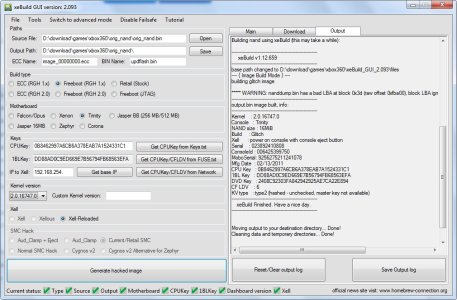
Xbox 360 Jtag or RGH Hack Easy Update to Dashboard 17502 with XeBuild GUI

hello Insane, i tried updating my jtag xbox 360 jasper to dash 16756 but fail, E72... so i return to my old dash 16203 via xell... then I try again updating to 16747 and E72 again... NAND Flasher 360 shows no bad block or whatsoever... anyway I can update my xbox 360?? I really want to play sacred 3 and 2k15 on my xbox 360... =( right now Im downloading a RAW FLASH via xell... and Im wondering, is RAW FLASH really this big? 528MB??
 
so i've finish downloading the raw flash and got myself a "flashdmp.bin".. and use it on xeBuld gui 2.093 and generate a 16747 update file... then write t on my xbox 360 using xell reloaded and turn off my 360 for about 5 minutes after the successful wrting. but still, E72... =( any help plz?? =(
 
i have a xbox falcon 2008, i did RGH on this , with Coolrunner chip, ( i did the same on another xbox it read the nand fine, and the glitch is succesfull when i write the glitch bin file back .)
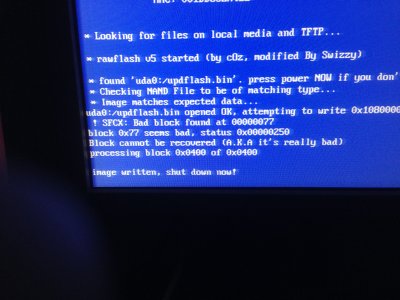
But on this Xbox ( also falcon) it reads with badblock 77 error. so ive 4original Bin files of this xbox all error block 77
and when i write , the same error apears.
Now the xbox gives me black screen.
Before i saw the xell , but now only black screen..

help!8-)

Thank you!
 
So the Xbox has never actually booted a hacked dashboard before? I'm not sure what else to suggest to you, I dont personally follow the Jtag / RGH scene much anymore. Usually dumping the your RAW flash in Xell then using XeBuild to build a new image will re-map any bad blocks.
 
Hi, hope someone can help me. Here's my problem:

Pre-update:
Unit is perfectly working but some games like NBA2k15 & NFS Rival won't play.

Post-update:
Unit will turn-on (Only the green light at the center of the switch button is on. Power brick is green) but will not boot. No output on the screen at all.

Unit Model:
Xbox 360 Slim
320GB HDD

Steps done:
Followed steps stated in page 1 for RGH except that I dumped NAND using NAND Flasher (I still have backup of this).
When building new NAND, I noticed bad block (I attached here SS for this).
I flashed NAND using Xell and disconnect power brick from the outlet for several minutes.
When I turned on, the unit will not boot.

Other steps done:
- dumped NAND using Xell and used this to build new NAND. same result.
- renamed the original NAND backup created from NAND Flasher and used this to update my unit. same result.
- renamed the raw NAND created using Xell and used this to update my unit. same result

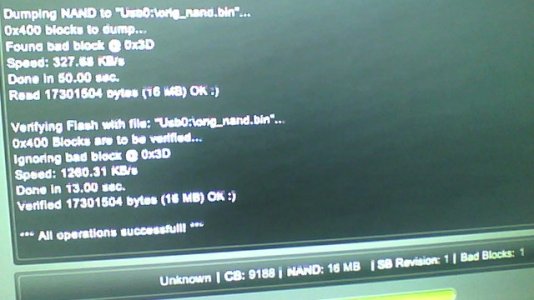
Also, I noticed when using NAND Flasher that the console revision stated was "unknown" (please see attached SS

Don't know what else should I do now to make my unit working again.

Hope someone can help me. Thanks in advance.

P.S. I can still boot through Xell (either HDMI or component)


Nand_via_NAND_Flasher.jpg2014-10-18-171411.jpg
 
@InsaneNutter, did that already as what I posted earlier.

"Other steps done:
- dumped NAND using Xell and used this to build new NAND. same result."


After several experimentation, I think I bricked my unit. Can no longer boot to Xell. Switch button is green but after few minutes, it will turn red.

I guess it's time to visit the local shop :-(
 
So the Xbox has never actually booted a hacked dashboard before? I'm not sure what else to suggest to you, I dont personally follow the Jtag / RGH scene much anymore. Usually dumping the your RAW flash in Xell then using XeBuild to build a new image will re-map any bad blocks.


I dumped the updnand , from Xell.
It says: see pictureIMG_0138.JPG
 
Could you please help? My Xbox is RGH1 Jasper 16megs using Freestyle 3. I wanted to update to kernel 16747.
So I I used "simple 360 NAND flasher" . During the Nand dump had ONE bad block but it completed dumping flashdmp.bin. Example: "game:\flashdmp.bin opened ok. attempting to read 0x10800000 bytes from falsh processing blcok 0x01c1 of 0x0400 SFCX Bad block found at 000001C0 block 0x1c0 seems bad, status 0x00000350"

My question to you is ... what do I do ? Can I CONTINUE and use this flashdmp.bin (Jasper=16megs) and run xeBuildGUI and create a kernel 16747 "updflash.bin" ??
Will this bad block has any bad effect after I update it using "simple 360 NAND Flasher" ? (using this newly updflash.bin to flash my 360 NAND back".
Please help me. You are my last resource!
Please reply to me? or PM me please!
 
Could you please help? My Xbox is RGH1 Jasper 16megs using Freestyle 3. I wanted to update to kernel 16747.
So I I used "simple 360 NAND flasher" . During the Nand dump had ONE bad block but it completed dumping flashdmp.bin. Example: "game:\flashdmp.bin opened ok. attempting to read 0x10800000 bytes from falsh processing blcok 0x01c1 of 0x0400 SFCX Bad block found at 000001C0 block 0x1c0 seems bad, status 0x00000350"

My question to you is ... what do I do ? Can I CONTINUE and use this flashdmp.bin (Jasper=16megs) and run xeBuildGUI and create a kernel 16747 "updflash.bin" ??
Will this bad block has any bad effect after I update it using "simple 360 NAND Flasher" ? (using this newly updflash.bin to flash my 360 NAND back".
Please help me. You are my last resource!
Please reply to me? or PM me please!

Bad blocks are normal and should get remapped automatically, you should be able to update as normal.
 
Bad blocks are normal and should get remapped automatically, you should be able to update as normal.
How does bad blocks automatically remapped? I mean do I need to do anything different/Extra? I have dump my flashdmp.bin and ready to run xeBuildGUI to create a new upflash.bin with kernel 16747 then flash back upflash.bin.
Buttom line : Is there any steps? or just continue what I am doing.
Thank you!!! x 100
 
It seems like the block can not be remapped which is bad, try having a read of this: NAND:Bad Blocks - Free60

I Compared the 4 nands. ( they all had the same bad block while reading it.
after compare:
Comparing...
Bad Block ID 0077 Found @ 0x03FF [Offset: 0x107BE00]
Block ID 03FF [Offset: 0x107BE00] remapped to Block ID 0077 [Offset: 0x1EAE00]
Bad Blocks Remapped


Well it remapped when i made the final NAND., and when i write the nand with J-Runner::
Saved to C:\RGH Xbox360\J-Runner\315616681505
Image is Ready
Initializing updflash.bin..
Falcon/Opus
Nand Initialization Finished
Version: 03
Flash Config: 0x01198010
Writing Nand
updflash.bin
Error: 202 writing block 77
Done!
in 2:06 min:sec
 
Thank you InsaneNutter!!
Update: so I got ahead with updflash.bin (after XebuildGUI).
XBOX360 NAND Flash wrote back with same Bad block number but completed.
I do notice my dashboard are now 16747. So I also lost my Avatar/Kinect data.
I used your steps 5.
It took me while to keep trying.. yes I followed XeBuildGUI to the words.
DashLaunch installed. Renaming to
$systemupdate (all low case) worked for me. (You need to be in the Xbox 360 Home THEN plug in your USB key)

Thank you guys!
 
Facing errors

I've tried dumping nand through Nand Flasher 360 it gives an error right away. So I then tried Simple Nand Flasher it dumps nand but shows unknown size error when I load it on Xebuild. My console is 4GB S Glitch 2, Corona.
 
I've tried dumping nand through Nand Flasher 360 it gives an error right away. So I then tried Simple Nand Flasher it dumps nand but shows unknown size error when I load it on Xebuild. My console is 4GB S Glitch 2, Corona.

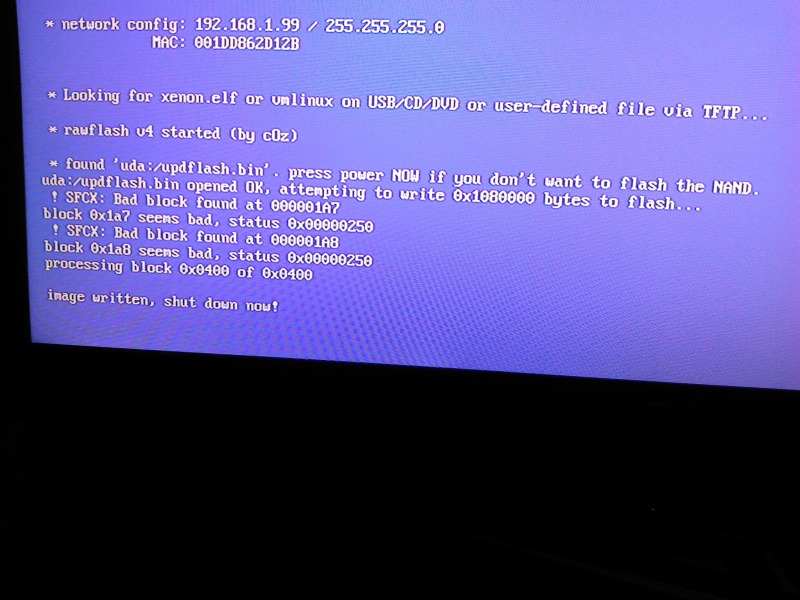
Power the console on with the eject button, Xell should load. Ensure the network cable it connected, then you should see an ip address in the network config:

11600d1349157999-easily-update-your-jtagged-rgh-xbox-360-kernel-dashboard-14699-xebuild-img_20120927_230702.jpg


Using your web browser on your PC go to http://192.168.1.99 or what ever your consoles ip address is, you should be able to download your "raw flash" from the console.

Do that and use it as your source nand to build a new image, after that has done flash it to the console by powerinf it on with the eject button and having the updflash.bin on a FAT32 formatted USB memory stick.
 

About Digiex

Digiex is a technology and gaming forum, founded in 2004 by InsaneNutter and Nimrod. Digiex has served the internet community with breaking news, detailed guides, exclusive downloads and a popular discussion forum. A small, friendly community of like‑minded people has developed over the years. People are encouraged to register and participate in on‑going discussions.

Get Social

Back
Top Bottom