Xbox 360 Jtag or RGH Hack Easy Update to Dashboard 17502 with XeBuild GUI

Help Me

Dear InsaneNutter,

First, I just wanna say thank to you, I already followed your tutorial, and it works! Thank you very much! :)

Im using Xbox 360 slim Trinity 4GB + external HDD 500GB.
After I updated to 16757, whenever I turn my console on with the external HDD connected to the console, it always boot to Freestyle Manager dashboard, and I couldn't find my game there. Can you help me? How to play games from Freestyle Manager dashboard?
Or how to switch from Freestyle Manager dashboard to Normal Dashboard?

But, if I turn my console on without connecting my external HDD, my console boot to normal dahsboard. And I have to re-connect my external HDD to the console after my LED TV displaying Normal dashboard.
Everytime I wanted to turn my console on, I have to disconnect my external HDD first, then after my console succesfully boot to Normal dashboard, I have to re-connect my external HDD, to play my games via Xex.

My question is, how to boot my console in Normal dashboard with the external HDD connected to the console??Just like before I updated to 16757?
(FYI: before I updated to 16757, I was using 16203, and I never disconnected my external HDD from the console, but I never face this problem before. My console always boot to Normal dashboard even the external HDD is connected to the console)

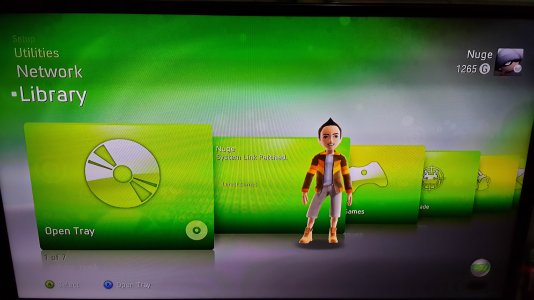
This is the picture after I updated to 16757,
Pict 1: When I connect my external HDD, my console always boot to Freestyle Manager dashboard, I couldn't find my games there, and I couldn't play game from there.
20141028_193308.jpg


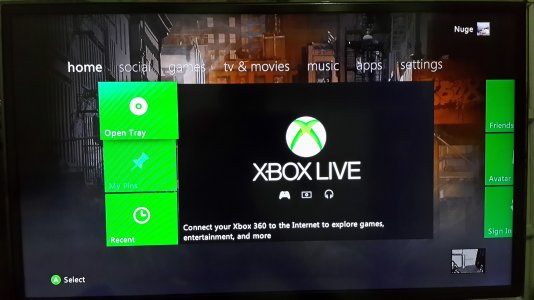
Pict 2: When I disconnect my external HDD before turn my console on, and then turn my console on, my console can boot to Normal Dashboard.
20141028_193900.jpg
After this dashboard displayed, I have to re-connect my external HDD to play the games via Xex.


Help me, please. :)
 
You need to edit your Dashlaunch settings, these can usually be found in a launch .ini file on your internal hard drive.

If you download and run Dash Launch you should be able to enable / disable FSD loading when you power the console on. I have mine set to only load FSD when I power the console on if I hold down the B button on the controller.

If you need any more help I can show you my launch.ini settings when i'm home from work.
 
I Compared the 4 nands. ( they all had the same bad block while reading it.
after compare:
Comparing...
Bad Block ID 0077 Found @ 0x03FF [Offset: 0x107BE00]
Block ID 03FF [Offset: 0x107BE00] remapped to Block ID 0077 [Offset: 0x1EAE00]
Bad Blocks Remapped


Well it remapped when i made the final NAND., and when i write the nand with J-Runner::
Saved to C:\RGH Xbox360\J-Runner\315616681505
Image is Ready
Initializing updflash.bin..
Falcon/Opus
Nand Initialization Finished
Version: 03
Flash Config: 0x01198010
Writing Nand
updflash.bin
Error: 202 writing block 77
Done!
in 2:06 min:sec

No its not booting E74 error, within 40x reboot it finanly boots and i come in my dashboard menu.
But then never again!
 
You need to edit your Dashlaunch settings, these can usually be found in a launch .ini file on your internal hard drive.

If you download and run Dash Launch you should be able to enable / disable FSD loading when you power the console on. I have mine set to only load FSD when I power the console on if I hold down the B button on the controller.

If you need any more help I can show you my launch.ini settings when i'm home from work.

I already tried to edit my launch.ini , I connected my external HDD to laptop, then I cleared the path for "default" in launch.ini. ,now whenever I power my console on, it boot normally to Normal Dashboard. :)

Am I correct?
Or you have a better settings?
Thank you
 
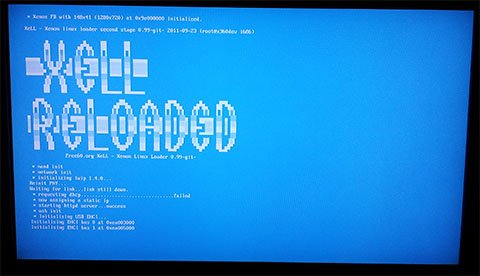
Power the console on with the eject button, Xell should load. Ensure the network cable it connected, then you should see an ip address in the network config: Using your web browser on your PC go toor what ever your consoles ip address is, you should be able to download your "raw flash" from the console. Do that and use it as your source nand to build a new image, after that has done flash it to the console by powerinf it on with the eject button and having the updflash.bin on a FAT32 formatted USB memory stick.
Got the updflash.bin to a fat32 formatted stick, powered on using eject button Xell- Reloaded loads.. saying something like sdk fail, nand related options will not be available, then when init usb, screen turns red.. Segmentation Fault! :(
 
I already tried to edit my launch.ini , I connected my external HDD to laptop, then I cleared the path for "default" in launch.ini. ,now whenever I power my console on, it boot normally to Normal Dashboard. :)

Am I correct?
Or you have a better settings?
Thank you

Thats fine, enjoy your updated Xbox 360 :)


Got the updflash.bin to a fat32 formatted stick, powered on using eject button Xell- Reloaded loads.. saying something like sdk fail, nand related options will not be available, then when init usb, screen turns red.. Segmentation Fault! :(

I thought you were trying to dump your nand? boot Xell with no USB drivce plugged in, however ensure the network cable it connected. It should then give you a an ip address to visit in your web browser to download your consoles raw flash. This can then be used as the source nand to build an updated nand.
 
hi
this is my first time to do such things
even i don't know if my console is rgh or jtag or whatever, however i would like to update the dashboard to the latest one (16767) to allow me playing 2015 games such as FIFA .....
Please advise if this tutorial is applicable for me especially that only 16747 update is available in the
xeBuild_GUI_2.093.
now I’m on 16203 system and i have modified xbox 360 with only option to play with non-original dvds.
 
The easiest way to find out if you have a Jtag / RGH console is to power the Xbox on with the eject button, if you see Xell then you have a Jtag / RGH, if not you likely just have a Xbox with a flashed DVD drive.

xell.jpg
 
Ok
I did and yes I have Xell.
What can I do next.
I cannot access to the nand flasher as I don't have xexmenu on by xbox.
moreover I want to update to the 16767 not 16747.
kindly advise.
 
Ok
I did and yes I have Xell.
What can I do next.
I cannot access to the nand flasher as I don't have xexmenu on by xbox.
moreover I want to update to the 16767 not 16747.
kindly advise.
 
You can use the ISO version of XEX Menu from here, burn to a disc and it will appear in your demo's menu on the dashboard: https://digiex.net/downloads/downlo...enu-iso-live-xex-file-manager-xbox-360-a.html

Nand flasher can then be loaded with that.

16747 is the latest official hacked dashboard, it will play all the latest games.

i did everything as described here in this guide using the raw flash, the update was ok, but unfortunately i cannot play anything from the dvd either original or copy games as every time i tried to play game from dvd it just get back to the home page.
Please advise.

I saw that this happens to someone in the replies and you told him to update the dvd firmware to LTE3.

Can this solve the problem?

If yes how I can do that?

 
Dear InsaneNutter
Thank you very much for your valuable guide and help, finally the update is working with the dvd as well by just checking the "disable fcrt.bin" in the right side of the XeBuild, then build the new nand.
thanks again.
 
Dear InsaneNutter
kindly add the post reply #134 in the FAQ as i noticed that the same problem happened with several persons.

moreover, i have a final question, can i go online with such update ?
 
Thanks for the suggestion, I have added it to the FAQ.

No you can't go on-line, you will be banned instantly if you try and connect.
 
Dvd games was working, but after I updated my kernel from 16537 to 16767, dvd games not work anymore. I have tried already check "no fcrt.bin" on xebuild & in autoGG, but still not works.

-My dvd key is correct.
-My console is PAL-E

There's other things to do ? I want to play games from dvd.
 
Last edited:
Hi... I have a question ...
I just updated my jtag\xbox360 dashboard but it seem it cannot read copied dvd games any longer (when I put any dvd it says "Play DVD")
can I reflash the old nand or try again with the "disable fcrt.bin check" method??? any help?
 
Try the disable fcrt.bin check, it appears to work for people who have had problems.
 

About Digiex

Digiex is a technology and gaming forum, founded in 2004 by InsaneNutter and Nimrod. Digiex has served the internet community with breaking news, detailed guides, exclusive downloads and a popular discussion forum. A small, friendly community of like‑minded people has developed over the years. People are encouraged to register and participate in on‑going discussions.

Get Social

Back
Top Bottom