Xbox 360 Jtag or RGH Hack Easy Update to Dashboard 17502 with XeBuild GUI

Easy Tutorial!
But I have some problem here
Is JTAG and RGH are different?
Mine is JTAG but have Xell Reloaded. Is it normal? Is it JTAG? I'm totally confused.
I need replies asap
 
hi. my xbox360 was jtagged when I bought it but recently i updated it to dashboard/Kernel 16547 though the usb official dashboard update, now it doesn't play the chipped cd games nor saved games from harddrive. is the any possible way to recover back the jtag?? please help me, thanks.
 
xbox 360 dvd

After i did all the steps and after i booted my xbox the kernel number wasn't 16547 but 16537 and every time i put any xbox disc it just says xbox 360 dvd.
Please help.
 
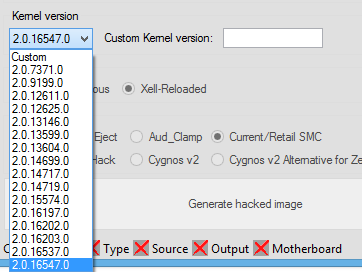
16547.png

You might have antecedently scrolled up to an earlier version here.

As for games on a DVD you can only play originals from disc still unless you have flashed the drive.
 
Please help me.
hi. my xbox360 was jtagged when I bought it but recently i updated it to dashboard/Kernel 16547 though the usb official dashboard update, now it doesn't play the chipped cd games nor saved games from harddrive. is the any possible way to recover back the jtag?? please help me, thanks.
 
Help. I followed your guide to update from 14699 to 16547 and I believe it has worked, but afterwards it boots in to the stock XBOX dashboard and I cannot get back to my FSD 3.0 screen... How do I get my XBOX to launch FSD 3.0 by default so I access all my stuff on the hard drive? I can't even access DashLaunch to modify the launch behavior?

There is XexMenu on the stock dash but when I try to launch it, it asks to download security updates from Microsoft which I do not think would be a good idea to do...

Also, I booted my XBOX with the $$ystemUpdate on a USB stick, but it didn't recognize it. It asks for the regular Microsoft Kinect update download. Do I need to boot up with XELL?

In case you need this info, I have a XBOX SLIM, with a Trinity motherboard, RGH... thanks!
 
You need to put dashlaunch on a USB device, then install it again with XEX Menu.

In regards to the message you have got when launching XEX Menu I believe i got that when i set my Jtag up a long long time ago. If you read the message its something about allowing Microsoft to update the console, however its not an actual update. All i do is set the DNS / Default gateway to an address that doesn't exist on my network so the console can never connect to the outside world. You can also just unplug the network cable, where is it going to get a system update from then unless you load a game with one. Once Dashlaunch is installed you can block any updates anyway.
 
how can I update

My dashboard is 2.0.16203.0 and my kenal is 2.0.16203.0 how can I update to latest dashboard..nd I dnt know that my xbox is jtagged or rgh.plzz help me out
 
My dashboard is 2.0.16203.0 and my kenal is 2.0.16203.0 how can I update to latest dashboard..nd I dnt know that my xbox is jtagged or rgh.plzz help me out

It doesn't matter what your current kernel is, this still works for it...

If you don't know what type of mod your Xbox 360 has, DashLaunch can tell you, among other homebrew apps. Look on the bottom right, where it says "Type". "Glitch" means RGH.
 
Can you give me a tutorial for that..plzz

Follow this tutorial and XeBuild will work out why tyoe of modification you console has.

xebuild-gui-16203.png


All your existing settings are read from your nand dump, which you can obtain by following the tutorial on the first page.
 
Hi! I've read the entire thread and couldn't find anyone with the same problem as mine. I've generated the updflash.bin in accordance to the tutorial but Xell won't read the image from my pen drives (which are all formatted to FAT32). I have 32GB pen drives and also tried an 8GB microSD card + reader to no avail. Is it possible that Xell will only read smaller capacity flash drives? Thanks!
 
Are you sure you have not called the update updflash.bin.bin, i have seen some people have a double file extension like that when an app is associated with .bin files.

8gb should be fine, does Xell say its looking for an update?
 
Are you sure you have not called the update updflash.bin.bin, i have seen some people have a double file extension like that when an app is associated with .bin files.

8gb should be fine, does Xell say its looking for an update?

Thanks for the fast reply. Had to use a different tutorial and use rawflash (apparently I had an archaic version of Xell). Now that I've apparently successfully updated my dash my problems are:

-I get an "You need to update your Xbox Live" message each time I boot up the console

-I can't get FSD installer (have it on a bootable DVD and it worked perfectly on other consoles) to install FS correctly

Thanks for the input InsaneNutter and for those whose Xell won't read their updflash.bin file plz try using rawflash (google it so that I don't have to attach someone else's tutorial ; ) )
 
1 - You need to install the avatars / kinect data (done by running the official system update) presuming the console is blocked from connecting to Xbox Live you can say yes to the update message and it will not ask you again.

2 - You need to install Dashlaunch which can be done using the installer loaded via the XEX Menu live cd. When you have Dashlaunch installed you can get FSD to auto boot.
 
Hi!!
Super thanks for the very easy and detailed guide. I've successfully updated my dashboard!!!! (Y)(Y)(Y) More games to play woooHooo!!


Now, I'm still downloading the update for the kinect hope nothing goes wrong when I update that.

THANK YOU AGAIN!!!
 
Very very good!!
I works like a charm withou any issue !:D
But what if I'd like to update kernel to a newer version (current on xbox official site is : 16767) ?
Thanks in advance
 

About Digiex

Digiex is a technology and gaming forum, founded in 2004 by InsaneNutter and Nimrod. Digiex has served the internet community with breaking news, detailed guides, exclusive downloads and a popular discussion forum. A small, friendly community of like‑minded people has developed over the years. People are encouraged to register and participate in on‑going discussions.

Get Social

Back
Top Bottom