
You are using an out of date browser. It may not display this or other websites correctly.
You should upgrade or use an alternative browser.
You should upgrade or use an alternative browser.
xbox beta saying i got kicked outWTF
- Thread starter Corona
- Start date


Rick
Veteran
*
Last edited:

DRO Krazed
Elite Member
- Joined
- Sep 8, 2010
- Messages
- 75
samehere to
Link Removed
Why does that URL have the word QUIT in it?
See here - LongURL | Expand URL
I'm not touching it.
Original Link Removed, Once on LongURL site do not click the link to go to the shortern URL because as you guessed, it will exit you out of the Dashboard Program - Nimrod.
Rick
Veteran
I don't click on those unofficial links unless their in my email or on the connect.microsoft.com site.
@GILLY
nice discovery
@GILLY
nice discovery
Seems like Microsoft didn't allow your accounts to do that yet and kicked you out.
Nope it's the link to QUIT the program, I'd advise anyone who wants early access & is still in the program NOT to click that link

Rick
Veteran
For some reason he posts that and then closes his thread + blocks his wall,dirty tricks
https://digiex.net/digiex/news-article-submission/9497-xbox-beta-released-get-now-4.html#post50781
@[URL="https://digiex.net/members/maxsalez.html"]maxsalez
I[/URL] don't think there is a way to get back in.
https://digiex.net/digiex/news-article-submission/9497-xbox-beta-released-get-now-4.html#post50781
@[URL="https://digiex.net/members/maxsalez.html"]maxsalez
I[/URL] don't think there is a way to get back in.

lem_is_cool
Resident
If you quit by accident, maybe here in the directory you can rejoin https://connect.microsoft.com/directory/non-feedback.
I can't tell if you lets you as I'm still in, but worth a look. I'm guessing it wont though as they've already closed the intake.
I can't tell if you lets you as I'm still in, but worth a look. I'm guessing it wont though as they've already closed the intake.
Happy Postal
Active Member
Okay Here Is Some New Information, Please Be Sure To Be Logged In To The Connect.Microsoft.com Website Before Clicking This Link Otherwise It Will Appear In Error. So First, Go To Microsoft Products Accepting Bugs and Suggestions | Microsoft Connect And Sign In With The Account You Are A Beta Tester With The Xbox Live BETA Program On, Then Click This Link (LINK REMOVED) Afterward, It Should Ask You To Login To You Xbox Live Account On The Console You Want To Use On The Beta. Afterward, It Will Tell You To Click Here Once You Are Signed On. It Will Automatically Detect The Console Information, Then Click Finish
THIS IS UNSIGN ME FROM BETA TEST! YOU ******* IDIOT! I HOPE YOU CONSOLE WILL BE PERMANENTLY BANNED!!!! ***! FOGG!
Edit by Nimrod - Link and Language Removal.
THIS IS UNSIGN ME FROM BETA TEST! YOU ******* IDIOT! I HOPE YOU CONSOLE WILL BE PERMANENTLY BANNED!!!! ***! FOGG!
Edit by Nimrod - Link and Language Removal.
Rick
Veteran
can you please edit your posts and lower your font size & please inbox him your comments
DRO Krazed
Elite Member
- Joined
- Sep 8, 2010
- Messages
- 75
some just leak it then that would be nice
Rick
Veteran
no one has received the beta yet
and even when it does it might disable your xbox live access
and even when it does it might disable your xbox live access
DRO Krazed
Elite Member
- Joined
- Sep 8, 2010
- Messages
- 75
whos care


Nimrod
Dev Ops
- Joined
- Jun 1, 2007
- Messages
- 1,512
His email address is: Kody2011@Live.com (Thats kody2011 (at) live.com for anyone who finds the first post blanked)
Straight from Admin Panel
If people want to post his personal details, numbers and stuff up for general public view, your authorised.
VeJLEXDK - Feel free to post his number if you know for sure its his.
Straight from Admin Panel
If people want to post his personal details, numbers and stuff up for general public view, your authorised.
VeJLEXDK - Feel free to post his number if you know for sure its his.

Dark Scyth
Veteran
- Joined
- Mar 3, 2009
- Messages
- 2,520
I'll also provide the warning again so this doesn't happen again hopefully. NEVER click shortened links. If anyone sees a shortened link, report it so we can deal with it asap.
Nimrod
Dev Ops
- Joined
- Jun 1, 2007
- Messages
- 1,512
I'll also provide the warning again so this doesn't happen again hopefully. NEVER click shortened links. If anyone sees a shortened link, report it so we can deal with it asap.
It's a valid point. The only time shortened links make sense is on Twitter due to its post limit. On the forums, there is never a reason to post a shortern link unless you want to hide its URL. Always keep that in mind.
Dark Scyth
Veteran
- Joined
- Mar 3, 2009
- Messages
- 2,520
Happy Postal
Active Member
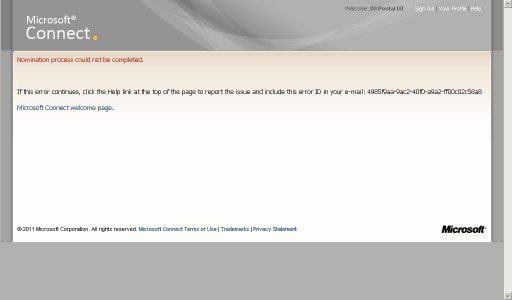
Im try this link. NOTHING... Not working...Could someone who 'exit' the beta Try this link? It'll redo the survey, not sure if it'll re-accept you but worth a shot.

Last edited:
Similar threads

- Replies
- 4
- Views
- 3K


- Replies
- 2
- Views
- 2K

- Replies
- 27
- Views
- 68K

About Digiex
Digiex is a technology and gaming forum, founded in 2004 by InsaneNutter and Nimrod.
Digiex has served the internet community with breaking news, detailed guides, exclusive downloads and a popular discussion forum. A small, friendly community of like‑minded people has developed over the years. People are encouraged to register and participate in on‑going discussions.
Get Social



