• Welcome to the Digiex Download Center, you are welcome to download anything you like here. No registration is required! Digiex offers direct download links with no captchas or wait times.
    The team do our best to ensure no content infringes copyrights and provide a DMCA Takedown request form to request the removal of content from Digiex.

    Notable sections: Pokemon Archives | Xbox Archives | Xbox 360 Archives

Xbox One System Update 10.0.19041.5082 Download (November 2020 Update)

InsaneNutter

Resident Nutter
Joined
Jun 1, 2007
Messages
11,874
Location
UK
xbox-one.png


Info on the Xbox One 10.0.19041.5082 (rs_xbox_release_2010.201102-1500) November 2020

Release date

05/11/2020

What's New:

General stability and performance improvements.

Download:

Download Xbox One System Update 10.0.19041.5082 Download (November 2020)

Updating your Xbox One:

Read: How to install an Xbox One System Update from a USB Memory Stick

To find your Xbox One console’s operating system version:

  • Press the Xbox button to return to Home.
  • Press the Menu button and select Settings (or select Settings on the Home screen).
  • Select System.
  • Select Console info.
  • Your operating system version is the third row down.
  • Note If you’re in the middle of a system update and need to find your operating system version on your console, pull both triggers and both bumpers on the controller. The operating system version is listed as Build and is the second line down.
 
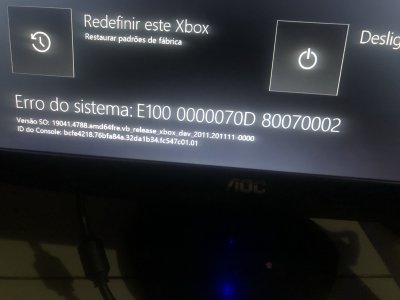
any way of getting hold of os ver 19041.4788.amd64 fre.vb_release_xbox_dev_2011.201111-0000
i can't install any of osu files just keep getting error 106

thanks
 
This is the latest public release, its not possible to get anything newer at the moment.
 
[QUOTE = "InsaneNutter, post: 83557, membro: 2"] Este é o último lançamento público, não é possível obter nada mais recente no momento. [/ QUOTE]

ok obrigado, vou aguardar a próxima então.. :(
 
[QUOTE = "InsaneNutter, post: 83557, membro: 2"] Este é o último lançamento público, não é possível obter nada mais recente no momento. [/ QUOTE]
consegui resolver, usei o osu1 de 30 de novembro. obrigado pela atenção!
 
any way of getting hold of os ver 19041.4788.amd64 fre.vb_release_xbox_dev_2011.201111-0000
i can't install any of osu files just keep getting error 106

thanks


Hello... I had same problem... But as we say (Czechs), The Courageous luck wishes... :D

1) Download this tool: https://gbatemp.net/download/xbox-o...partitioning-script.34239/update?update=36779
2) Plug xbox hdd drive to your PC thru USB or SATA port
3) Backup whole System Update drive (my is X: ) to your PC Drive... (just folder A nd B and updater.xvd file)
4) Download update file from this site
5) After downloading update file, open it and copy host.xvd file to folders A and B on your XBOX backup on PC drive (host.xvd its same on all updates but its missing on xbox drive)
6) Format the XBOX drive thru windows as normal NTFS drive
7) Unpack the xboxonehdd-master app to your PC and run it from win folder create_xbox_drive_gui.bat with admin privileges...
8) choose option A (Replace/Upgrade without a working original drive)
9) choose your drive... Normally last Drive with 1TB space and prepare it...
10) After whole scripts end, copy backuped files back to new System update drive...
11) Plug the HDD drive back to your xbox, plug network cable and HDMI and power it up... And prey!!! :D

its worked for me....

P.S. Maybe it will work just with copy of host.xvd file from the update file from here... Try it...

Have nice evening.. .

VoDaCZ
 
Last edited:
I'm getting the same error as davewooll. Swapped my SSD out to PS4 and put my original HDD back in. Getting this E106 error when booting up, and E101 when trying to apply the OSU from the official xbox website. OS version says its on 19041.4788.amd64fre.vb_release_xbox_dev_2011.201111-0000 should i wait till the new OSU is released and then try again or does somebody has some knowledge on how to fix this? Appreciate it, and many thanks.
 
Hello... I had same problem... But as we say (Czechs), The Courageous luck wishes... :D

1) Download this tool: https://gbatemp.net/download/xbox-o...partitioning-script.34239/update?update=36779
2) Plug xbox hdd drive to your PC thru USB or SATA port
3) Backup whole System Update drive (my is X: ) to your PC Drive... (just folder A nd B and updater.xvd file)
4) Download update file from this site
5) After downloading update file, open it and copy host.xvd file to folders A and B on your XBOX backup on PC drive (host.xvd its same on all updates but its missing on xbox drive)
6) Format the XBOX drive thru windows as normal NTFS drive
7) Unpack the xboxonehdd-master app to your PC and run it from win folder create_xbox_drive_gui.bat with admin privileges...
8) choose option A (Replace/Upgrade without a working original drive)
9) choose your drive... Normally last Drive with 1TB space and prepare it...
10) After whole scripts end, copy backuped files back to new System update drive...
11) Plug the HDD drive back to your xbox, plug network cable and HDMI and power it up... And prey!!! :D

its worked for me....

P.S. Maybe it will work just with copy of host.xvd file from the update file from here... Try it...

Have nice evening.. .

VoDaCZ
Ive tried this and also used a new 500gb HD and im still getting the errors, the system update gets to about 6% then fails.

my xbox was working fine and i factory reset it to sell, ive never had an issue with it before.

I was a xbox insider and didnt unenroll before resetting it.

how can i fix the issue?
 
I'm having trouble updating my xbox I downloaded the latest offline update available here and even then it's failing, my console's version is 10.0.19041.4788, could someone help me?
 

Attachments

  • IMG_4246.JPEG
    IMG_4246.JPEG
    498.5 KB · Views: 966
I'm having trouble updating my xbox I downloaded the latest offline update available here and even then it's failing, my console's version is 10.0.19041.4788, could someone help me?

if anyone has the files for that version of the system and can help me please send me.
 
Hello... I had same problem... But as we say (Czechs), The Courageous luck wishes... :D

1) Download this tool: https://gbatemp.net/download/xbox-o...partitioning-script.34239/update?update=36779
2) Plug xbox hdd drive to your PC thru USB or SATA port
3) Backup whole System Update drive (my is X: ) to your PC Drive... (just folder A nd B and updater.xvd file)
4) Download update file from this site
5) After downloading update file, open it and copy host.xvd file to folders A and B on your XBOX backup on PC drive (host.xvd its same on all updates but its missing on xbox drive)
6) Format the XBOX drive thru windows as normal NTFS drive
7) Unpack the xboxonehdd-master app to your PC and run it from win folder create_xbox_drive_gui.bat with admin privileges...
8) choose option A (Replace/Upgrade without a working original drive)
9) choose your drive... Normally last Drive with 1TB space and prepare it...
10) After whole scripts end, copy backuped files back to new System update drive...
11) Plug the HDD drive back to your xbox, plug network cable and HDMI and power it up... And prey!!! :D

its worked for me....

P.S. Maybe it will work just with copy of host.xvd file from the update file from here... Try it...

Have nice evening.. .

VoDaCZ

I don't have the files that you backed up in step 3, could you give them to me if you have?
 
hi guys is this an update that is after the 19041.4402.amd64free.vb_release_xbox_dev_2010.201023-1840?
thanks for the respond and sorry for my bad english
 
hi guys is this an update that is after the 19041.4402.amd64free.vb_release_xbox_dev_2010.201023-1840?
thanks for the respond and sorry for my bad english


probably yes, I don't know if it is what is in parentheses or the number that is after 10.0 that says about the version but both are bigger than your version
 
Do the Xbox One and XBox One X run the same software? I have a One X with 19041.4788 that's stuck with an E106 after failing to get it to leave the Insider program.

I have other Xbox One consoles on site and wonder if it might be possible to enter one of those into the Insider program in order to get suitable updater files from it to help resurrect the crashed One X.
 
Ive tried this and also used a new 500gb HD and im still getting the errors, the system update gets to about 6% then fails.

my xbox was working fine and i factory reset it to sell, ive never had an issue with it before.

I was a xbox insider and didnt unenroll before resetting it.

how can i fix the issue?

Have u this files on your drive??

A/host.xvd
A/SettingsTemplate.xvd
A/system.xvd
A/systemaux.xvd
A/systemmisc.xvd
A/systemtools.xvd
B/host.xvd
B/SettingsTemplate.xvd
B/system.xvd
B/systemaux.xvd
B/systemmisc.xvd
B/systemtools.xvd
updater.xvd
 
I don't have the files that you backed up in step 3, could you give them to me if you have?

Im not at home... After coming home i will looking to my PC if its there... But i dont know if i not deleted after copy into xbox
 
Do the Xbox One and XBox One X run the same software? I have a One X with 19041.4788 that's stuck with an E106 after failing to get it to leave the Insider program.

I have other Xbox One consoles on site and wonder if it might be possible to enter one of those into the Insider program in order to get suitable updater files from it to help resurrect the crashed One X.


Hi I am in the same problem here... so, Did you try this?, Does works for you?? let me know please because I drive me nuts
 

About Digiex

Digiex is a technology and gaming forum, founded in 2004 by InsaneNutter and Nimrod. Digiex has served the internet community with breaking news, detailed guides, exclusive downloads and a popular discussion forum. A small, friendly community of like‑minded people has developed over the years. People are encouraged to register and participate in on‑going discussions.

Get Social

Back
Top Bottom