


HaxAras
Resident
- Joined
- Mar 11, 2012
- Messages
- 141
Currently, I don't have a save to upload for any of the tickets. I do have a save with a transferable wonder card for Fire Red and Leaf Green but it's already been posted in the Gen 3 Pokemon: Legit events thread.
I'll be updating this post later with saves for
Pokemon Ruby/Sapphire - (English)
Eon Ticket - Transferable to other cartridges via mixing records.
Pokemon Ruby/Sapphire (Japanese)
Eon Ticket - Transferable to other cartridges via mixing records.
Decoration Present - 3 Regi Golem dolls for your secret base.
Pokemon Emerald (English & *Japanese)
Eon Ticket
Old Sea Map
Mystic Ticket
Aurora Ticket
Pokemon Fire Red/Leaf Green
Mystic Ticket (Navel Rock)
*Note 01: I'll be using cheating devices to get most of these items into the game. You'll then be able to go and catch the Pokemon yourself. The name on the save will be HaxAras for English and Aras for Japanese. You can just use a save editor called A-Save to change the OT to your own name.
*Note 02: I like legit hardware just as much as the next guy. In a future edit, I'll be sharing pictures of my Decoration Present card, Eon Ticket and English and Japanese E-readers. I'll only be hacking in the Emerald events. The Fire Red/Leaf Green save will contain a fan-made wonder card.
Advanced Game Port.
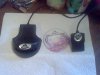
This thing acts like an Action Replay and a GameBoy Player but doesn't do either of them well. You insert it into the B slot of your GameCube and use the boot up disk to start it up. Works with the GameCube keyboard. You can play most of the Pokemon games on it and take "Screenshots" to make a backup of your save file.
Things to know.
1: When writing a screenshot, save multiple times and walk around so you know it took. Soft reset the game to make sure your character is standing where you last saved so you know it worked.
2: I tried writing a screenshot of my Leaf Green from the title screen and I lost my save. It would go through the "Previously on your adventure" nonsense and then load up the current save.
3DS R4
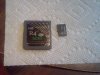
I think most of us know how R4's work. You can put roms on them and play them. You can also download a GBA save backup tool to write and read GBA save files. I highly recommend it for the save files I'll be adding to this thread.
SD Media Launcher
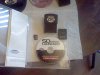
You insert this thing into the B slot of your GameCube. You'll need an SD card and an adapter if you're using micro SD. You also need a boot up disk. I use GameCube: Mod Manager to backup and restore saves. It can backup and restore Advanced Game Port saves if you lack and R4 (Like I did for the longest time)
Here's a video where I show a quick example of how to use it at the start of the video.
If you wish to have these events or dolls on your own saves, you could upload or send them to me and I will do my best to help you get them in a reasonable amount of time.
The dolls might be a bit harder. I could write your English save to my Japanese cart but it might mess up your trainer name if it's longer than 5 characters. I haven't experimented with this.
Quick Google searches should help you find all the things you need. (I'd post links but I don't yet know all of the forums rules by heart and I do not wish to break any.)
Advanced Game Port
R4 3DS
GBA Backup tool
Codejunkies - SD Media Launcher
GameCube Mod Manager
I've done my best to word this in a coherent manner but I'm not exactly the best at doing so. Please ask any questions. Also. Please know that I don't currently have these saves at the time of writing this. These games take time to play through and I have work and other projects. Please subscribe to the thread for updates. I'll be trying to update these saves in a reasonable amount of time as well as including my living Pokedex when I'm done re-making it.
To do list:
E-reader and cards pictures
Upload saves
Hardware demonstration videos.
I'll be updating this post later with saves for
Pokemon Ruby/Sapphire - (English)
Eon Ticket - Transferable to other cartridges via mixing records.
Pokemon Ruby/Sapphire (Japanese)
Eon Ticket - Transferable to other cartridges via mixing records.
Decoration Present - 3 Regi Golem dolls for your secret base.
Method 1 to transfer:
Depending on the number your ID ends in, there will be a man in the Mauville Pokemon Center who you can trade decorations with. If you talk to him, you can trade him one Regi doll at a time. Hook up the purple plug of the GBA Link Cable to your GBA and mix records with a Japanese Emerald to transfer the doll to Emerald. Then, plug in the purple plug to the Japanese Emerald and mix Records with an English Emerald and Ta-da! You now have a legit Regi Golem doll on an English save. You can now send it to an English Ruby or Sapphire using the same method.
Method 2 to transfer:
Download the Japanese save, write it to your English cart using an R4. Mix records with another English save to transfer the dolls.
*Note: You can only trade with the man with green hair 1 time. To trade with him again, you need to mix records and have him sent back into your game. I recommend restarting saves and mixing records until you have 2 saves with the man with green hair so you can save time.
For EX:
(English) New save, Correct ID: Mix records with Regi doll save. Purple plug in English save. (Sends the Green haired man to the Japanese save.)
(English) Restart. Get correct ID again.
(Japanese) Trade Regi Doll to green haired man.
(Japanese) Mix records with English save. Purple plug connected. (Sends Regi doll and green haired man to English save.)
(English) Trade junk secret base item for Regi Doll.)
(Japanese) Trade another Regi Doll to the green haired man. Mix records with the English save again. Purple plug connected.
Repeat until the English save has all the Regi dolls.
Depending on the number your ID ends in, there will be a man in the Mauville Pokemon Center who you can trade decorations with. If you talk to him, you can trade him one Regi doll at a time. Hook up the purple plug of the GBA Link Cable to your GBA and mix records with a Japanese Emerald to transfer the doll to Emerald. Then, plug in the purple plug to the Japanese Emerald and mix Records with an English Emerald and Ta-da! You now have a legit Regi Golem doll on an English save. You can now send it to an English Ruby or Sapphire using the same method.
Method 2 to transfer:
Download the Japanese save, write it to your English cart using an R4. Mix records with another English save to transfer the dolls.
*Note: You can only trade with the man with green hair 1 time. To trade with him again, you need to mix records and have him sent back into your game. I recommend restarting saves and mixing records until you have 2 saves with the man with green hair so you can save time.
For EX:
(English) New save, Correct ID: Mix records with Regi doll save. Purple plug in English save. (Sends the Green haired man to the Japanese save.)
(English) Restart. Get correct ID again.
(Japanese) Trade Regi Doll to green haired man.
(Japanese) Mix records with English save. Purple plug connected. (Sends Regi doll and green haired man to English save.)
(English) Trade junk secret base item for Regi Doll.)
(Japanese) Trade another Regi Doll to the green haired man. Mix records with the English save again. Purple plug connected.
Repeat until the English save has all the Regi dolls.
Pokemon Emerald (English & *Japanese)
Eon Ticket
Old Sea Map
Mystic Ticket
Aurora Ticket
Pokemon Fire Red/Leaf Green
Mystic Ticket (Navel Rock)
*Note 01: I'll be using cheating devices to get most of these items into the game. You'll then be able to go and catch the Pokemon yourself. The name on the save will be HaxAras for English and Aras for Japanese. You can just use a save editor called A-Save to change the OT to your own name.
*Note 02: I like legit hardware just as much as the next guy. In a future edit, I'll be sharing pictures of my Decoration Present card, Eon Ticket and English and Japanese E-readers. I'll only be hacking in the Emerald events. The Fire Red/Leaf Green save will contain a fan-made wonder card.
Advanced Game Port.
This thing acts like an Action Replay and a GameBoy Player but doesn't do either of them well. You insert it into the B slot of your GameCube and use the boot up disk to start it up. Works with the GameCube keyboard. You can play most of the Pokemon games on it and take "Screenshots" to make a backup of your save file.
Things to know.
1: When writing a screenshot, save multiple times and walk around so you know it took. Soft reset the game to make sure your character is standing where you last saved so you know it worked.
2: I tried writing a screenshot of my Leaf Green from the title screen and I lost my save. It would go through the "Previously on your adventure" nonsense and then load up the current save.
3DS R4
I think most of us know how R4's work. You can put roms on them and play them. You can also download a GBA save backup tool to write and read GBA save files. I highly recommend it for the save files I'll be adding to this thread.
SD Media Launcher
You insert this thing into the B slot of your GameCube. You'll need an SD card and an adapter if you're using micro SD. You also need a boot up disk. I use GameCube: Mod Manager to backup and restore saves. It can backup and restore Advanced Game Port saves if you lack and R4 (Like I did for the longest time)
Here's a video where I show a quick example of how to use it at the start of the video.
If you wish to have these events or dolls on your own saves, you could upload or send them to me and I will do my best to help you get them in a reasonable amount of time.
The dolls might be a bit harder. I could write your English save to my Japanese cart but it might mess up your trainer name if it's longer than 5 characters. I haven't experimented with this.
Quick Google searches should help you find all the things you need. (I'd post links but I don't yet know all of the forums rules by heart and I do not wish to break any.)
Advanced Game Port
R4 3DS
GBA Backup tool
Codejunkies - SD Media Launcher
GameCube Mod Manager
I've done my best to word this in a coherent manner but I'm not exactly the best at doing so. Please ask any questions. Also. Please know that I don't currently have these saves at the time of writing this. These games take time to play through and I have work and other projects. Please subscribe to the thread for updates. I'll be trying to update these saves in a reasonable amount of time as well as including my living Pokedex when I'm done re-making it.
To do list:
E-reader and cards pictures
Upload saves
Hardware demonstration videos.
Attachments
Last edited:





