
Hack a 250gb, 320gb or 500gb Sata harddrive to work in the Xbox 360 and Xbox 360 Slim

Should I upload my "Undo.bin" here for others?... I just did a WD5000BPKX
(I'm actually going to be doing another WD5000BPKX too... so I could upload both undo.bin files if that would help)


(edit)
found the older post... I misread, they confirmed 460GB of space.

(my original post)
How much space should I have available after doing this on a 500GB hard drive??
I just finished and xbox only shows 460GB... thought someone else confirmed 480GB... 460GB seems pretty low to me... thoughts?
 
Should I upload my "Undo.bin" here for others?... I just did a WD5000BPKX
(I'm actually going to be doing another WD5000BPKX too... so I could upload both undo.bin files if that would help)


(edit)
found the older post... I misread, they confirmed 460GB of space.

(my original post)
How much space should I have available after doing this on a 500GB hard drive??
I just finished and xbox only shows 460GB... thought someone else confirmed 480GB... 460GB seems pretty low to me... thoughts?
You can upload it here. https://digiex.net/downloads/downlo...33-hddhackr-undo-files-downloads-uploads.html
I usually format the hard drive using the console as well so that it asks for the console serial number.
 
Thanks again Rick... I've already formatted and entered the serial everything is looking good.

Undo.bin uploaded to your link... I only uploaded one undo file since both HDDs were the same MDL

Do you know how I can copy (not transfer) my old hard drive data to the new one? It seems like a pain if I use Horizon... I seem I remember doing it before, but can't recall the program I used.
 
Right now I'm trying "Party Buffalo" to extract the drive data... with luck I'm hoping I can just as easily inject that data into my new HDD. If that doesn't work I guess I'll try to create a backup image of the HDD... but my concern there is having the image cause issues like changing my 500GB into a 320GB or other related complications.

I think in the past I used Xport 360... but of course with sizes over 250GB it can't read.

I'd prefer to use Horizon, but I don't see a way to extract an entire drive... I can only extract one file at a time and that would take way too long to manually do.
 
I have transferred a 250gb(which was close to being full) hacked drive connected via usb to a usb external hard drive, it took several hours. The same process from copying the data from the external to the 500gb hacked drive was a pain. Sometimes it would give an error and then I would have to figure out which files didn't copy across. It might be best to use the xbox to delete installed games from disc so the process will take less time.

You could backup the drive on a pc then use a microsoft transfer cable to transfer(move) everything to the new hdd. I also had problems with the forza games and had to transfer the saves using a usb flash drive and the xbox 360.
 
That's a good idea... I think I was too tired last night to think about creating a 320GB image first, then using transfer cable, then restoring image to the 320GB... guess I couldn't see the forest through the trees on that one. Thanks. :)


Also... I did get everything off the drive using "Party Buffalo"... but I can't see a way to put that data back onto the drive as easily as it was extracted. Kinda lame really, lol.


EDIT - I take that back... I can add back things as quickly as I could extract with Party Buffalo... my issue is that I can't create new root directories and my 320GB has a couple root directories that my 500GB doesn't have. Maybe Horizon will let me do that?

At any rate, I'm guessing that I'll end up just creating a real backup image of the 320 like you suggested Rick... I just want to finish my test to see if it works. ;)
 
Does anyone know what partition(s) the folders "System Auxiliary" and "System Extended" go to? I can't seem to find this info on google searches. My "Data" folder is clearly Partition 3.... and they are NOT part of Partition 2 since my 320GB never had that one... so I'm guessing either Partition 0 or perhaps even Partition 1???
 
Last edited:
No the Xbox One doesn't have any protection like that on hard drives, you could open an Xbox One up right now and install a 2TB hard drive if you wished.
Seriously? That's great news. Was hesitant to buy the XboxOne because I'm sick of Microsoft limiting you to their licensed products just so they can make more money. Still want to get a 500GB for my 360, which I'll probably go pick up tomorrow.
 
That's a good idea... I think I was too tired last night to think about creating a 320GB image first, then using transfer cable, then restoring image to the 320GB... guess I couldn't see the forest through the trees on that one. Thanks. :)


Also... I did get everything off the drive using "Party Buffalo"... but I can't see a way to put that data back onto the drive as easily as it was extracted. Kinda lame really, lol.


EDIT - I take that back... I can add back things as quickly as I could extract with Party Buffalo... my issue is that I can't create new root directories and my 320GB has a couple root directories that my 500GB doesn't have. Maybe Horizon will let me do that?

At any rate, I'm guessing that I'll end up just creating a real backup image of the 320 like you suggested Rick... I just want to finish my test to see if it works. ;)
I just copied all files and didn't use any image backup option. I think this might be for cloning specific drive sizes.

Seriously? That's great news. Was hesitant to buy the XboxOne because I'm sick of Microsoft limiting you to their licensed products just so they can make more money. Still want to get a 500GB for my 360, which I'll probably go pick up tomorrow.
You can use a external hard drive with usb 3.0 above 256gb-xTB and use it for storage.
 
@ Rick

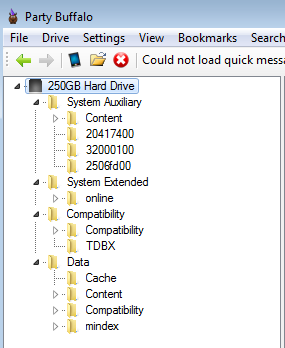
Yeah, I found that with Party Buffalo I really can do a batch/bulk copy to my PC and back to another 360 drive. The true issue I ran into was that Party Buffalo doesn't list the separate Partitions and won't let me create new root folders on those partitions...

So in Party Buffalo I get a root "Data" folder (which is actually "Partition 3") and a root "Compatibility" folder (Partition 2).... the only things really missing from Party Buffalo is a break down of partitions so I can be certain I'm on the correct one... like... I'd rather have it show "Partition 3" with a root folder "Data"... AND then allow me to create a new folder under Partition 3.

The reason I was "stuck" was because I was trying to copy my root folders (and all files in them) to the root of my 360 hard drive... something that Party Buffalo won't let me do... once I went into the various folders I could copy normally.


Party Buffalo is nearly perfect... it's really just missing a few features and adjustments (like being able to see and create partitions, copy all files to a new HDD and make root folders). Too bad development seems to be dead on it. :(
 
You will need to transfer everything to the data folder, see image below.
partybuffaloexample.png
 
lol.. we're saying the same thing in different ways. I've done that already. ;)

What I'd like to do is add the "System Auxiliary" and "System Extended" from my 320GB drive too... but the problem is my 500GB HDD doesn't have those directories so I can't add them to the root of the drive... ALSO... you can't see what partition that those directories would need to go on... the root "Data" folder is actually on "Partition 3"... the root "Compatibility" folder is on "Partition 2"... but what about System Extended and System Auxiliary????

In the end it doesn't appear to matter though... my 500GB is setup and running fine without those two "missing" folders. ;)
 
Hey guys, I got a question for you, everytime it's finished restoring the sectors on the HDD in HDDHackr it fails to do the partition and it just pops up with "Can't save drive firmware for later restore!" and ideas why?
 
Hello

some users confirmed that WD5000LPVX-00V0TT0 and WD5000LPVX-22V0TT0 work OK, so I bought WD5000LPVX-75V0TT0 and this one doesn't work. The same as WD5000LPVX-08V0TT5 Xbox 360 does not want to recognize no matter what... checked with 2 PCs and 1 notebook (7 years old).... no errors after firmware flash... need to change for something confirmed to work :(
 
Hello

some users confirmed that WD5000LPVX-00V0TT0 and WD5000LPVX-22V0TT0 work OK, so I bought WD5000LPVX-75V0TT0 and this one doesn't work. The same as WD5000LPVX-08V0TT5 Xbox 360 does not want to recognize no matter what... checked with 2 PCs and 1 notebook (7 years old).... no errors after firmware flash... need to change for something confirmed to work :(
What does the drive show up as in bios after using hddhackr?
 
Hi,

at first, I used the search function, but didn't found my problem.

I have a WD5000BPKT, which is a 320GB Xbox Drive since a year. Since the 500GB HDDS.bin was released, I wanted to upgrade it. My problem is, that my undo.bin got lost because my flash drive broke some months ago. Is it possible to reflash the drive with the 500GB HDDS.bin in its current "condition"?

And by the way: How did you guys get a 500GB drive HDDS.bin, since the official drive isn't out yet?

Thanks in advance
 

About Digiex

Digiex is a technology and gaming forum, founded in 2004 by InsaneNutter and Nimrod. Digiex has served the internet community with breaking news, detailed guides, exclusive downloads and a popular discussion forum. A small, friendly community of like‑minded people has developed over the years. People are encouraged to register and participate in on‑going discussions.

Get Social

Back
Top Bottom



