

Rick
Veteran
Try to undo the drive then re hack the drive. You might need to re-transfer everything.
You can upload it here. https://digiex.net/downloads/downlo...33-hddhackr-undo-files-downloads-uploads.htmlShould I upload my "Undo.bin" here for others?... I just did a WD5000BPKX
(I'm actually going to be doing another WD5000BPKX too... so I could upload both undo.bin files if that would help)
(edit)
found the older post... I misread, they confirmed 460GB of space.
(my original post)
How much space should I have available after doing this on a 500GB hard drive??
I just finished and xbox only shows 460GB... thought someone else confirmed 480GB... 460GB seems pretty low to me... thoughts?


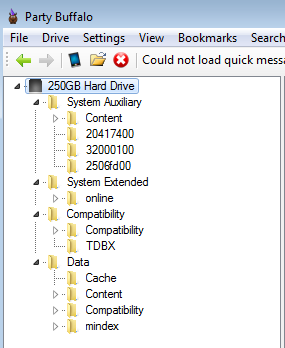
 the folders "System Auxiliary" and "System Extended" go to? I can't seem to find this info on google searches. My "Data" folder is clearly Partition 3.... and they are NOT part of Partition 2 since my 320GB never had that one... so I'm guessing either Partition 0 or perhaps even Partition 1???
Seriously? That's great news. Was hesitant to buy the XboxOne because I'm sick of Microsoft limiting you to their licensed products just so they can make more money. Still want to get a 500GB for my 360, which I'll probably go pick up tomorrow.No the Xbox One doesn't have any protection like that on hard drives, you could open an Xbox One up right now and install a 2TB hard drive if you wished.
I just copied all files and didn't use any image backup option. I think this might be for cloning specific drive sizes.That's a good idea... I think I was too tired last night to think about creating a 320GB image first, then using transfer cable, then restoring image to the 320GB... guess I couldn't see the forest through the trees on that one. Thanks.
Also... I did get everything off the drive using "Party Buffalo"... but I can't see a way to put that data back onto the drive as easily as it was extracted. Kinda lame really, lol.
EDIT - I take that back... I can add back things as quickly as I could extract with Party Buffalo... my issue is that I can't create new root directories and my 320GB has a couple root directories that my 500GB doesn't have. Maybe Horizon will let me do that?
At any rate, I'm guessing that I'll end up just creating a real backup image of the 320 like you suggested Rick... I just want to finish my test to see if it works.
You can use a external hard drive with usb 3.0 above 256gb-xTB and use it for storage.Seriously? That's great news. Was hesitant to buy the XboxOne because I'm sick of Microsoft limiting you to their licensed products just so they can make more money. Still want to get a 500GB for my 360, which I'll probably go pick up tomorrow.

What does the drive show up as in bios after using hddhackr?Hello
some users confirmed that WD5000LPVX-00V0TT0 and WD5000LPVX-22V0TT0 work OK, so I bought WD5000LPVX-75V0TT0 and this one doesn't work. The same as WD5000LPVX-08V0TT5 Xbox 360 does not want to recognize no matter what... checked with 2 PCs and 1 notebook (7 years old).... no errors after firmware flash... need to change for something confirmed to work
What does the drive show up as in bios after using hddhackr?
Undo the drive with hddhackr. Then see if there is any other sata or hdd modes in the bios.In BIOS I can see HITACHI with model number (need to take photo). Next week will test WD5000BEVT-22a0rt0.
Undo the drive with hddhackr. Then see if there is any other sata or hdd modes in the bios.



