Hack a 250gb, 320gb or 500gb Sata harddrive to work in the Xbox 360 and Xbox 360 Slim

Dell drives might have a different firmware on which makes them behave slightly differently to a normal drive, i know large OEM's like Dell sometimes do this for certain hardware. You could try hacking it again and see what happens.

Well, turns out that the disk has some serious SMART errors.

Thanks for your response.
 
Hi all!

I have the WD5000LPVX, I followed all of the steps.... and when I go to put my HDD in the Xbox.... it says that I don't have enough space Lol. I'm probably doing something wrong.... I know its 2016 and Microsoft now allows external 2TB drives..... but the truth is..... the install times on the externals are atrocious. Hopefully someone can answer me today because I am prepared to return this HDD. I spend hours upon hours attempting to make this thing work and nothing has worked.

HDDHACKR says the drive was hacked successfully; however, I swear, as soon as I plug the drive in the Xbox, it says there isn't enough space on the drive for format. The drive is a 500GB drive WD and yes, it's in the compatibility list:(
 
That seems strange, try creating the partitions with hddhackr.

If you don't have any luck with that try re hacking the hard drive again. That seems an unusual issue.
 
Hi InsaneNutter! It seems that i am out of luck with my HDD.
My console is xbox 360 slim and my drive is WD blue WD5000LPCX.
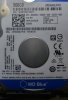
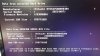
20161012_040426_HDR.jpg
I've used hddhackr 1.40 and HDDSS from hitachi (from first page). Hddhackr reported that everything is fine, go use in console, but console did not recognize the drive (i cut the power as suggested, no reboot).
Now when i connected drive second time, hddhackr see it as hitachi
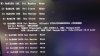
20161012_035700_HDR.jpg
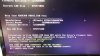
but when i tried to create partitions (as you suggested in other post) i get error in red "Choose another file name and try again! Choose another file name and try again!"
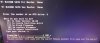
20161012_035722_HDR.jpg
and computer hangs.

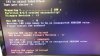
I also tried to recover drive to original state but received error like BELDAM did.
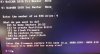
20161012_041834_HDR.jpg
As the site does not allow to attach actual undo.bin file, here is screenshot of the beginning.
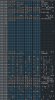
undo.bin.jpeg
Have you any clue what can be wrong?

P.S.
I am booting from USB flash with HIREN Boot CD, in pure dos mode. My main board is Gigabyte ga-m57sli-s4, it's pretty old and there is no legacy mode (at least i could not find it).

 
P.S.
I am booting from USB flash with HIREN Boot CD, in pure dos mode. My main board is Gigabyte ga-m57sli-s4, it's pretty old and there is no legacy mode (at least i could not find it).

Is that MS DOS or Free DOS? it's been a long while, however i seem to remember Free DOS had some issues with Hddhackr which is why i recommended MS DOS in the tutorial.
 
Seems like good old dos for me :-)
20161012_234636_HDR.jpg

Anyway i will try to do everything as in your tutorial and get back to you.

Thanks for reply!
 
Hello InsaneNutter,
I've tried with exact steps from your tutorial no dice. It acts different but still fails.

20161013_001013_HDR.jpg20161013_001046_HDR.jpg20161013_003509_HDR.jpg
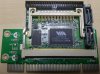
I even tried to flash with pci-to-sata bridge on VIA VT6421A chipset - same result.
20161013_223710_HDR.jpg
I guess i've messed up drive already.
Do you know if it is possible to recover my undo.bin file and restore drive to it's original state?
I can open it fine with hex editor and can get info from there to create my own hddss.bin file but wanted to double check if it is possible to restore full information.


Thank you so much for your involvement!
 
I presuming you can't recover the drive with the undo.bin from what you have said? if not then that's what its there for.

You can't re flash the drive again before using the undo.bin.
 
Hey Guys,I've got a little problem here I was going to hack a WD1600BEVS out of an old HP Laptop but I can't even flash MS Dos to my USB Stick I've tried it with 2 USB Sticks and an micro SD card with adapter and on 2 different PCs but the tool either tells me that it couldn't format the drive or that it is protected.
I hope someone has an idea for me.
 
Hey Guys,I've got a little problem here I was going to hack a WD1600BEVS out of an old HP Laptop but I can't even flash MS Dos to my USB Stick I've tried it with 2 USB Sticks and an micro SD card with adapter and on 2 different PCs but the tool either tells me that it couldn't format the drive or that it is protected.
I hope someone has an idea for me.

I have figured out why!
My problem was,that I used Windows 10 for preparing the usb stick so I quickly installed Windows 7 on another HDD and it worked.
But then I encountered another problem...I couldn't flash my HDD because of my SATA Controller (my Mainboard:MSI 970 Gaming) so I tried it in my mother's PC which is an older Intel LGA 775 and it worked. The SATA Controller also caused Xplorer360 to not recognize the HDD which was also solved by using the other PC.

I hope writing my solve for the problem will help someone who encounters same or similar problems in the future!(H)
 
formatted

Is that MS DOS or Free DOS? it's been a long while, however i seem to remember Free DOS had some issues with Hddhackr which is why i recommended MS DOS in the tutorial.
did everything then when i put the hd in slim got unformatted
 
Answer pliz

a simple question can you install craked games on the hard drive while he is on the pc?
 
This is an excellent guide that you have created, it must have taken a lot of time and effort! I am new to that so sorry for my ignorance.I have followed your guide, (i believe to the letter) and have successfully hacked my Western Digital Scorpio Blue 500GB but when i replaced it with the original one on my Xbox360 i see that the xbox recognizes that the hard disk has only left 14Mb of free storage (although the hard disk is almost empty) do you happen to have a clue as of why this issue occurs? It also does not show the total capacity of the hard disk but only the "free" space which off course is not only 14Mb.My hard disk is compatible for hacking i have checked the list of compatible hard disk that you have posted.
 
You might have restored partition 2 to partition 3 somehow. "hat about trying to format the hard drive from the Xbox 360 dashboard?
 
I would like to say that I have followed your guide up to the point that the disk was hacked then I removed the hard disk and placed it to my xbox360 and then as you proposed formatted the hard drive, then from 14Mb I got something like 354 Mb.
I have to mention that I did not do the part " Restoring the Xbox Classic Emulator and User Content " I thought that this was not necessary was I wrong?
If yes I am sorry to trouble you.
 
Yes i already have formatted the hard drive twice as it is inside the xbox 360 but this has not solved the problem, the hard disks capacity shows as 354 Mb (although it is 500 GB).

I have to mention that I did NOT do the part " Restoring the Xbox Classic Emulator and User Content " I thought that this was not necessary was I wrong?

Thank you in advance.
 

About Digiex

Digiex is a technology and gaming forum, founded in 2004 by InsaneNutter and Nimrod. Digiex has served the internet community with breaking news, detailed guides, exclusive downloads and a popular discussion forum. A small, friendly community of like‑minded people has developed over the years. People are encouraged to register and participate in on‑going discussions.

Get Social

Top Bottom