

InsaneNutter
Resident Nutter
This tutorial will tech you how to enable Blu-ray playback on the PS4, without connecting to the PSN and updating your PS4.
Before we begin you will need the following:
Enable Blu-Ray Playback On The PS4
Presuming you have the PS4 playground setup, go to Settings > User Guide.
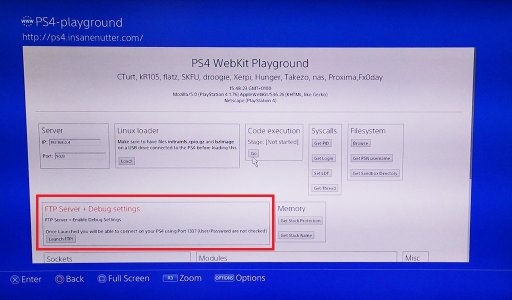
This should load the PS4 Playground.
Click "Launch FTP" this will enable the FTP server and debug settings on your PS4:
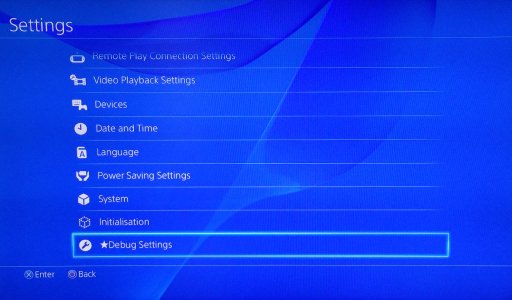
You should now see you have "Debug Settings" as on option on the PS4's settings menu:
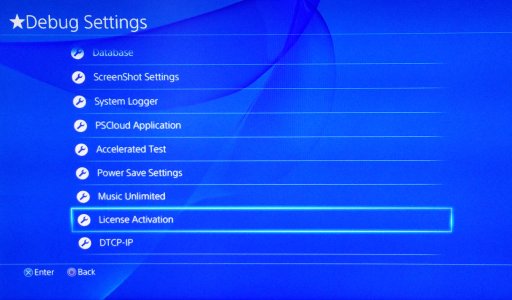
In the Debug Settings menu, go down to "Licence Activation":
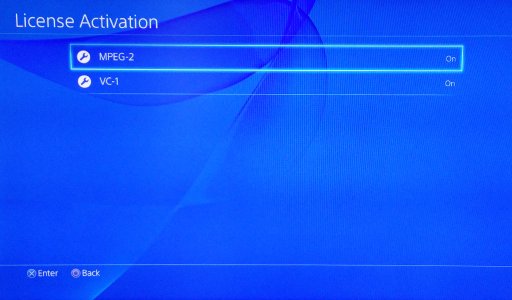
Enable MPEG-2 and VC-1:
Congratulations, you can now play Blu-rays on your 1.76 firmware PS4.
It's worth keeping in mind newer Blu-ray's require the AACS encryption key to be updated for the PS4 to be able to decrypt newer Blu-ray's. This is currently not possible to do without updating your PS4 to a firmware version which is no longer exploitable.
All Blu-rays released before September 2014 and possibly a few months after that will work fine, i'm not sure when the AACS encryption was updated on newer Blu-rays discs. Firmware 1.76 was released in September 2014, meaning any Blu-ray released before that will work fine.
Before we begin you will need the following:
- To to be on firmware 1.76, this is not currently possible on any other firmware.
- Setup the PS4 Playground which will allow you to exploit a 1.76 PS4.
Enable Blu-Ray Playback On The PS4
Presuming you have the PS4 playground setup, go to Settings > User Guide.
This should load the PS4 Playground.
Click "Launch FTP" this will enable the FTP server and debug settings on your PS4:
You should now see you have "Debug Settings" as on option on the PS4's settings menu:
In the Debug Settings menu, go down to "Licence Activation":
Enable MPEG-2 and VC-1:
Congratulations, you can now play Blu-rays on your 1.76 firmware PS4.
It's worth keeping in mind newer Blu-ray's require the AACS encryption key to be updated for the PS4 to be able to decrypt newer Blu-ray's. This is currently not possible to do without updating your PS4 to a firmware version which is no longer exploitable.
All Blu-rays released before September 2014 and possibly a few months after that will work fine, i'm not sure when the AACS encryption was updated on newer Blu-rays discs. Firmware 1.76 was released in September 2014, meaning any Blu-ray released before that will work fine.




