Easy Nintendo Wii U Homebrew Channel Hack Guide [5.3.2, 5.4, 5.5.1, 5.5.2, 5.5.3, 5.5.4]

Yes it's FAT32 formatted. I already had the "SD mount failed" error.
Here are the contents :)
View attachment 14801

Providing the homebrew_launcher.elf is in the homebrew_launcher folder that all looks correct. Like others are seeing the exploit is unreliable to essentially keep trying. After the first successful exploit launch it should be a lot more reliable. In previous posts I have listed a few tips you can try, as have other people.

I am starting to see there are multiple ways to exploit the console.
It looks like the majority of homebrew tutorials do require some kind of exploitable game.
I don't know how the exploit here differs or why no game is required with this exploit but I am wondering why it has to fail so many times before it succeeds.

Is there some kind of algorithm involved where it keeps trying to cycle through to identify a correct value and until it does the console will freeze?
Perhaps it remember that value thereafter which might explain why the exploit is more reliable once the initial exploit is applied?

Again any tutorial that requires a game is for the Wii not the Wii U, however some do work on the Wii U's "Virtual Wii" which is what i'm thinking is confusing you. Think of the "Virtual Wii" as like a Virtual PC, if you hack that you are not hacking the Wii U, just an emulated Wii.

The only currently released hack for the Wii U requires the web browser as an entry point.

As to why it's so unreliable, its a race attack, it's racing to exploit the Wii U before the Wii U blocks it from doing so, for a lack of a better way of explaining it. Once it's successful i presumed this is logged how the attack succeeded which is why is becomes a lot more reliable. I can't really explain any better as i don't know the technical details of how the exploit works, beyond that.
 
So far the worst thing about this exploit is that is it extremely unreliable. I have to literally pull the plug on my wii u tens of times before the exploit will launch once. And then it is the same process again when you power off your Wii U.
I've had no luck coming across this:
"However the good news is once it has launched successfully on your Wii U once, it will usually launch on the first attempt after that. All you can do is keep trying to launch the exploit if it fails or the Wii U crashes."
 
or instead of watching your wii u crash over and over, go to loadiine and select your version to launch this hack. 100% works every time!
 
I've tried everything but it still don't work.
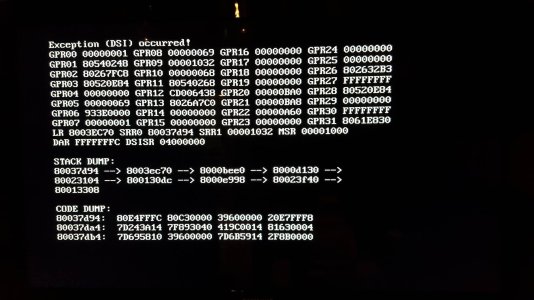
I have a Wii U and I try to install homebrew on the Wii menu (not in the Wii U menu). I use exploit for Batman. When i try to install the HBC I get the following screenshot. screenshot.jpg
I use a SD-card of 2GB. Is there any other solutions?
 
I've tried everything but it still don't work.
I have a Wii U and I try to install homebrew on the Wii menu (not in the Wii U menu). I use exploit for Batman. When i try to install the HBC I get the following screenshot.View attachment 14877
I use a SD-card of 2GB. Is there any other solutions?

This guide is for hacking the Wii U, not the Virtual Wii. With Lego Batman i'm not sure, however if you have Smash Bros and post a new thread I can probably help you with that as that's how I hacked my Virtual Wii on my Wii U.

One thing I will tell you is dont follow any guide for Hacking the Wii on the Wii U's Virtual Wii, the process for the Wii U's Virtual Wii is slightly different and if you blindly follow any old Wii guide on the Wii U then you might brick your Virtual Wii.
 
InsaneNutter, thanks for this and finally making me dust off my old Wii u.

The exploit worked perfectly the first time, but now it won't work at all. I am on firmware 5.5.1U. Also, when it worked I tried to use the USB to hid compliantly, it crashed when I opened up steamworld dig.

Any help would be great!
 
If the Wii U crashes it can take a bit of trying to get the exploit to work again, all you can do is keep trying!
 
Hey, I have a quick question.
I wanted to know if can still play games online and do updates (system updates aswell as software updates) on my Wii U when I once started the Homebrew channel? And if I can, can I do that while the Mii Maker is the homebrew channel or should I first restart my Wii U so that I should have to do the Web Browser thing again?
 
You can play any disc based game online or any game downloaded from the eshop. You can't take system updates as the next update will patch this exploit. Game updates can be installed from the eshop until another system update is released, greater than 5.5.1. After that you can install updates offline.

You will still be able to play online though aslong as the game is updated. If the Wii U is updated past 5.1.1 this homebrew hack will no longer work.

You should be able to play disc based games / eshop games fine when the Mii Maker is the homebrew channel. Some homebrew will case games to crash though so as the eshop spoof for lower firmware.

However you can use HID 2 Vpad then load a game from the disc with no problems for example, it really depends on the homebrew and what it's doing.
 
Thanks for the tutorial, however, I am unsure of what occurs during my attempts at launching for the first time is usual or not.

During my attempts, I am stuck at the initial launching of the bookmark. I am stuck at a black video screen and the Wii U freezes. The may be normal, however, I am unsure. My current firmware version is 5.5.1.

Any help is highly appreciated!
 
Gamecube emulator on homebrew

Hey! I have managed to get homebrew on Wii U and wonder if you can add a Gamecube emulator with games there?
 
Any help is highly appreciated!

It's normal unfortunately, just keep trying!

Hey! I have managed to get homebrew on Wii U and wonder if you can add a Gamecube emulator with games there?

You can actually achieve this by installing the Homebrew Channel on the Virtual Wii, you then use the Homebrew App Nintendont. I dont have a tutorial for that yet, however it's something i plan on doing in the future. You will find some for various games if you have a look on Google.

You do however need an exploitable Wii game, such as Smash Brothers Brawl.

Just be sure to follow tutorials for the Virtual Wii and not the real physical Wii, otherwise you can brick the Virtual Wii on your Wii U.
 
Is there a gamecube emulator on the Homebrew Wii U? If not then I guess it's only on Homebrew on the Wii.
 
Ignore this post, I thought I only posted once but saw that I did it a little before haha xD
 
I really need help!

Hello, InsaneNutter!

I'm sorry to disturb you right now, but I really need help with my Wii U Homebrew Exploit.
Whenever I run it, it pops up as a black video. It doesn't crash, I have to manually reboot the system. I am on Firmware 5.5.1, with a 2GB Micro SDXC card with an adapter.
I have tried all of the strategies above (filling up the cache, retrying about 30 times), but it still doesn't work.

Please reply as soon as you can!

Thanks very much! :)

~ Mike
 
What happens if you keep pressing refresh in the top right? it's just an endurance test unfortunately!

As i've said once it worked once for me it's been pretty stable, however 5.3.2 does seem to be more stable than 5.5.1. That said i know people who are managing to launch it first time on 5.5.1.

I can't really think of anything else to help that i've no already said unfortunately, it's a case of keep trying and you will get there!
 

About Digiex

Digiex is a technology and gaming forum, founded in 2004 by InsaneNutter and Nimrod. Digiex has served the internet community with breaking news, detailed guides, exclusive downloads and a popular discussion forum. A small, friendly community of like‑minded people has developed over the years. People are encouraged to register and participate in on‑going discussions.

Get Social

Back
Top Bottom