

InsaneNutter
Resident Nutter
This tutorial will tech you how to enable the debug settings on a PlayStation 4 (PS4) which is on firmware 1.76.
Before we begin you will need the following:
How To Enable Debug Settings On PS4 Firmware 1.76
Presuming you have the PS4 playground setup, go to Settings > User Guide.
This should load the PS4 Playground.
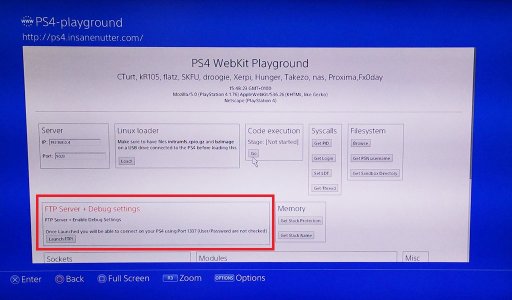
Click "Launch FTP" this will enable the FTP server and debug settings on your PS4:
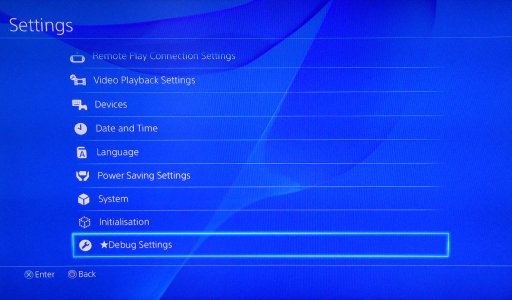
You should now see you have "Debug Settings" as on option on the PS4's settings menu:
Clicking on Debug Settings will give you many debug settings to play about with:
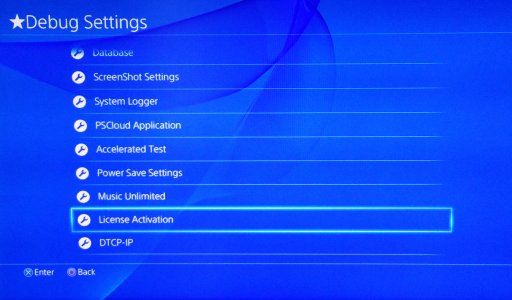
Not all the debug setting menu's will work, however you can install PKG files and activate the licences for MPEG-2 and VC-1, meaning you can play Blu-rays on a PS4 which has never been connected to the PSN or install the PGK file for the P.T. Silent Hills PS4 Demo (You still need a licence to play the demo sadly!)
Just be careful with the debug settings you mess with as you could well do some damage changing things you are unsure of.
Have fun!
Before we begin you will need the following:
- To to be on firmware 1.76, this is not currently possible on any other firmware.
- Setup the PS4 Playground which will allow you to exploit a 1.76 PS4.
How To Enable Debug Settings On PS4 Firmware 1.76
Presuming you have the PS4 playground setup, go to Settings > User Guide.
This should load the PS4 Playground.
Click "Launch FTP" this will enable the FTP server and debug settings on your PS4:
You should now see you have "Debug Settings" as on option on the PS4's settings menu:
Clicking on Debug Settings will give you many debug settings to play about with:
Not all the debug setting menu's will work, however you can install PKG files and activate the licences for MPEG-2 and VC-1, meaning you can play Blu-rays on a PS4 which has never been connected to the PSN or install the PGK file for the P.T. Silent Hills PS4 Demo (You still need a licence to play the demo sadly!)
Just be careful with the debug settings you mess with as you could well do some damage changing things you are unsure of.
Have fun!




