• Welcome to the Digiex Download Center, you are welcome to download anything you like here. No registration is required! Digiex offers direct download links with no captchas or wait times.
    The team do our best to ensure no content infringes copyrights and provide a DMCA Takedown request form to request the removal of content from Digiex.

    Notable sections: Pokemon Archives | Xbox Archives | Xbox 360 Archives

Left 4 Dead Premium Theme Download

InsaneNutter

Resident Nutter
Joined
Jun 1, 2007
Messages
11,867
Location
UK
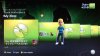
left-4-dead-jpg.3878

This is the Left 4 Dead Premium Theme given away with the Official Xbox Magazine UK, it is not available for download on Xbox Live.

You will need some way of connecting either your 360’s Hard Drive or Memory card to the PC, you cannot burn this to a CD and copy it to your 360.

Once you have either a hard drive or memory card connected to the PC load Xplorer 360 up and click Drive > Open > Hard drive or memory card.

If you are using a memory card open Partition 1, If you are using a 360 hard drive open Partition 3

Unzip the theme, the folders and theme file should be copied to: Content\0000000000000000\

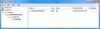
The end result should look something like this:
end-result-jpg.2290


Now just sign your profile in, go to the my xbox section, click your gamertag, click change theme and enjoy!

Download Left 4 Dead Premium Theme
 

Attachments

  • End result.jpg
    End result.jpg
    24.9 KB · Views: 97,864
  • Left 4 Dead.zip
    Left 4 Dead.zip
    8.9 MB · Views: 16,526
  • Left 4 Dead.jpg
    Left 4 Dead.jpg
    95.1 KB · Views: 25,820
hi insanenutter..
i get ban with my console..
and i lose some things of my HD...u know what.
is possible i get this theme? or (HD blocked) it block me to do that..
 
I dont know to be honest, best thing to do would be to try and see if it works on a banned console.
 
explorer 360 says "cannot locate a fatx drive to open" im using a sandisk 16gb flash drive configured already... any help? thanks
 
explorer 360 says "cannot locate a fatx drive to open" im using a sandisk 16gb flash drive configured already... any help? thanks

Are you using USBXTAFGUI to browse your flash drive? If not download it here. After you have downloaded it will ask you if you want to update to the newest one, I highly recommend it. After that open as administrator.
 

About Digiex

Digiex is a technology and gaming forum, founded in 2004 by InsaneNutter and Nimrod. Digiex has served the internet community with breaking news, detailed guides, exclusive downloads and a popular discussion forum. A small, friendly community of like‑minded people has developed over the years. People are encouraged to register and participate in on‑going discussions.

Get Social

Top Bottom