• Welcome to the Digiex Download Center, you are welcome to download anything you like here. No registration is required! Digiex offers direct download links with no captchas or wait times.
    The team do our best to ensure no content infringes copyrights and provide a DMCA Takedown request form to request the removal of content from Digiex.

    Notable sections: Pokemon Archives | Xbox Archives | Xbox 360 Archives

Pokemon Diamond and Pearl Recovery Program (JPN)

Professor Oak

Pokemon Professor
Joined
Jan 3, 2017
Messages
103
Location
Pallet Town
About:

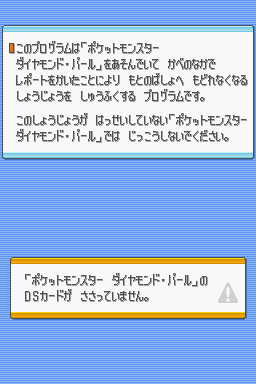
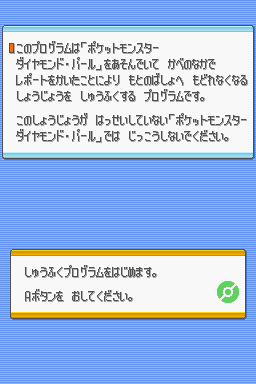
I don't know exactly what the Pokemon Diamond and Pearl JPN recovery program was used for, however I suspect this was used to recover from the surf glitch.

What is the surf glitch?

The surf glitch is a glitch found only in the Japanese versions of Pokémon Diamond and Pearl best known for allowing the player to catch the event-only Mythical Pokémon Darkrai and Shaymin.

Due to a programming mistake, the door in Aaron's room of the Pokémon League can be Surfed through, by facing the door and manually selecting Surf from the party screen. This allows the player to step into the void around the indoor area and walk to other areas.

As the void is not intended to be accessed during the normal course of the game, it poses the risk of the player getting trapped with no way out.

How did Nintendo fix the surf glitch?

Nintendo has officially acknowledged the glitch and made it possible to repair the save with a program that was distributed to DS Download Stations in Japan starting October 27, 2006. When the save is fixed the player is transported back outside their house in Twinleaf Town, allowing them to resume the game.

Their seems to have been various revisions of the Diamond and Pearl games released in Japan over the years, presumably to patch this glitch and various other. Groups in the rom scene have dump 1.5 and 1.6 versions of both games for example:
  • Pocket_Monsters_Diamond_v1.5_JAP_NDS-PUSSYCAT
  • Pocket_Monsters_Diamond_v1.6_JAP_NDS-PUSSYCAT
  • Pocket_Monsters_Pearl_v1.5_JPN_NDS-BAHAMUT
  • Pocket_Monsters_Pearl_v1.6_JPN_NDS-BAHAMUT
How to use:

You can load the Pokemon Diamond and Pearl Recovery Program on a DS using a flash cart, I then presume if you swap the cartridge out and insert a legitimate JPN Diamond and Pearl which has been glitched it will patch the game for you.

It's possible this could be a homemade rom created by capturing the files sent to the DS from a DS Download Station.

This was released by the rom scene as Pocket_Monsters_Diamond_and_Pearl_Recovery_Program_JPN_Demo_NDS-iND (ind-pmdaprp) with the release notes "found this someplace and decided to share it enjoy!"

Screenshots:
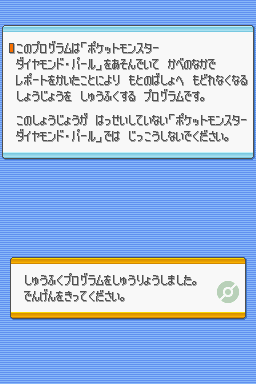
pocket-monsters-diamond-pearl-recovery-program-3.png pocket-monsters-diamond-pearl-recovery-program-2.png pocket-monsters-diamond-pearl-recovery-program-1.png

Download:

Pokemon Diamond and Pearl Recovery Program (JPN) Download
 

Attachments

Couldn't seem to get this working with 2 different flashcarts (for the recovery) to fix a retail cart (JPN), on a DS lite.
[It freezes when I eject the flashcart].

Perhaps this only works with it flashed on an actual cart, reminiscent of this reply I found regarding DS Action Replay roms.

https://gbatemp.net/goto/post?id=4273580#post-4273580 said:
The AR firmware is meant for a specific set of hardware, hardware the flash cart does not have.
 
Couldn't seem to get this working with 2 different flashcarts (for the recovery) to fix a retail cart (JPN), on a DS lite.
[It freezes when I eject the flashcart].

Perhaps this only works with it flashed on an actual cart, reminiscent of this reply I found regarding DS Action Replay roms.
I ran a basic string forensic tool on this file a while back, and it seemed to imply that it was somehow distributed over DS Download play, or even Wi-Fi. You can try it yourself and see if you reach the same basic conclusion haha.
 
I ran a basic string forensic tool on this file a while back, and it seemed to imply that it was somehow distributed over DS Download play, or even Wi-Fi. You can try it yourself and see if you reach the same basic conclusion haha.
While the description doesn't say anything about download play, I'm willing to try it :D

edit: the recovery program itself doesn't broadcast via Download Play.
Also, it's interesting that removing the cart on a 3DS doesn't exit NDS mode (it causes the freeze)

Maybe if there is a way to insert the ROM into a NDS wireless station ROM, it can be received via Download Play on another unit.

edit again: I tried modding a DS Vol Station 1 and Puzzle League to send the Recovery Program,
But the receiving NDS hangs. I wonder if there's a homebrew way to send the game without the hang...
(for either case, rename our program.nds to .srl, and replace the .srl in the DS Vol/Puzzle League)

edit yet again: I've succeeded in getting it to work!

1. Use either method as mentioned above to send the Recovery Program, however
2. It must be received on a NDS/NDS lite that has Flashme installed (to bypass the signature check).
When Download Play is launched, the JPN DP cart must already be in the slot.
3. Mesh through A button, eventually it'll prompt a japanese text that translates to "Please turn off the power".

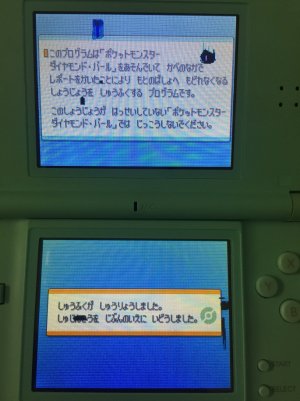
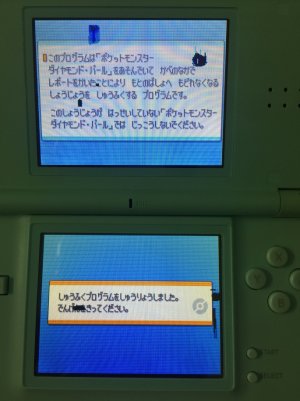
Images on my NDS lite. (ignore the dead pixels; I literally bought this cheap second hand unit to perform these line of tests)
IMG_4888 - Copy.JPG IMG_4889 - Copy.JPG
It's the bottom screen that changes.
Left image says something to the effect of repair is in progress.
The one on the right, second line, is the one that says please turn of the power.

でんげんをきってください。is hiragana for 電源を切ってください。,
which means Please turn off the power. (I notice this screen is also in the screenshot in OP)


Closing notes:
a. I confirm that the 'void bricked' save I was using got restored, by sending me back to Starter town.
b. I cannot confirm if it only works on JPN cart. (I don't have other lang DP carts on hand)
c. Without a properly signed recovery program .nds, a FLASHME installed unit is required (based on what I've read on gbatemp, in relation to sending non-demo games using a modded Download Stations)
d. I uploaded a smaller version (compared to a previous version I couldn't upload). The one I uploaded is confirmed to work for me; either "Polarium" or "Meteos" would load it on a FLASHME'd device.
 

Attachments

Last edited:
While the description doesn't say anything about download play, I'm willing to try it :D

edit: the recovery program itself doesn't broadcast via Download Play.
Also, it's interesting that removing the cart on a 3DS doesn't exit NDS mode (it causes the freeze)

Maybe if there is a way to insert the ROM into a NDS wireless station ROM, it can be received via Download Play on another unit.

edit again: I tried modding a DS Vol Station 1 and Puzzle League to send the Recovery Program,
But the receiving NDS hangs. I wonder if there's a homebrew way to send the game without the hang...
(for either case, rename our program.nds to .srl, and replace the .srl in the DS Vol/Puzzle League)

edit yet again: I've succeeded in getting it to work!

1. Use either method as mentioned above to send the Recovery Program, however
2. It must be received on a NDS/NDS lite that has Flashme installed (to bypass the signature check).
When Download Play is launched, the JPN DP cart must already be in the slot.
3. Mesh through A button, eventually it'll prompt a japanese text that translates to "Please turn off the power".

Images on my NDS lite. (ignore the dead pixels; I literally bought this cheap second hand unit to perform these line of tests)
View attachment 17064 View attachment 17065
It's the bottom screen that changes.
Left image says something to the effect of repair is in progress.
The one on the right, second line, is the one that says please turn of the power.

でんげんをきってください。is hiragana for 電源を切ってください。,
which means Please turn off the power. (I notice this screen is also in the screenshot in OP)


Closing notes:
a. I confirm that the 'void bricked' save I was using got restored, by sending me back to Starter town.
b. I cannot confirm if it only works on JPN cart. (I don't have other lang DP carts on hand)
c. Without a properly signed recovery program .nds, a FLASHME installed unit is required (based on what I've read on gbatemp, in relation to sending non-demo games using a modded Download Stations)
d. I uploaded a smaller version (compared to a previous version I couldn't upload). The one I uploaded is confirmed to work for me; either "Polarium" or "Meteos" would load it on a FLASHME'd device.

If you have a Nintendo 3DS with an advanced Custom Firmware like Luma 3DS you can use the method mentioned above with Puzzle League without FlashMe. The CFW patches the TWL firmware as well so it has a similar effect like FlashMe.

 
A proper dump of this was recently added to the No-Intro database as "Pocket Monsters - Diamond & Pearl - Shuufuku Program (Japan) (Rev 3) (Save Data)"
According to No-Intro the existing dump was hacked by the scene groups which caused it to no longer boot correctly on an unmodified DS
 
It has been while so just a minor update
  1. Without modification, it apparently will not read foreign carts.
    This is what I was given as proof:
    upload_2026-6-6_23-35-8.png

    (I imagine such a modification will require CFW/FlashME to load it)

  2. I've been told that the software can check whether there is actually something wrong with the cart, and would not try repairs if no issues were detected.

  3. Rev 3 mentioned above apparently works for non hacked devices. @InsaneNutter long time no speak, hope you've been fine. I think the first post can be updated to include the files for Rev3
 
Last edited:

About Digiex

Digiex is a technology and gaming forum, founded in 2004 by InsaneNutter and Nimrod. Digiex has served the internet community with breaking news, detailed guides, exclusive downloads and a popular discussion forum. A small, friendly community of like‑minded people has developed over the years. People are encouraged to register and participate in on‑going discussions.

Get Social

Back
Top Bottom