


InsaneNutter
Resident Nutter
This is a GBA E-Reader save file with the Eon Ticket scanned and ready to distribute to Pokemon Ruby and Sapphire. This will allow you to emulate the Eon ticket distribution to your Pokemon Ruby and Sapphire save game.
The Eon Ticket allows you to travel to the Southern Island via S.S.Tidal once the Elite Four have been defeated, this is where the version-opposite Eon Pokémon can be battled and caught, Latias or Latios, depending on your game.
What you need to unlock this on an emulator:
1. To get started download VBA Link with E-Reader + Link Cable Emulation
2. You will a Pokemon Ruby or Sapphire rom you will have to provide yourself
3. In addition you will need a rom of the USA GBA E-Reader, if you Google Card e-Reader ( U ) (Independent) you should find this easily
4. Finally you will need the e-Reader save with the Eon Ticket already scanned on to it.
The 128KB savegames are meant for the e-Reader (US) retail cartridge or emulator usage, while the 64kB savegames are meant for flashcarts since usually they have a 64kB sram.
Supported game languages include: English, French, German, Italian and Spanish. Please use the save game for the language which matches your Pokemon game.
Setting things up:
Extract the VBA Link Emulator with E-Reader support
Copy your Pokemon Ruby or Sapphire rom and e-Reader rom in to the emulators folder.
Your Pokemon save game should be named the same as the Pokemon rom with the .sa1 file extension
The e-Reader save should be named the same as the e-Reader rom with the .sa2 file extension
Example below:
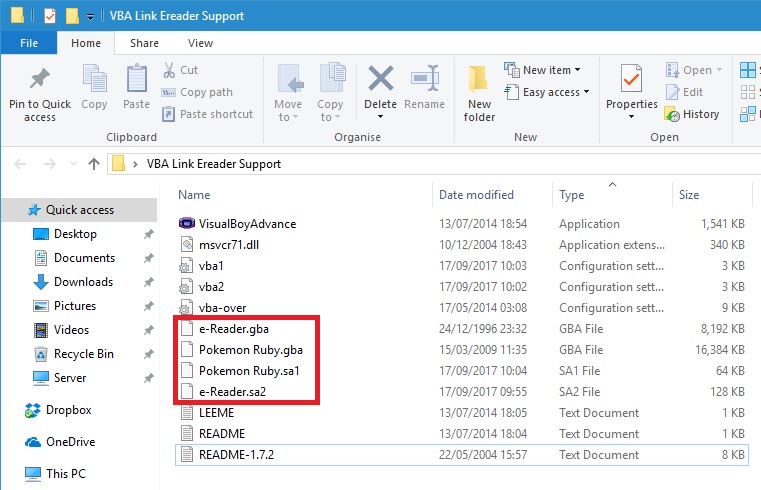
You now want to load VBA up twice.
In the VBA window you first opened load your Pokemon game rom, in the second load the e-Reader rom.
You might need to change the controls on the second VBA window which has the e-Reader rom running, otherwise they will conflict with your Pokemon Ruby game:
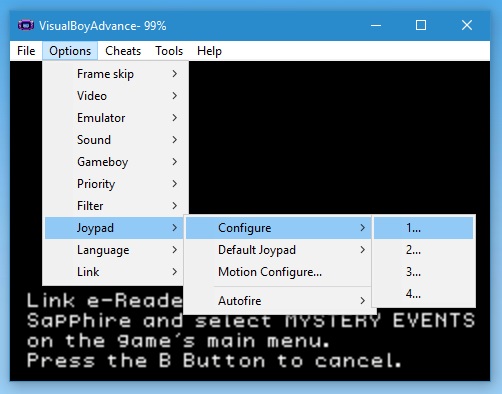
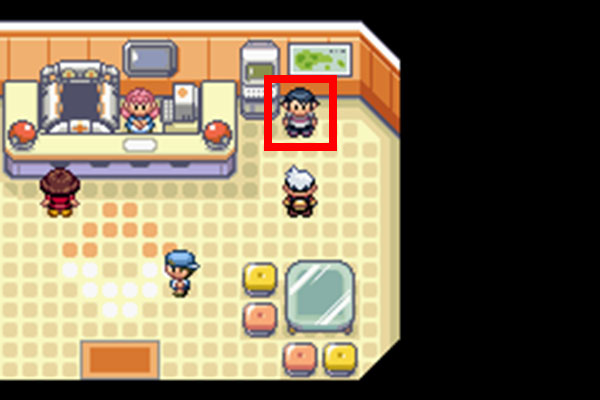
Keep in mind if you don't have the Mystery Events option on your Pokemon save game you have to have obtained the 5th Gym Badge and be in Petalburg City. You can then go in to the Pokemon Center and talk to this man:
You can then tell him: Mystery Event Is Exciting, as below:
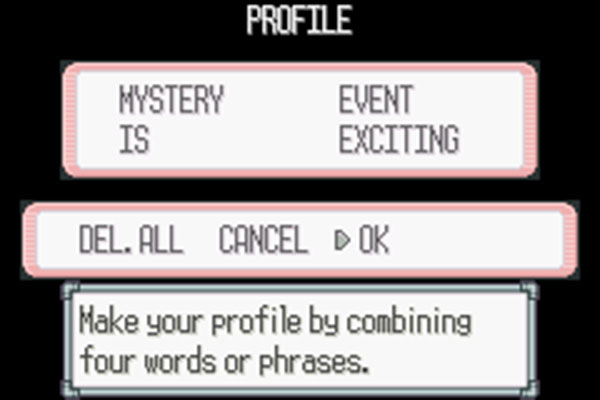
Press ok and Mystery Event will be unlocked. Remember to save your game.
Next time you load the game Mystery Event will be an option on the main menu.
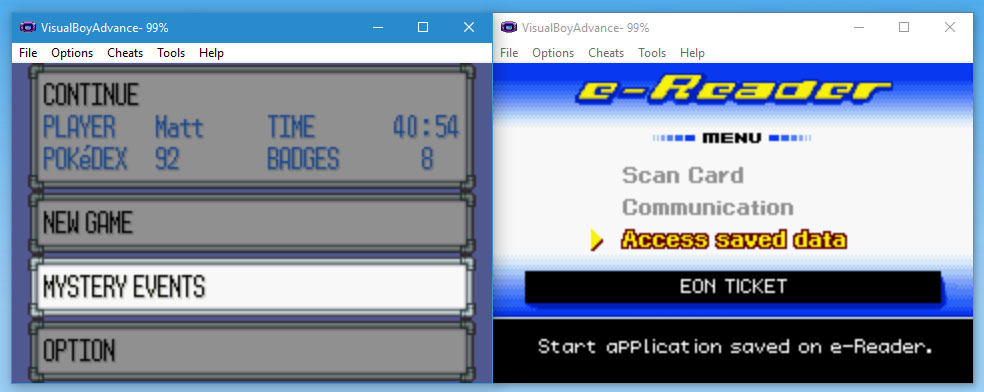
Now that everything is setup select "Mystery Events" on your Pokemon Game, then "Access Save data" on the E-Reader:
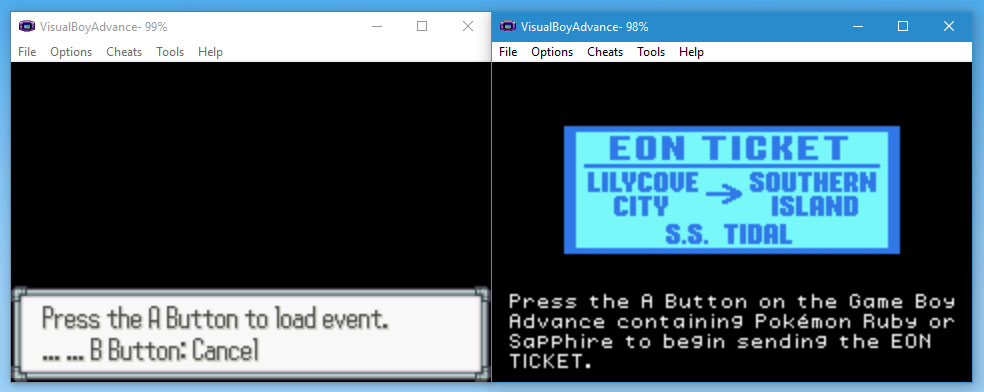
Press the "A" Button on your Pokemon game to load the event:
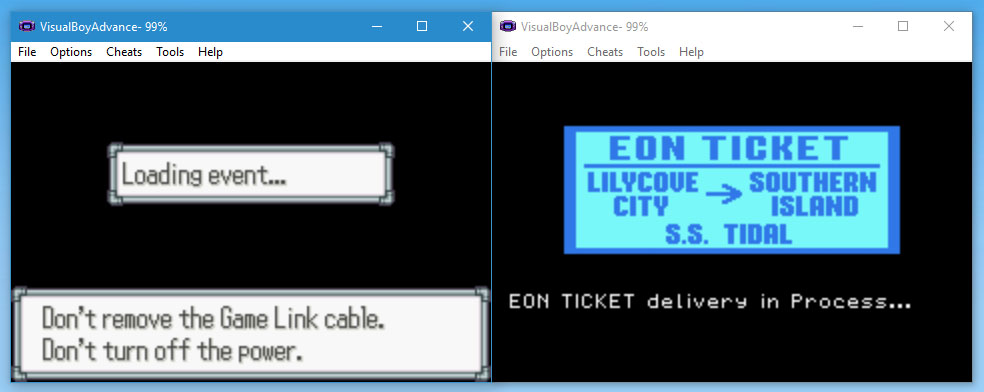
The Eon Ticket should then be delivered:
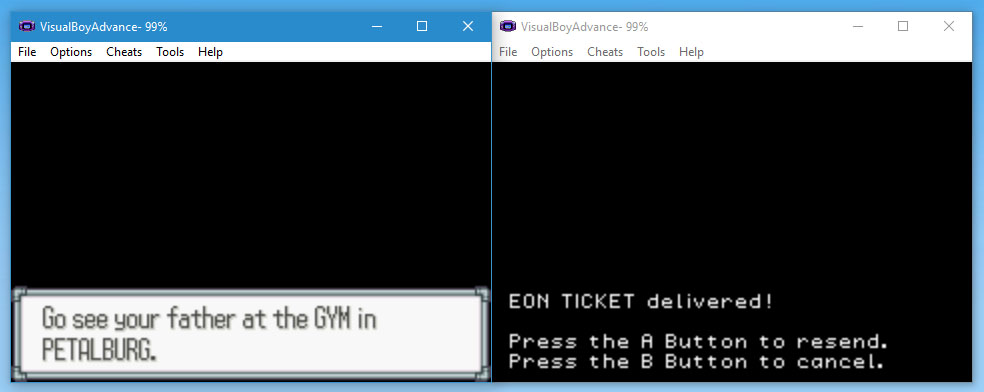
That's all, you can now go to the Petalburg gym and start the story line unlocked by the Eon Ticket:
You can now enjoy the Eon Ticket event without having to use any cheats or save game modifications to unlock it, totally legit!
The Eon Ticket allows you to travel to the Southern Island via S.S.Tidal once the Elite Four have been defeated, this is where the version-opposite Eon Pokémon can be battled and caught, Latias or Latios, depending on your game.
What you need to unlock this on an emulator:
1. To get started download VBA Link with E-Reader + Link Cable Emulation
2. You will a Pokemon Ruby or Sapphire rom you will have to provide yourself
3. In addition you will need a rom of the USA GBA E-Reader, if you Google Card e-Reader ( U ) (Independent) you should find this easily
4. Finally you will need the e-Reader save with the Eon Ticket already scanned on to it.
The 128KB savegames are meant for the e-Reader (US) retail cartridge or emulator usage, while the 64kB savegames are meant for flashcarts since usually they have a 64kB sram.
Supported game languages include: English, French, German, Italian and Spanish. Please use the save game for the language which matches your Pokemon game.
Setting things up:
Extract the VBA Link Emulator with E-Reader support
Copy your Pokemon Ruby or Sapphire rom and e-Reader rom in to the emulators folder.
Your Pokemon save game should be named the same as the Pokemon rom with the .sa1 file extension
The e-Reader save should be named the same as the e-Reader rom with the .sa2 file extension
Example below:
You now want to load VBA up twice.
In the VBA window you first opened load your Pokemon game rom, in the second load the e-Reader rom.
You might need to change the controls on the second VBA window which has the e-Reader rom running, otherwise they will conflict with your Pokemon Ruby game:
Keep in mind if you don't have the Mystery Events option on your Pokemon save game you have to have obtained the 5th Gym Badge and be in Petalburg City. You can then go in to the Pokemon Center and talk to this man:
You can then tell him: Mystery Event Is Exciting, as below:
Press ok and Mystery Event will be unlocked. Remember to save your game.
Next time you load the game Mystery Event will be an option on the main menu.
Now that everything is setup select "Mystery Events" on your Pokemon Game, then "Access Save data" on the E-Reader:
Press the "A" Button on your Pokemon game to load the event:
The Eon Ticket should then be delivered:
That's all, you can now go to the Petalburg gym and start the story line unlocked by the Eon Ticket:
You can now enjoy the Eon Ticket event without having to use any cheats or save game modifications to unlock it, totally legit!


 itself lol. Will probably end up doing as Deoxyz says and using a DS Lite to load the save onto the e-reader I ordered
  .
.





