• Welcome to the Digiex Download Center, you are welcome to download anything you like here, no registration is required! We offer direct download links with no captchas or wait times.
    We do our best to ensure no content infringes copyrights, and provide a DMCA Takedown Request Form to request the removal of content from Digiex

Xbox 360 MP Gui Download - Title Update / Media ID Manager / Create / Extract ISO

InsaneNutter

Resident Nutter
Staff member
360MPGui can read the Title Update / Media ID from an ISO, Default.xex, GoD (Games on Demand) or Arcade game.
This makes it easy for you to findout the Title Update ID and Media of your game so you can download the correct one, 360MPGui can also check the Title Update ID and Media ID of a downloaded Title Update.

Aside from its ability to help you manage and obtain title updates 360MPGui can also extract ISO's, create ISO's and provide information on the game, such as the dashboard version it requires to play and the region it is locked.

The tool also has the ability to manage arcade games / DLC and unlock them for use if required.

Download:

Download Xbox 360 MP Gui


l25rwjsz8izn18x7y51y.jpg
 
Its a false positive, however if your concerned run it in a virtual machine so you dont have to worry about your main windows install.
 
This tool is awesome; I am amazed. Hopefully, I will be able to learn how to use it fully. It has great potential. Thank you.
 
Some antivirus programs flag this as malicious due to the way the app works, even though it's not. That could be the reason.
 
It says a trojan virus

Already answered multiple times in the posts above yours.

When I try and download MP Gui, my Avast says there is malware, and blocks it.

Its a false positive, however if your concerned run it in a virtual machine so you dont have to worry about your main windows install.

Some antivirus programs flag this as malicious due to the way the app works, even though it's not. That could be the reason.
 
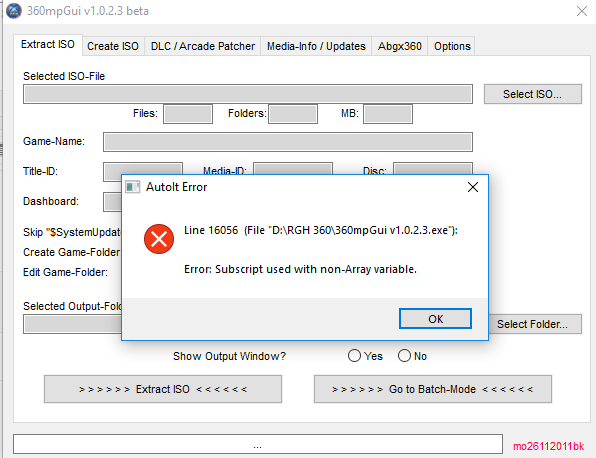
Hey I'm getting the same error. Does anyone know how to fix this? I've also tried to run it as admin and disabled anti-virus.
Thanks!
 
I am also getting the AutoIt error. From what I can dig up it has something to do with a certain hard-coded folder path not having any files in it. I have no idea what folder path it is, but I have one machine that doesn't get the error and one that does. Running the program as admin or disabling anti virus hasn't helped anyone (myself included) because it doesn't seem to be a permissions issue.

I've never made anything with AutoIt but tomorrow I'll try to decompile/disassemble the exe and see if I can figure out what folder path is causing the error. The OP could save me the work, if he decides to visit the thread again.

EDIT: Actually I'm not going to be doing this right now because I discovered that ISOs are working for my purpose. Might revisit later if I have a need to open them with this program.
 
Last edited:
Top Bottom