

tomaszof
Member
So you might have a RGH Xbox that doesn't have avatars. Maybe you didnt flash the nand with avatars, maybe the person you bought it from didn't. In this guide i'll show you how to do it yourself with a USB stick and no flashing the system, as that's a pretty risky process that can get your console bricked.
First, navigate to the settings of your console to check the dash version by opening the Xbox guide and press RB 2 times so you are in the settings tab and then go to System settings. After that, go to console settings, navigate to System Info and take note of the Dashboard version you have there. If you have 17559, you can download it here. Older dash? search it up and download it. After you download it you will have to most likely extract the file. After you extract it, you will have a folder called '$SystemUpdate', make sure you rename it to '$$ystemUpdate' , and then copy it to a fat32 formatted USB Stick. Make sure it looks like this
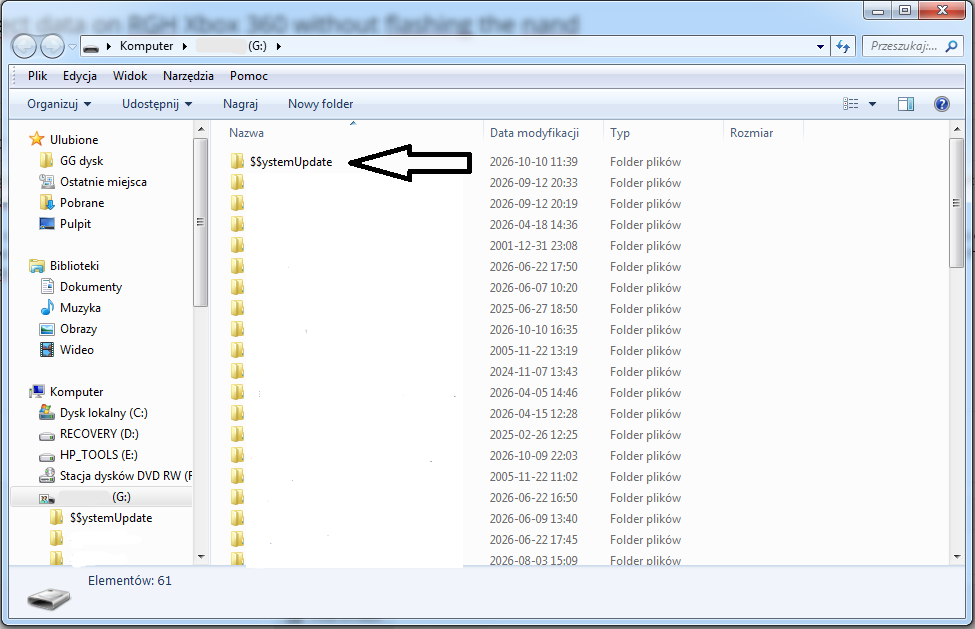
After putting the folder on the USB, you will want to unplug it and put it in your Xbox. It will take about 5 seconds to pop up a message about updating your Xbox
READ THIS CAREFULLY!!! A MISTAKE HERE WILL BRICK YOUR XBOX!!!
MAKE SURE THE MESSAGE SAYS THIS
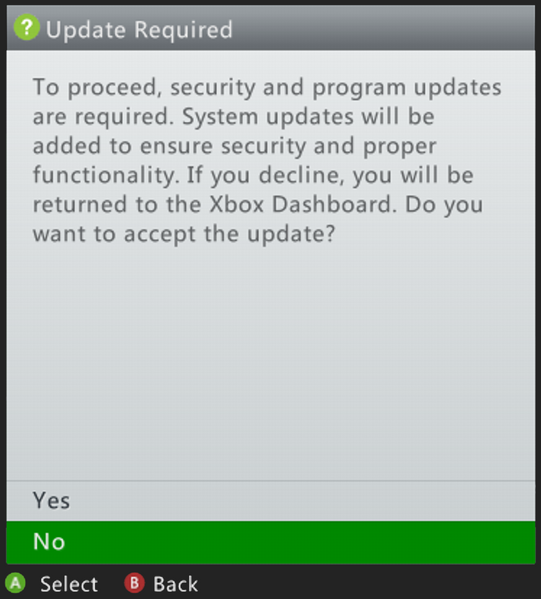
IF IT SAYS THIS, DO NOT UPDATE THE CONSOLE AS IT WILL BRCK A RGH OR JTAG CONSOLE
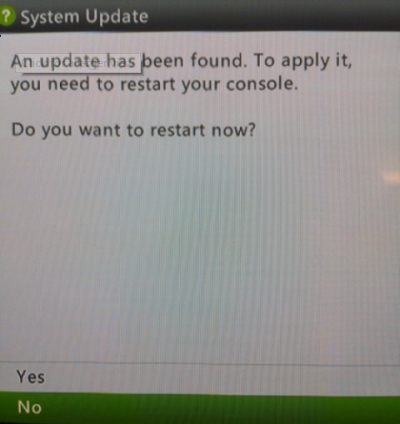
After you make sure the message says the first picture here (basically, the longer text) , you can press Yes and it will install the avatar and kinect data. It should take ~1 minute or less, and your Xbox should boot to Kinect and Avatar data installed.
I hope i helped. More RGH guides coming soon (probably)
First, navigate to the settings of your console to check the dash version by opening the Xbox guide and press RB 2 times so you are in the settings tab and then go to System settings. After that, go to console settings, navigate to System Info and take note of the Dashboard version you have there. If you have 17559, you can download it here. Older dash? search it up and download it. After you download it you will have to most likely extract the file. After you extract it, you will have a folder called '$SystemUpdate', make sure you rename it to '$$ystemUpdate' , and then copy it to a fat32 formatted USB Stick. Make sure it looks like this
After putting the folder on the USB, you will want to unplug it and put it in your Xbox. It will take about 5 seconds to pop up a message about updating your Xbox
READ THIS CAREFULLY!!! A MISTAKE HERE WILL BRICK YOUR XBOX!!!
MAKE SURE THE MESSAGE SAYS THIS
IF IT SAYS THIS, DO NOT UPDATE THE CONSOLE AS IT WILL BRCK A RGH OR JTAG CONSOLE
After you make sure the message says the first picture here (basically, the longer text) , you can press Yes and it will install the avatar and kinect data. It should take ~1 minute or less, and your Xbox should boot to Kinect and Avatar data installed.
I hope i helped. More RGH guides coming soon (probably)





