• Welcome to the Digiex Download Center, you are welcome to download anything you like here. No registration is required! Digiex offers direct download links with no captchas or wait times.
    The team do our best to ensure no content infringes copyrights and provide a DMCA Takedown request form to request the removal of content from Digiex.

    Notable sections: Pokemon Archives | Xbox Archives | Xbox 360 Archives

Pokémon WCD Patcher 1.0.0

AlamosIT

Backup Master
Joined
Jun 21, 2020
Messages
195
Location
Italy
Now that we have a Custom Mystery Gift Events GBA page here, I think that this software also needs a little bit of space.

What it does:
WCDPatcher swaps out Wondercard in the Deoxys Distribution Cart 2008 and replaces it with a user specified Wondercard (Pokémon and items).

Supports all IV gen Pokémon DS games.

It also enables selection of the distribution region, setting the friend distribution limit, removing distribution date limits and editing of the ROMs header info.


What you will need:
- Deoxys Distribution Cart 2008 ROM
- A valid Wondercard (Project Pokémon event downloads)


Original Project Pokémon post by @King Impoleon

How to use it:
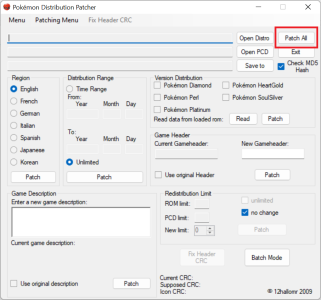
  • Download both the software and the Deoxys Distribution Cart 2008 ROM
  • Open WCDPatcher, click on Open Distro and select the Deoxys ROM
  • Click on Open PCD and select the Wonder Card you want to use
    • If you want to edit or create a PCD Wonder Card you can use Mystery Gift Editor (download the PMGEv1.4.3.0Portable.zip version)
  • Click on Save to and choose a file name
    • It will immediately create a NDS file, but it won't be "ready" yet
  • Select the distribution Region and click on Patch
  • Select the Distribution Range and click on Patch
    • Original distribution ROMs have a "time range", if you select "Unlimited" it will be removed so you can use the ROM in every date
  • Write your new Game Description and click on Patch
  • Write your new Game Header and click on Patch
  • Click on Patch All
upload_2022-9-12_10-34-56.png
  • Now click on Read in Version Distribution tab and check the game versions that will work, if they aren't what you want flag the versions you like and click on Patch
  • Your new NDS patched ROM is now ready to use, enjoy (ip)
Tip:

If you want to check if everything is ok before use actual hardware you can use MelonDS 0.4 to emulate the distribution, as suggested here.
 

Attachments

Last edited:
Are there any downsides? I'm planning to use this to get the VGC Shiny Milotic distribution but I don't know how to correctly put in everything in that program.
 
Last edited:
Are there any downsides? I'm planning to use this to get the VGC Shiny Milotic distribution but I don't know how to correctly put in everything in that program.
Here there is the ROM for VGC Shiny Milotic (I used this Wonder Card).

I patched the ROM to work with every english IV gen game (not just Platinum like the original), if you want a "more legit" experience you should download it with Platinum and with the receiver DS date set between 05.09.2009-06.13.2009
 

Attachments

Wow. Thanks for the Milotic. I downloaded the program and got a few files I would like to make a Wondercard with but I don't know how to correctly put everything in. May I ask how you were able to make a custom Wondercard? I would like to attempt this for myself.
 
Wow. Thanks for the Milotic. I downloaded the program and got a few files I would like to make a Wondercard with but I don't know how to correctly put everything in. May I ask how you were able to make a custom Wondercard? I would like to attempt this for myself.
At the moment I'm abroad, when I'll return at home I will write a little guide!
 
I updated the post with a little guide!
Thanks for the updated post. I just started to do the distribution Wondercards for Gen IV. I do have a question. On the New Game Description and Gameheader, what do I put?
 
Thanks for the updated post. I just started to do the distribution Wondercards for Gen IV. I do have a question. On the New Game Description and Gameheader, what do I put?
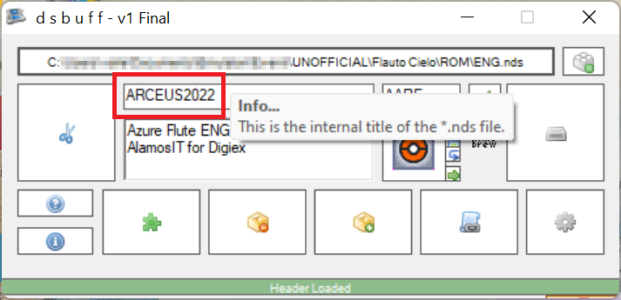
The Game Description is what is shown in the DS menu (like this), so write what you want to display.

The Game Header is the "internal" name of the ROM, here you can write what do you want, maybe a short name that will refer to the distribution.
upload_2022-9-13_20-50-20.png
(Example from my Azure Flure ROM)
 
The Game Description is what is shown in the DS menu (like this), so write what you want to display.

The Game Header is the "internal" name of the ROM, here you can write what do you want, maybe a short name that will refer to the distribution.
View attachment 18005
(Example from my Azure Flure ROM)

I'm actually doing it on an R4. I did a World's 2010 Crobat for a test. I put in everything you listed and when I clicked "Patch All", it gives me a message saying the conversion from string _____ to type "Double" is not valid. What does that mean?
 
Last edited:
I'm actually doing it on an R4. I did a World's 2010 Crobat for a test. I put in everything you listed and when I clicked "Patch All", it gives me a message saying the conversion from string _____ to type "Double" is not valid. What does that mean?
Do you have a screenshot?
Which Wonder Card did you use?
 
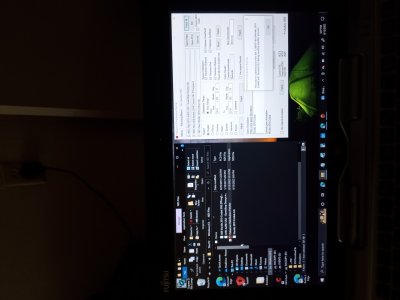
Have you try to run the program from the internal memory (disk C)?
Sometimes there are some software that doesn't work if they run from an external memory.

Hm? You mean Windows ( C: )? I downloaded the Distribution Patcher and it was in the Downloads section of my laptop. Are you talking about the Deoxys Distribution?
 
Last edited:
Hm? You mean Windows ( C: )? I downloaded the Distribution Patcher and it was in the Downloads section of my laptop.
Yes, I see "Disk E", I don't know how many disk/partition you have in your laptop, but try in C (using PCD file in C and saving new NDS rom in C), just try
 
Yes, I see "Disk E", I don't know how many disk/partition you have in your laptop, but try in C (using PCD file in C and saving new NDS rom in C), just try

It says the same thing as before. I tried to Patch All again and it gives me this. Is the Patch All function really necessarily? Is it needed or could I just patch each section individually without Patch All?
 

Attachments

  • IMG_20220913_170706064.jpg
    IMG_20220913_170706064.jpg
    1.8 MB · Views: 463
It says the same thing as before. I tried to Patch All again and it gives me this. Is the Patch All function really necessarily? Is it needed or could I just patch each section individually without Patch All?

In my experience if you don'c click "Patch all" it doesn't work, but you can try.
 
It says the same thing as before. I tried to Patch All again and it gives me this. Is the Patch All function really necessarily? Is it needed or could I just patch each section individually without Patch All?
I see that this time it says another thing, have you try to delete the NDS new rom and recreate another one?
 
In my experience if you don'c click "Patch all" it doesn't work, but you can try.

I did and tried again. I patched each section individually without Patch All and changed the date on my NDS when the Crobat was distributed. I tried to distribute the Crobat to HeartGold. It worked...for now.
What do you mean by "doesn't work"?
 

About Digiex

Digiex is a technology and gaming forum, founded in 2004 by InsaneNutter and Nimrod. Digiex has served the internet community with breaking news, detailed guides, exclusive downloads and a popular discussion forum. A small, friendly community of like‑minded people has developed over the years. People are encouraged to register and participate in on‑going discussions.

Get Social

Back
Top Bottom