Now that we have a Custom Mystery Gift Events GBA page here, I think that this software also needs a little bit of space.
What it does:
WCDPatcher swaps out Wondercard in the Deoxys Distribution Cart 2008 and replaces it with a user specified Wondercard (Pokémon and items).
Supports all IV gen Pokémon DS games.
It also enables selection of the distribution region, setting the friend distribution limit, removing distribution date limits and editing of the ROMs header info.
What you will need:
- Deoxys Distribution Cart 2008 ROM
- A valid Wondercard (Project Pokémon event downloads)
Original Project Pokémon post by @King Impoleon
How to use it:
If you want to check if everything is ok before use actual hardware you can use MelonDS 0.4 to emulate the distribution, as suggested here.
What it does:
WCDPatcher swaps out Wondercard in the Deoxys Distribution Cart 2008 and replaces it with a user specified Wondercard (Pokémon and items).
Supports all IV gen Pokémon DS games.
It also enables selection of the distribution region, setting the friend distribution limit, removing distribution date limits and editing of the ROMs header info.
What you will need:
- Deoxys Distribution Cart 2008 ROM
- A valid Wondercard (Project Pokémon event downloads)
Original Project Pokémon post by @King Impoleon
How to use it:
- Download both the software and the Deoxys Distribution Cart 2008 ROM
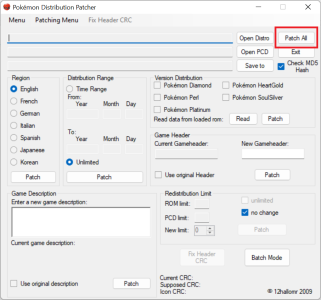
- Open WCDPatcher, click on Open Distro and select the Deoxys ROM
- Click on Open PCD and select the Wonder Card you want to use
- If you want to edit or create a PCD Wonder Card you can use Mystery Gift Editor (download the PMGEv1.4.3.0Portable.zip version)
- Click on Save to and choose a file name
- It will immediately create a NDS file, but it won't be "ready" yet
- Select the distribution Region and click on Patch
- Select the Distribution Range and click on Patch
- Original distribution ROMs have a "time range", if you select "Unlimited" it will be removed so you can use the ROM in every date
- Write your new Game Description and click on Patch
- Write your new Game Header and click on Patch
- Click on Patch All
- Now click on Read in Version Distribution tab and check the game versions that will work, if they aren't what you want flag the versions you like and click on Patch
- Your new NDS patched ROM is now ready to use, enjoy

If you want to check if everything is ok before use actual hardware you can use MelonDS 0.4 to emulate the distribution, as suggested here.
Attachments
Last edited: