
You are using an out of date browser. It may not display this or other websites correctly.
You should upgrade or use an alternative browser.
You should upgrade or use an alternative browser.
PSP 6.61 Custom Firmware Install on any PSP - PSP, PSP Slim, PSP 3000, PSP Go & E1000
- Thread starter InsaneNutter
- Start date
hello
I have psp fat 1000 in my country and my nephew found it recently and asking for more games. it had a CFW which I installed long time ago. I wont be able to put a latest CFW from the distance and there is none to do it for him so I was searching to buy a original game disks when found a seller who claims that his game files just need to be copied to memory card on any of the psp (no CFW needed) and they will play. Since I was not following psp news for some time I would like to ask if its possible to copy a special game files to any psp and just play it without a CFW.
thank you and sorry if this question is not related to this thread
I have psp fat 1000 in my country and my nephew found it recently and asking for more games. it had a CFW which I installed long time ago. I wont be able to put a latest CFW from the distance and there is none to do it for him so I was searching to buy a original game disks when found a seller who claims that his game files just need to be copied to memory card on any of the psp (no CFW needed) and they will play. Since I was not following psp news for some time I would like to ask if its possible to copy a special game files to any psp and just play it without a CFW.
thank you and sorry if this question is not related to this thread

InsaneNutter
Resident Nutter
It’s possible that could be done, as the keys to sign things for the PSP leaked. Someone could have used these to sign some games to work on any PSP.
The Pro Update / Fast Recovery tools used in this tutorial are signed to work on PSP’s with no custom firmware.
I guess you can just and see.
The Pro Update / Fast Recovery tools used in this tutorial are signed to work on PSP’s with no custom firmware.
I guess you can just and see.
It’s possible that could be done, as the keys to sign things for the PSP leaked. Someone could have used these to sign some games to work on any PSP.
The Pro Update / Fast Recovery tools used in this tutorial are signed to work on PSP’s with no custom firmware.
I guess you can just and see.
Thank you for a quick response
Garywolfboy
New Member
- Joined
- Jul 13, 2016
- Messages
- 1
I've attempted to put pops loader on my psp as after I put custom firmware on it my psone games purchased from psn will no longer start.
All vids and tutorials I've watched mention seplugins folder. My psp has no folder by this name.
Any my help would be appreciated.
My mega drive emulator works ok but I'm a bit miffed that games I've bought no longer load up.
All vids and tutorials I've watched mention seplugins folder. My psp has no folder by this name.
Any my help would be appreciated.
My mega drive emulator works ok but I'm a bit miffed that games I've bought no longer load up.
InsaneNutter
Resident Nutter
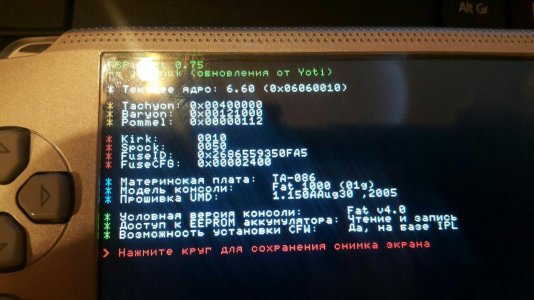
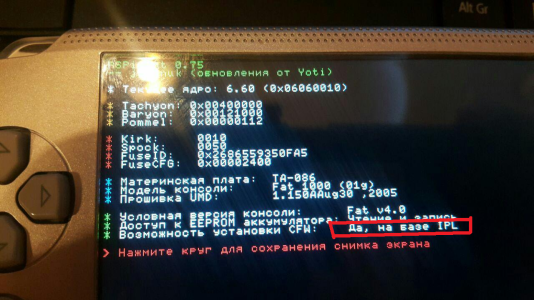
I'm not sure what the red part i've highlighted says in English, however it looks like you can permanently flash the firmware. It wont actually let you if you can't anyway.
hello
sorry didn't see your reply.
its in Russian language probably because it had CFW set in this language before.
last line you highlighted says ' it can run CFW based on IPL'' the same as on your tutorial screenshot but for some reason when we switch it off completely it goes back to official FW and we need to run recovery file again and the good news is we are able to play iso games. it had a permanent CFW back in 2005 running on 5.30 or 5.50. We have tried to run CIPL flasher again to see if it helps but it comeback with the error. is there anything else we can try ?
thank you for your time and help
sorry didn't see your reply.
its in Russian language probably because it had CFW set in this language before.
last line you highlighted says ' it can run CFW based on IPL'' the same as on your tutorial screenshot but for some reason when we switch it off completely it goes back to official FW and we need to run recovery file again and the good news is we are able to play iso games. it had a permanent CFW back in 2005 running on 5.30 or 5.50. We have tried to run CIPL flasher again to see if it helps but it comeback with the error. is there anything else we can try ?
thank you for your time and help
InsaneNutter
Resident Nutter
It should be able to flash the custom firmware by the looks of it, what does that error say?
It should be able to flash the custom firmware by the looks of it, what does that error say?
hello
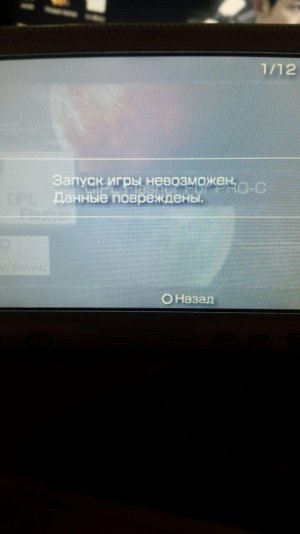
that's what we get when trying to flash CFW again '' unable to start game. data corrupted''
could it be that CFW 5.30 is getting on the way of CFW 6.60 ?
thank you
InsaneNutter
Resident Nutter
Did you run the fast recovery application first, before trying to flash permanently?
Did you run the fast recovery application first, before trying to flash permanently?
Hello
We followed the tutorial step by step and run recovery only after full restart when we have confirmed that software version reversed back to 6.60 from CFW.
I will try to do everything again from the beginning and see if it helps
Thank you
Shadowx089
New Member
- Joined
- Jul 26, 2016
- Messages
- 1
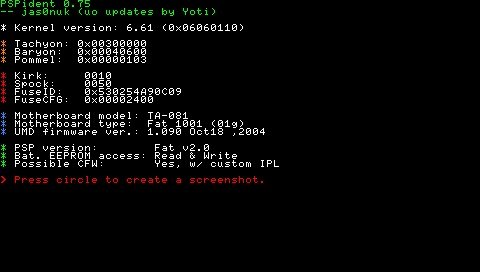 Hello InsaneNutter, I thought I was late to the game but it looks like your still around helping people through this. I can't seem to find a list of compatibility for PSP. I figured i'd ask just like everyone else. Here is my version, would I be able to flash? Thanks for all your support and hard work.
InsaneNutter
Resident Nutter
Yes you can flash, you have a PSP 2000 that is not an 88 v3 version.
Hello there, I have a quick question. I placed the ISO folder in the root and the game now shows up on the memory card after I run the custom firmware update. But everytime I start the ISO the system restarts and reverts back to 6.60.Thanks for any information.
Kendrick Delva
New Member
- Joined
- Jul 19, 2016
- Messages
- 1
How to ISO
How do I install PSP ISO files, where do I put them on the SD card?
How do I install PSP ISO files, where do I put them on the SD card?
Hi,
I hope somebody can help me as I have tried a lot already. Here is my situation:
I have a PSP 1000 that had previously a custom firmware installed - that was years ago. I haven't used the PSP in a long time and then came across this guide so I decided to dust it off and update to the latest version. Here is what I did so far:
1. Updated to OFW 6.61
2. followed this guide to install CFW 6.61 Pro-C
3. When I start the PROUPDATE I get the PSP screen, it goes black, I can see some loading from the memory stick
4. the screen stays black, the battery light is green
5. Eventually the PSP goes to sleep
Then I tried many different things:
- downgraded to 6.20
- tried 6.20 cfw - same result
- updated to 6.60
- tried 6.60 cfw - same result
- downgraded to 6.35
- tried 6.35 cfw - same result
- tried formatting the memory stick (2G) - same result
- tried a different memory stick (2G) - same result
- deleted the seplugins folder - same result
So I'm at the end of my knowledge. Does anybody have any suggestions?
Thanking you in advance
I hope somebody can help me as I have tried a lot already. Here is my situation:
I have a PSP 1000 that had previously a custom firmware installed - that was years ago. I haven't used the PSP in a long time and then came across this guide so I decided to dust it off and update to the latest version. Here is what I did so far:
1. Updated to OFW 6.61
2. followed this guide to install CFW 6.61 Pro-C
3. When I start the PROUPDATE I get the PSP screen, it goes black, I can see some loading from the memory stick
4. the screen stays black, the battery light is green
5. Eventually the PSP goes to sleep
Then I tried many different things:
- downgraded to 6.20
- tried 6.20 cfw - same result
- updated to 6.60
- tried 6.60 cfw - same result
- downgraded to 6.35
- tried 6.35 cfw - same result
- tried formatting the memory stick (2G) - same result
- tried a different memory stick (2G) - same result
- deleted the seplugins folder - same result
So I'm at the end of my knowledge. Does anybody have any suggestions?
Thanking you in advance
How do I install PSP ISO files, where do I put them on the SD card?
- Connect your PSP to your computer via data cable. On your PSP, go to Settings > USB Connection.
- Your PSP memory stick will appear as a removable device on your computer.
- Open the memory stick and go to ISO folder. If there’s no ISO named folder then create one and make sure you name it in Caps (ISO not iso).
- Now copy the downloaded PSP Game ISO / CSO file into ISO folder.
- Disconnect your PSP from your computer.
InsaneNutter
Resident Nutter
So I'm at the end of my knowledge. Does anybody have any suggestions?
Thanking you in advance
You have tried everything i can immediately think of, have you reset the PSP to factory settings? I think it might force you to do that when downgrading anyway (it's been a few years so i'm not totally sure).
That's the only thing you haven't said you have done so might be worth a shot?
Also remove any plugins you might have in case their been loaded (or attempted to be loaded), although i don't think that is the cause of it.
Hi InsaneNutter,
thank you for your suggestion. I did the resetting to default, but never tried (because I forgot about it) 4 button factory reset. and it was partly successful :-)
I was able to install the 6.20 pro-c2 onto my psp now.
So I thought I try the same on 6.61 - and it didn't work - same issue as before even after resetting multiple times, formating the memory stick etc.
so I downgraded to 6.20 again and installed cfw
For now I am happy. until I find something that only works on higher fw.
thanks again for your help.
thank you for your suggestion. I did the resetting to default, but never tried (because I forgot about it) 4 button factory reset. and it was partly successful :-)
I was able to install the 6.20 pro-c2 onto my psp now.
So I thought I try the same on 6.61 - and it didn't work - same issue as before even after resetting multiple times, formating the memory stick etc.
so I downgraded to 6.20 again and installed cfw
For now I am happy. until I find something that only works on higher fw.
thanks again for your help.
Similar threads

- Replies
- 12
- Views
- 198K

- Replies
- 21
- Views
- 118K

- Replies
- 0
- Views
- 2K

- Replies
- 0
- Views
- 155
About Digiex
Digiex is a technology and gaming forum, founded in 2004 by InsaneNutter and Nimrod.
Digiex has served the internet community with breaking news, detailed guides, exclusive downloads and a popular discussion forum. A small, friendly community of like‑minded people has developed over the years. People are encouraged to register and participate in on‑going discussions.
Get Social



