• Welcome to the Digiex Download Center, you are welcome to download anything you like here. No registration is required! Digiex offers direct download links with no captchas or wait times.
    The team do our best to ensure no content infringes copyrights and provide a DMCA Takedown request form to request the removal of content from Digiex.

    Notable sections: Pokemon Archives | Xbox Archives | Xbox 360 Archives

Xbox Offline Xbox Live Downloadable Content [DLC] Installers

Long time follower, first time poster. I love your work and the work of the others.

Is there any update with the PSO dlc or is things a bit complicated on that right now?

We already have some Midtown madness 3 DLC up, but I can go over it later.
As for PSO it looks like there is a title update and 1 piece of content.

Name=Central Dome Fire Swirl

I will look at building up an installer for it tonight.
 
Hello Harcroft, I don't know if you'll be seeing this, but I'll try still...although this is a question maybe somebody else may answer.

I have troubles regarding a few DLCs, MM3 included...but I see I'm not the only one. No, I also have problems regarding SWBF1 DLC, Jabba's Palace map. It doesn't work. When I launch it, it'll load, the loading circle will turn twice, then it'll freeze, and I'll have to reset the console. I don't know what happens, other DLCs like Crimson Skies' will work, but not this map on SWBF.

Given info if anyone has any clue...It's a PAL Xbox, modded with an UnleashX dashboard. Game is on disc, PAL too. DLC was downloaded from here...


Very, very, very big thank you to whoever has any idea on what's going on.
 
Incomplete test installer for PSO DLC created. I doubt it will work without more DLC like the hunters license, but it's all I have for now. I need people who know more about Phantasy Star Online than I do, to test it.

Blanket statement: All the installers are from NTSC sources unless specifically listed otherwise. If your DLC isn't working because you're using a PAL version of the game, find an NTSC version of the game to try it with.
 
Mmmhhh I see, this is an answer I like, it gives me a clue at last.

Do you know where I could eventually find the PAL version of these DLCs?
 
Incomplete Phantasy Star Online DLC installer with Title Update and Central Dome Fire Swirl uploaded. I doubt it's going to work without the Hunters License DLC, but have at it, give it a test.

Do you know where I could eventually find the PAL version of these DLCs?
You'll find it here if anyone ever uploads PAL copies of the DLC for me to work with.
 
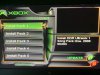
Please help, I am new to this site. I downloaded the DLC for Dance Dance Revolution Ultramix, I make it as far as this, but when i hit A on the file to install i only hear a sound but nothing happens. any help would be great.
 

Attachments

  • image0.jpeg
    image0.jpeg
    80.6 KB · Views: 661
You're missing a good chunk of the installer. If the images are missing and nothing is copying, then the installer has nothing to copy.

Please help, I am new to this site. I downloaded the DLC for Dance Dance Revolution Ultramix, I make it as far as this, but when i hit A on the file to install i only hear a sound but nothing happens.
any help would be great.
 
Incomplete Phantasy Star Online DLC installer with Title Update and Central Dome Fire Swirl uploaded. I doubt it's going to work without the Hunters License DLC, but have at it, give it a test.


You'll find it here if anyone ever uploads PAL copies of the DLC for me to work with.
That's the most challenging thing I've been told lol.

Ok, I have something else for you. If you can understand this and are sure of it maybe it'll help me out with SWBF 1 DLCs.

I just acquired a physical copy of SWBF 2, and was able to retrieve a working USB drive for my OG Xbox. So, I done everything : I moved the downloaded DLC, from here, from the USB drive to the E:\ partition of my Xbox. From there, I launched the default.xbe file. I install the game's update. I restart the console, then install extensions. Everything seems to be written on the partition, all goes fine. Then, I launch the game, and...nothing. No new maps, nor game modes, nothing.

SO : it is either is what you said, a compatibility problem, OR I install those wrong, and thus files install on the wrong partition, so the game can't make DLCs to work properly, either for Battlefront 1 AND 2. If there's something special I must do or anything tell me, about all I described above, please. I am really curious to know what is wrong with this.

EDIT : For both games, DLCs are there, they EXIST, they're SEEN on MSdashboard's Memory part of the HUD, installed with green checks on it...
 
You're using PAL copies of the games. Get an NTSC copy of those games and they should work fine. Please make some effort in the future to read the first post and the first few pages of the thread. These questions have been answered literally a dozen times in this thread.
Beyond that you said you're copying over USB. I have no idea what app you're using to write to FATX or if you're relying on an XBOX to Read FAT16/FAT32 but it doesn't matter. You should being using FTP in binary mode to move any DLC installers to your console. as shown in the first post in this thread by Hoffman.

Fight Club DLC uploaded again. There is still some hidden signature check I can't bypass which invalidates the DLC install. The game will flag it as corrupted and will not use the DLC, but it also won't delete it.
Fortunately the DLC for Fight Club is just 4 songs, and the game plays Xbox Soundtracks. So I just added the option to install the 4 songs as an Xbox soundtrack. I recommend NOT installing the DLC, and just using the soundtrack option, not that anyone is ever going to play Fight Club.

Star Wars Battlefront II DLC package updated to have a title update for PAL only copies of the game. Other than updating the installer the rest of the content remains completely the same. Sources of the DLC from all regions matches up bit for bit perfectly. I still recommend grabbing an NTSC-U NA release of the game to use and use the first title update.

JTAG update for Star Wars Battlefront II also added.
 
Last edited:
Well. Thank you for the SWBF 2 DLC, anyway !

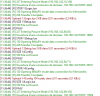
Just used FTP to copy stuff from PC to Xbox, namely SWBF 1, new SWBF 2, Crimson Skies and PGR 2 DLCs. Set up in binary mode as said, I copy all the content to the xbox. The content is written on the console though I have a 550 File not found for almost each file copied...

Just tried to reinstall said DLCs, now that it is copied via FTP; still not working even with the latest version of SWBF2's installer. Guess now the problem is largely on my part and gonna working on it
 
Did you try re downloading and unpacking the installer? File not found is definitely on your end, I'm just not sure what step of the way you're getting that error from.
 
Hello,

Yup those are very fresh DL, I even redled the DLCs, as I had deleted these from my PC when I USB transfered them to my Xbox the first time. So I got them again for a FTP transfer. I'll look into it, strange thing is, I have the error many times on a single transfer, but all files are still copied, though it may explain why it still doesn't work. Other than the binary transfer, there's not any other settings I should have know about for this from either ends (xbox/PC) ?
 
Are you copying the installer very deep in the folder structure? You might be putting it so deep that the filenames are being truncated because of FATX limitations.

Is the drive you're copying it to too full?

Is your PC hard drive or xbox hard drive throwing errors?

Can you show us some screenshots of what you're talking about so it's more clear?
 
Hmmmm here it is :

It is in the E:\Apps\ folder for every DLC, with unchanged folder name after the download, my E drive is 4 GB free, my PC SSD is out of the cause though I couldn't say about Xbox's, the only infos I have rn are in the Harddisk settings of the modded dashboard, where I have like : Raw Read Errors 200, Max : 200, Write Error : Current : 200, Max : 200 and other informations but I don't know if it's really useful.

As for the screenshot, I have a a sample there after a MM3 DLC upload for testing purpose. It does it with any upload I try anyway
 

Attachments

  • 2020-06-21 11_48_36-192.168.1.62 - FlashFXP Evaluation Copy.png
    2020-06-21 11_48_36-192.168.1.62 - FlashFXP Evaluation Copy.png
    28.4 KB · Views: 758
Don't use the Midtown Madness 3 DLC installer, it's still broken. I finally know WHY it doesn't work, I just haven't figured out a solution.

Try updating your Filezilla, using a different FTP client like FlashFPX and try copying from a different drive on your PC.

There are a lot of threads on the filezilla project forum about error 550, I would recommend going through troubleshooting steps there too see if you can solve your issue.
 
Yes, I know for MM3 but it was just to show you, also I am really sorry as I should have screened the whole window, for it is already FlashFPX...I'll try FTPing a whole folder from my other drive, although this one is much more subject to potential fails. I'll tell you when I've tried ;) Thank you for your tips also ! One by one I'll finally find the culprit in this story.
 
Updated Unreal Championship installer. it now has DLC sourced from Xbox Live, a PAL demo disc and an NTSC demo disk. Any one of the DLC package sets should work on any console, file for file they all match identically. The only difference being the DLC package table of contents/signature file. I included everything for preservation sake. Don't install multiple copies of the DLC, there's absolutely no reason to.

If you already have the Title Update installed, you don't need this update.


More to come...LOTS of PAL to come.
 
Last edited:
Updated Unreal Championship installer. it now has DLC sourced from Xbox Live, a PAL demo disc and an NTSC demo disk. Any one of the DLC package sets should work on any console, file for file they all match identically. The only difference being the DLC package table of contents/signature file. I included everything for preservation sake. Don't install multiple copies of the DLC, there's absolutely no reason to.

If you already have the Title Update installed, you don't need this update.


More to come...LOTS of PAL to come.

YAY ! Thank you for this, in the name of the whole PAL community :D
 
Man I wish there was a way to get all of the sega GT online DLC back. The cars in that game were pretty fun!
 

About Digiex

Digiex is a technology and gaming forum, founded in 2004 by InsaneNutter and Nimrod. Digiex has served the internet community with breaking news, detailed guides, exclusive downloads and a popular discussion forum. A small, friendly community of like‑minded people has developed over the years. People are encouraged to register and participate in on‑going discussions.

Get Social

Top Bottom