Minecraft Launcher by Digiex.net

Status
Not open for further replies.
If you read the above statement, you will find it says "(that will only work on windows though)".
 
If you read the above statement, you will find it says "(that will only work on windows though)".

The Main Version (Not the New Beta Windows version) works on Mac and Linux (as well as Windows).

The problem could be related to free memory? Perhaps try closing some other stuff and try again maybe?
 
Can i suggest a feature to the launcher, well here it is anyway,
can you add a feature that allows users to launch different .minecrafts because when i place different jars, like 2 jars have the same mod and more they don't work properly as one is updated more and they use the same folder so they don't work, and i would have to reset my entire .minecraft to get it working and only use one jar at a time then that makes the Digiex launcher useless. thanks for reading (hopefully you implement the feature)
 
Problems with launching.

I have no idea if i am posting this in the wrong place, but... Meh.
I can't get the .NET launcher to run in 2048MB, it always comes up with two errors.
Error: Could not create the Java Virtual Machine &
Error: A fatal exception has occurred. Program will exit.

Does anyone have any idea as to how i could fix this?
 
Are you running it from a batch file? If so what operating system are you running on? Windows 7 64bit or 32bit ?

Also if you do run a batch file post the lines you got in there here in this topic. With the other information.
 
Are you running it from a batch file? If so what operating system are you running on? Windows 7 64bit or 32bit ?

Also if you do run a batch file post the lines you got in there here in this topic. With the other information.

Nope, I don't use a bat, I use the launching icon that the .NET installed. Should I use a bat?
 
for some reason i used the jar downloader and downloaded final_1.1.0.jar and it was and invalid jar {it said it was a file and i couldnt open it with archive editor [7 zip] i cant open it or anything what so ever!

message me or reply to me if you have an answer

i cant open it or anything nothing at all
 
Last edited by a moderator:
Can you make it so you can select the folder where it finds the .JARs? I have world edit and previous backups in my bin folder and I cannot remove or change the parent folder where it looks for JARs... :L
 
ok i am also a noob to this and i am having a problem i han download the older versions but cant select them please help me
 
Step 1: Go to the Launcher and click options.
Step 2: Click JAR downloader, Then choose a version you want from the dropdown.
Step 3, Download and wait for it to finish. After this close the download manager.
step 4 Under your password field, choose from the dropdown wich version you would like
Step 5..... Enjoy your minecraft and show digiex some love
 
Memory Usage

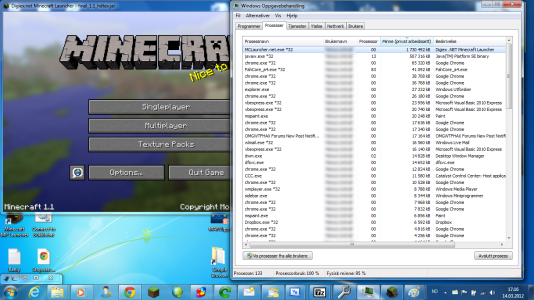
I don't think is very good, the .NET launcher uses almost 2 gigabytes of memory and that comes on top of the memory Java use to run Minecraft.
Why does Digiex need this much memory, even when idling?

I am using Windows 7 Home Premium 64-bit. Here is a screenshot:
 

Attachments

  • High memory usage.png
    High memory usage.png
    758.5 KB · Views: 11,624
hey for some reason any time i try to mod a minecraft jar, when i load it all that comes up is a white screen. do you have it so it auto-deletes the META-INF? if not how do i get in the jar to self correct it? please fix this.

Edit: i found where the other versions of minecraft are and when using the mod loader, it does not delete the META-INF folder. when i tried to delete it myself i got this mesage

'C:\Users\tjb4\AppData\Roaming\.minecraft\bin\final_1.1.jar: The archive is corrupt'

i will try for more bug testing to see on how to custom fix this problem.
 
Last edited:
Status
Not open for further replies.

About Digiex

Digiex is a technology and gaming forum, founded in 2004 by InsaneNutter and Nimrod. Digiex has served the internet community with breaking news, detailed guides, exclusive downloads and a popular discussion forum. A small, friendly community of like‑minded people has developed over the years. People are encouraged to register and participate in on‑going discussions.

Get Social

Back
Top Bottom