

• Welcome to the Digiex Download Center, you are welcome to download anything you like here. No registration is required! Digiex offers direct download links with no captchas or wait times.
    The team do our best to ensure no content infringes copyrights and provide a DMCA Takedown request form to request the removal of content from Digiex.

    Notable sections: Pokemon Archives | Xbox Archives | Xbox 360 Archives

XEXMenu 1.1 Download [XEX Menu ISO, LIVE and XEX] - File manager for Xbox 360

InsaneNutter

Resident Nutter
Joined
Jun 1, 2007
Messages
11,864
Location
UK
XEXMenu is a file manager / FTP server / dashboard for the Xbox 360, it can launch for XEX Homebrew, Games, Apps and Emulators from a USB drive, Internal hard drive or even a DVD.
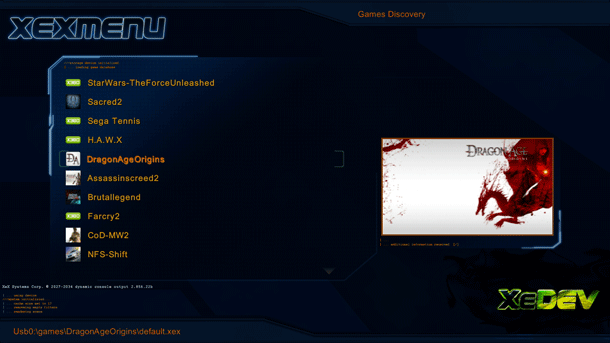
xex-menu-xbox360-jtag-rgh.png

XEXMenu has two different versions, which can be incredibly useful for different situations.

The ISO version of XEX Menu is useful for people with new Jtag or RGH Xbox 360 consoles. You can burn the ISO of XEX Menu to a CD or DVD and place it in the Xbox 360. You can then load XEX Menu directly from the dashboard, giving you FTP access to the Jtag or RGH hacked Xbox 360. In addition you also have access to install content from a FAT32 formatted USB hard drive.

XEX Menu allows you to copy content to a USB hard drive using a computer and then load that content on the Xbox 360, this is an advantage for people who dont wish to use special tools to gain access to the Xbox 360's unique FATX file system.

The ISO of XEX Menu is also handy in helping newbies to the Xbox Scene in launching the installers for Dashlaunch after updating your console, allowing you to quickly restore the Xbox 360's ability to boot in to a replacement dashboard, such as FreeStyle Dashboard.

The Live version of XEX Menu can be injected in to an Xbox 360 formatted usb stick using tools such as Party Buffalo Drive Explorer or even copied across from a USB hard drive to the internal hard drive when used with the ISO version of XEX Menu, allowing XEX Menu to be used without a disc in the Xbox 360 console.

Downloads:

Download XEX Menu 1.1 (ISO) -Unzip and burn the ISO to disc, XEX Menu will then appear under the Games / Demos tab on the dashboard.
Download XEX Menu 1.1 (Live / XEX) - Unzip and inject in to an Xbox 360 formatted usb memory stick, it will then appear under the Games / Demos tab on the dashboard.
 
Whats the diff between the live and regular versions (i know its probably "One is safe to use with live" but i started off softmodding my original xbox and as i understand it even with the original if the dash is diff it would ban you... So i guess im playing it safe
 
You will not get on live with any Xbox 360 capable of running XEX Menu, its an instant ban before you even finish connecting to live.

The live version is in a "live container" basically meaning it can be injected in to the hard drives or usb drives Content\0000000000000000\ folder allowing it to show up on the Microsoft Dashboard, presuming your console is either Jtag or RGH hacked. The XEX version needs to be launched from something else e.g. on boot using Dashlaunch or from another app such as FSD.

The ISO version can be burned to disc, very handy for getting stuff on a new hard drive if you have no way of connecting the hard drive to the PC.

Hope that explains a bit better what each version is and why you might want it.
 
After I download the Live Version, i put the file C009... or whatever it is on to a usb, correct?
 
I got one more question if you could answer, after i download a Game, The RGH/Jtag Rip, How would i go about putting it on my harddrive/USB?

Also with the ISO file, do i need to put it on a disk, before i can put it on my harddrive?
 
Last edited:
hey, if i use XEX menu - Live ISO version on the XKEY virtual drive mounter, which is a usb loader for the xbox 360, would the XEX MENU live version launch at all?
XKEY is NOT a mod chip or a jtag , instead it is a usb loader. I am thinking since the xkey is capable of launching ISO's then is it possable to use the ISO version of xex menu too?
 
Nope it will not work with the Xkey, that only works with ISO's of official games, not homebrew applications.
 
I just tried installing XEXMenu on my xbox 360 and it stays Corrupted. Please help, is there an updated file?
Thank you for your help.
 
I just tried installing XEXMenu on my xbox 360 and it stays Corrupted. Please help, is there an updated file?
Thank you for your help.

It sounds like you dont have a Jtag or RGH hacked Xbox 360, i'm presuming thats correct? If yes then you cant use XEX Menu.
 
Hey, I downloaded the ISO file and burned it to a disc but it doesn't work. The xbox 360 said that the disc was unreadable and suggested me to clean to disk or restart the console. I did both of those but still doesn't work. Mine is an Jtagged X360.
 
The disc will not play like a normal game, you should just see XEX Menu in the games / demos section of the dashboard.

You could try burning to a DVD-R also, as the Xbox 360 can read those a lot better.
 
Well, I tried that but I still can't find the Xex menu in Demos. Any suggestion? Ps: it seems that the Xbox doesn't recognise the disc. It popped up saying "Unrecognised disc ". I burned the ISO to a DVD- R but it still not working.
 
Try the "Live" version linked to in the first post and inject it in to an Xbox 360 formatted USB memory stick, shouldn't have any problems with that.
 
I tried but every time I plug it in my PC and open Horizon of USBXtafGUI, there's always an error. For Horizon, it said failed to load device and for USBXTAFGUI, it said object reference not set to an instance of an object. That's why I decided to use the ISO version but seems like I'm out of luck
 
Well, every time I plug in a newly bought USB or and old one, I can see the USB is shown as USB Storage Device with the amount of free space left on it. No configure device option. I can still access it like an hard drive but no configure option. When I choose device option I can only see "rename ", "format ", "clear system cache " and "transfer content ". But if I turned off the console and remove the hard drive, I can make the USB the system drive. But still not working because of some weird stuffs like my USB is 2Gb before making it system drive and after making it system drive, I plug the USB into my PC and try to inject Xex menu. But after plugging it back in the console, the USB is shown as "Unformatted ". And by formatting it, it just come back to the first time I plug it in. No configure device option. Dunno if this is because of my Xbox 360 or the USBs. Ps: When I plug any USB that I formatted on the Xbox 360, I can see a hidden folder called "content " (which was empty) and a txt file called "name ". I mean... WTF?:S
 
Ps: When I plug any USB that I formatted on the Xbox 360, I can see a hidden folder called "content " (which was empty) and a txt file called "name ". I mean... WTF?:S

That's what happens when it's setup to be used on the Xbox 360.

Have you tried using Party Buffalo Drive Explorer. I find it works a lot better than Horizon and USB Xtaf. You can also inject things in to the internal Xbox 360 hard drive with that, so that might be something to try instead.
 
Hello,
I just got modded xbox 360 from local game shop which has preloaded with 30 games. and it has the xex menu 1.1 in the demo section. when i open the game it started show the error "the game couldnt start try downloading the game again". Help me Please.
Thanks
 

About Digiex

Digiex is a technology and gaming forum, founded in 2004 by InsaneNutter and Nimrod. Digiex has served the internet community with breaking news, detailed guides, exclusive downloads and a popular discussion forum. A small, friendly community of like‑minded people has developed over the years. People are encouraged to register and participate in on‑going discussions.

Get Social

Top Bottom



