• Welcome to the Digiex Download Center, you are welcome to download anything you like here. No registration is required! Digiex offers direct download links with no captchas or wait times.
    The team do our best to ensure no content infringes copyrights and provide a DMCA Takedown request form to request the removal of content from Digiex.

    Notable sections: Pokemon Archives | Xbox Archives | Xbox 360 Archives

Digiex Exclusive: Premade Windows 98 Virtual Machine for use with older games

AHA! Awesome! Now my old really old games can work! :P
 
Wow! Thank you so much! I thought my old PC games would never see the light of day again! One question though, Im trying to make an ISO of "3D Ultra Pinball:Creepnight" on Daemon Tools, and it says that it can't make an ISO from a multi-session disk. It lets me make other files like MDX, MDS, MDF. But those don't work on the system. Is there anything that would work?
 
I downloaded this last night, installed it today, and installed Diablo. The lag is SOOOO BAAAAD. According to Virtual PC, it was running at 37 frames, yet it felt like 5. I could hardly use the main menu for Diablo. I set the RAM to 512mb, there's enough room on the virtual HDD, I even changed the VRAM to 64mb, yet nothing has worked. Can anyone help? *EDIT* Forgot to post my specs: HP DV7-6195us Laptop Intel Core i7 2630QM 2ghz 8gb RAM Radeon HD 6770M Windows 7 Home 64-bit *EDIT #2* o-O why can't I type the at symbol? The forums says that I'm attempting to post a megaupload link.
 
Hello,

Wonderful program and it works fantastically!
I got some old games to work which wouldn't work under Windows 7 but I have a minor issue.
The games I'm playing are KKnD and KKnD2 Krossfire. They're RTS games. In the Virtual PC, the mouse calibration is way off. If I slightly scroll in either direction, it instantly flickers to the other side of the screen. Both games have this issue. I played around with scroll speed sliders in-game but they don't affect it. On another forum I was told I may have to downclock my CPU within the Virtual PC to work around this. Is this correct? And if yes, how do I do that?

Thanks! And thanks for making this program available.
 
Hello,

Wonderful program and it works fantastically!
I got some old games to work which wouldn't work under Windows 7 but I have a minor issue.
The games I'm playing are KKnD and KKnD2 Krossfire. They're RTS games. In the Virtual PC, the mouse calibration is way off. If I slightly scroll in either direction, it instantly flickers to the other side of the screen. Both games have this issue. I played around with scroll speed sliders in-game but they don't affect it. On another forum I was told I may have to downclock my CPU within the Virtual PC to work around this. Is this correct? And if yes, how do I do that?

Thanks! And thanks for making this program available.
KKND 2 should work on Windows 7. I can play a match against you some day maybe :D It's a great game, lots of memories.
Virtual PC is pretty outdated and does not have graphics acceleration. Try Virtualbox instead.

Edit. I'm prebuilding a VM for VirtualBox. I'll upload it later this week.
Edit: It seems that VirtualBox does not support Windows 98
 
Windows 98 should work on virtualbox.You may need to use these files for it to boot.


KKND 2 should work on Windows 7. I can play a match against you some day maybe :D It's a great game, lots of memories.
Virtual PC is pretty outdated and does not have graphics acceleration. Try Virtualbox instead.

Edit. I'm prebuilding a VM for VirtualBox. I'll upload it later this week.
Edit: It seems that VirtualBox does not support Windows 98

KKND2 does work under Windows 7 but the issue I'm having there is that my screen constantly flickers to the point that it's unplayable. So I asked help on a forum and they directed me here. The VirtualPC thing makes it work without the flickering but then I get the mouse issue described in this thread ;)

Thanks for the heads up on VirtualBox. I just checked it out but I can't figure out how to get the game running.

I selected Windows 98 after installing the program, gave it a name and followed the steps from there. Is there something specific I should select/do in those steps? I just clicked the default option mostly.
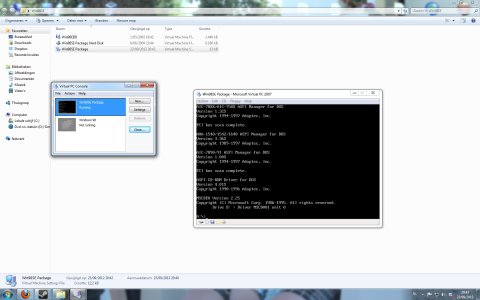
So after all those steps, I started it up and the only message I get on the black screen is "FATAL! No bootable media found! System halted."
In the "Devices" tab I selected the KKND2 disc and restarted the program but it gives me the same message.
I must be doing something wrong here. Care to help? Thanks!
 
That's odd, I have allocated more ram and it booted fine.Don't mount any cds or isos until you see the desktop.
The files i posted earlier are only to install windows 95,98,98se.

edit:
seems like drivers won't install.
 
That's odd, I have allocated more ram and it booted fine.Don't mount any cds or isos until you see the desktop.
The files i posted earlier are only to install windows 95,98,98se.

edit:
seems like drivers won't install.


This is as far as I can get. I'm not used to working with DOS command lines so is there a special command I have to type?

MYNWo.jpg
 
Can Triple Play 2001 run on this virtual Windows 98 OS?

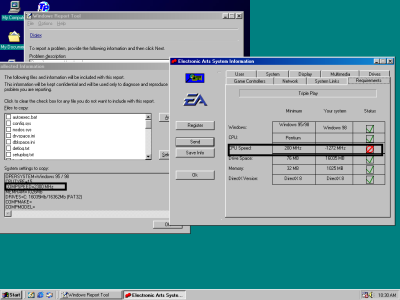
I have an old game, Triple Play Baseball 2001, that I've been wanting to play, so I was excited when I came across this virtual Windows 98 OS. The game installed great on this OS, but when I tried to play it, it wouldn't launch. Then I came across this:

tp 2001.png


​Why it the CPU speed shown in
Electronic Arts System Information different from the COMPSPEED shown in the system information for Windows 95? Is there a way to have the Electronic Arts System Information program read the COMPSPEED correctly?

 
It looks like you will need to try and find some patch to ignore that and let the game load regardless, some old games have bugs like that and are a total pain to get working.
 
Hello!

I managed to follow all the steps and make it work (even when im so bad at this kind of stuff). All to play dungeon keeper (good old games <3), but sadly i can't play it. when i enter it, it has some distorted colours and closes, just like when you try to open in in windows 7 :'(.

Please help.
 
Try changing the colours to 16bit or even 256 and see if that helps.

Still can't get in the game, the load screen was now in normal colours tough (for 16 bits and 256 colours) :'(.
Tried the same game on an older computer and it works :(
 
ok using this with VirtualPC boots fine what I cannot do is drag files from my actual PC to the virtual desktop.

I am using WIndows 7 Ultimate on the non Virtual PC and this Win98 image on the Virtual PC.

What am I doing wrong?
 
Share the files on your network and copy them to the VM like that, i think you can also share certain folders on your PC as a networked drive in the VM if you look at the settings in Virtual PC.
 
Share the files on your network and copy them to the VM like that, i think you can also share certain folders on your PC as a networked drive in the VM if you look at the settings in Virtual PC.


I am finding out jsut how much of WIN9X I have forgotten, there is a Homegroup on my main pc but do not think that will work
 

About Digiex

Digiex is a technology and gaming forum, founded in 2004 by InsaneNutter and Nimrod. Digiex has served the internet community with breaking news, detailed guides, exclusive downloads and a popular discussion forum. A small, friendly community of like‑minded people has developed over the years. People are encouraged to register and participate in on‑going discussions.

Get Social

Back
Top Bottom