
aritra2116
New Member
- Joined
- Apr 29, 2011
- Messages
- 1
AHA! Awesome! Now my old really old games can work! 


KKND 2 should work on Windows 7. I can play a match against you some day maybeHello,
Wonderful program and it works fantastically!
I got some old games to work which wouldn't work under Windows 7 but I have a minor issue.
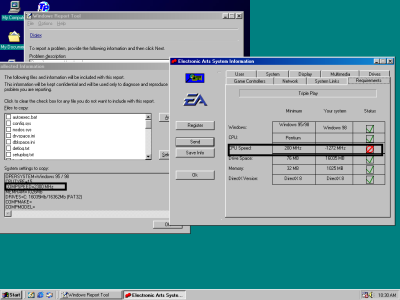
The games I'm playing are KKnD and KKnD2 Krossfire. They're RTS games. In the Virtual PC, the mouse calibration is way off. If I slightly scroll in either direction, it instantly flickers to the other side of the screen. Both games have this issue. I played around with scroll speed sliders in-game but they don't affect it. On another forum I was told I may have to downclock my CPU within the Virtual PC to work around this. Is this correct? And if yes, how do I do that?
Thanks! And thanks for making this program available.
 It's a great game, lots of memories.
Windows 98 should work on virtualbox.You may need to use these files for it to boot.
KKND 2 should work on Windows 7. I can play a match against you some day maybe
Edit: It seems that VirtualBox does not support Windows 98Virtual PC is pretty outdated and does not have graphics acceleration. Try Virtualbox instead.
Edit. I'm prebuilding a VM for VirtualBox. I'll upload it later this week.

That's odd, I have allocated more ram and it booted fine.Don't mount any cds or isos until you see the desktop.
The files i posted earlier are only to install windows 95,98,98se.
edit:
seems like drivers won't install.
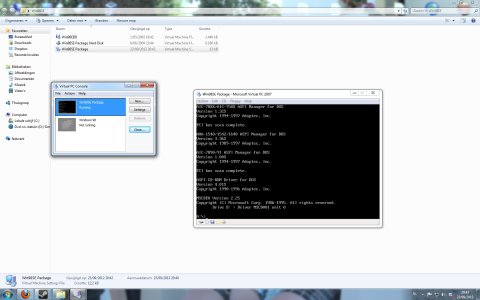
Don't use those files if you are running a vhd with an installed operating system such as win 98.This is as far as I can get. I'm not used to working with DOS command lines so is there a special command I have to type?
View attachment 11333
 .
.
Try changing the colours to 16bit or even 256 and see if that helps.
.
Share the files on your network and copy them to the VM like that, i think you can also share certain folders on your PC as a networked drive in the VM if you look at the settings in Virtual PC.






