• Welcome to the Digiex Download Center, you are welcome to download anything you like here. No registration is required! Digiex offers direct download links with no captchas or wait times.
    The team do our best to ensure no content infringes copyrights and provide a DMCA Takedown request form to request the removal of content from Digiex.

    Notable sections: Pokemon Archives | Xbox Archives | Xbox 360 Archives

Digiex Exclusive: Premade Windows 98 Virtual Machine for use with older games

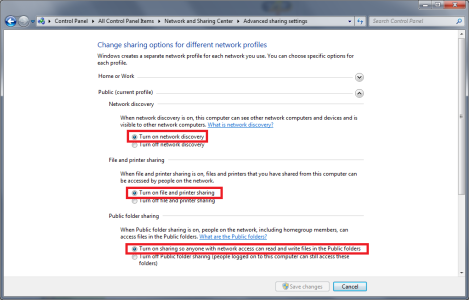
share.png

You need to enable file sharing, that should auto share C:\Users\Public which the Virtual Machine should be able to access.

 
same for win 95 god that was weird seeing that again, cant find any Win 3X images yet
 
Newbie here!! Dear InsaneNutter, please forgive my ignorance in advance! I found this by chance and my knees are weak beacuse I need something like this in a desperate way! My issues, I need to run windows 98 in order to use some cad software that I just can't seem to let go of, I like being in the stone age from the point of it works for me and I really don't see a need to change just yet.

I have a dell latitude laptop that we just loaded windows 98 onto, but I can't get anything to work (drivers for dell) So my cad screen is well crappy because I can't adjust it.

I don't do games at all so I really just need to make sure I can, delete windows 98 install XP and then do install of VM98, I want to then be able to run my cad program through VM98 but be able to either save drawings to VM files, or copy to a memory stick. In your professional opinion am I going to be able to do this?

ANY input is appreciated. I really need to find a way to make this happen, my livelihood depends on it right now.

TIA
 
I'm trying to get an old Carmen Sandiego game to play and I'm getting an gfxInit error 10802. The version of DirectX and QT from the CD are both installed.
 
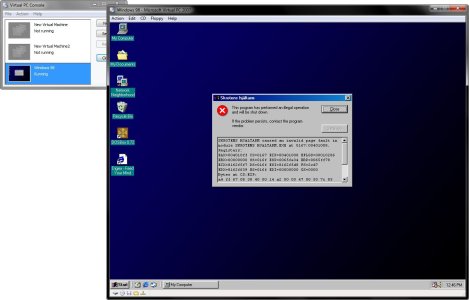
I installed the Virtual PC, but when I tried to run Windows 98.vmc, I got the error, "The virtual machine "Windows 98" can't be started because it is being used by another program, or marked as read-only." -- although I used Unlocker to release any lock & it is not marked as read-only --- but I still got the same error again.
 
I dont think Virtual PC emulates a good enough graphics card to play the game. You could try using Vmware Player, however i dont think if that will be any different.
 
Hi there InsaneNutter. I just downloaded the Windows 98 Virtual Machine you provided and it works like a dream. I do have one question for you concerning the sound on it. I'm trying to play a game that sounded awesome when I played it back on my Windows 98 pc and I was wondering how I could restore the sound to the way it was back then if possible. The sound comes out a bit muffled like and would like to get this fixed.

Thanks for your support.
 
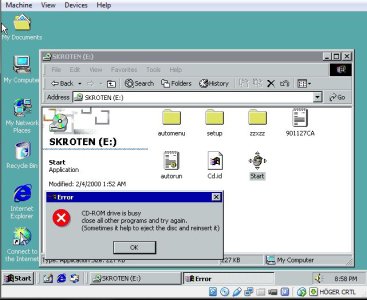
46d6898319519b937a40d91a30838c77.jpg I need help why does this happen. I remember i played this game back in 2007 or something with W Mellenium Pro edition and 512mb ram and nvidia 6600. But the game refusing to work i have 2 different packs of this game because i first thought the CD was broke but then i bought another copy from a friend who didnt use his more than once. Still the same thing

Any solutions or help?
 
Maybe make an ISO of the game and mount that in the virtual machines cd rom drive (presuming you haven't already)
 
Thanks for the image. I've been using it in Win7 for a few years now, but am running into an issue with Win8.1 (non-pro).
Since VPC2007 doesn't work on 8 (thanks MS ..) I installed Virtualbox. It recognizes the image, but gives all kind of driver errors when starting up.
Most annoying is the standard VGA driver (limited to 640x480 16bit) while the VPC on Win7 has the VM additions S3 as default.

Hardware: Pentium 3550M, 4GB RAM
Can anyone help me out in getting the image to play nice with Virtualbox?
 
If you install the Virtual Box additions it should hopefully pick the new hardware up. Usually swapping hard drives to different PC's, or in this case Virtual Machines doesn't have good results however.
 
That's what I figured. For now I've got another image working in Virtualbox but it's graphics visualization is not as good as in VPC. Seems to be a known Virtualbox issue with Win98 unfortunately. Let's hope someone finds a way to run VPC in Win8.....
 
Hello InsaneNutter,

I discovered your W98 virtual OS when I was searching around the Net for how to run Creatures 2 on Windows 7.

I've now got it all up and running, and installed the program via the virtual machine,

However, I've run into a problem.

When I try to launch Creatures 2, the virtual OS freezes up. I've reset it like 10 times, but it does this every time.

I tried allocating more RAM to the virtual OS because I thought it was something to do with this, but it still freezes when I try to start it up.

What could be wrong with my virtual OS? Is it the RAM, like I suspected, or is it just too graphically advanced for W98?

Thanks for any help in advance, and thanks for also giving me a piece of my computing past back!

- NovaScotiaHFX
 

About Digiex

Digiex is a technology and gaming forum, founded in 2004 by InsaneNutter and Nimrod. Digiex has served the internet community with breaking news, detailed guides, exclusive downloads and a popular discussion forum. A small, friendly community of like‑minded people has developed over the years. People are encouraged to register and participate in on‑going discussions.

Get Social

Back
Top Bottom