Hack a 250gb, 320gb or 500gb Sata harddrive to work in the Xbox 360 and Xbox 360 Slim

done, nothing happened :S
You can try this.
This may or may not fix it.
Go to settings>system>storage>press the following buttons in this order, LB RB X LB RB X > Press yes to delete the system update and to re-download the dashboard update. Or you can use a usb drive to update the console.
You can also try holding down the sync button after you turn the xbox on.
 
did this:
-with the LBRBX LBRBX, i removed the sysupdate, console restarted (WITH THE MODDED 160GBBEVS).
-Plugged in the pendrive, with the system update, restarted the box
-Shown up the update wizard>proceed>extraction>restart
-After the boot, before the dash, the following error occured: "Some Xbox 360 features are missing or corrupt. A system update is required to replace them. Your console will now restart..." Looping this if i leave the pendrive in the console, 'cause with this message the system update is deleted in the background. If i take it out, the error disappeared.

? :S

ps.:noticed a min. ago: with the error, the update succeded, the new dash is 16203, trying to install games.
pps: with my 20GB the dash update from the usb drive done perfectly
 
I want to ask question to everybody who knows about that:
Power your computer back on, before you carry on it might be an idea to enter you bios configuration and ensure the SATA operation mode is set to ATA or disable AHCI depending on the options you have. On some motherboards this can also be called legacy or enhanced, if you are presented with this you want to set it to legacy. This will vary depending on your motherboard / bios.

My motherboard very old (Gigabyte GA-8IPE1000-G v4 with bios version F2) in that case bios old too. I do not see any ATA mode, AHCI or legacy/enhanced mode. Is there is any chances to hack WD3200BEVT/WD3200BPVT in my PC or there is another similar options in bios? I don't want to waste my money :D.
 
Okay so I need to ask something. I got a cheaper generic Xbox 360 S hard drive from Amazon, and it worked great. But I wanted to restore my xbox 1 emulator so I followed the directions I found to use Xplorer360. Unfortunately I neglected to see that I needed the special 320GB version of this, and my xbox 360 no longer recognized my hard drive. I tried using Hddhackr and even the hex editor method to reflash my hard drive but I kept either getting errors or no recognition from the Xbox 360. Eventually I figured out that this is not a Western Digital drive, its made by some korean company named "Cloverhitech".

So my question is...how did the vendor get this hard drive to work?? I've looked all over and most places say only WD drives will work and only sometimes can you use a Seagate or other similar drive. Is there any other methods I can try to get this drive to work?
 
Hello,

I had few doubts before doing this procedure. Would be helpful if those doubts can be cleared before I start the procedure. I currently own the Xbox 360 Slim 4GB, all my games saves are on the internal 4GB memory storage. Also, along with the console, I got few game demos/trials (specifically, the Xbox Live Arcade games) which were loaded onto the internal memory. I have read the Original Post completely, and understand that I can use a Western Digital Scorpio Blue 320 GB HDD (WD3200BPVT) to be used with my Xbox. I'm pretty clear with the instructions about creating the bootable USB and using it with hddhackr. Now this is where it gets confusing for me. The part of the post after this stage describes how to restore the Xbox 1 emulator to this newly hacked HDD. Since I do not have a old HDD from the Xbox, is it necessary for me to restore the Partition 2 from a file linked by 'Hoffman'? To be honest, I really do not care about the game demos/trials that I got pre-loaded with the Xbox. Since the saves are already on the internal memory, would it be sufficient to just hack the HDD using hddhackr and insert the HDD into the Xbox and start using it? Or would I have to do the steps for dumping/restoring partition 2 using Xplorer 360 Extreme 2 and then dump/restore partition 3 using Xplorer 320GB edition no matter what? I'm really confused here, please throw some light in this regard and help me understand the procedure better. Thank you!
 
You only need the Xbox emulator if you wish to play Classic Xbox games (Such as Halo and Halo 2) it's not required for anything related to the functionality of the Xbox 360.

You can happily just hack the HDD using hddhackr and insert the HDD into the Xbox and start using it if you like, you will not be able to play classic Xbox games if you do however.
 
Hi OP!

Thanks for such a quick reply! So, I can hack the HDD and use it without having to worry about losing my saves? I'm just very scared to lose the saves, have put in a lot of time into the games. I just called my vendor, he says that WD Scorpio Blue Series BPVT is not available, but LPVT is. The difference between BPVT & LPVT is the HDD thickness; BPVT is 9.5mm whereas LPVT is 6.8mm. Is it OK to use this HDD? Will Xbox Arcade games (like Dead Rising 2: Case Zero) work without the Xbox emulator?
 
Arcade games will work without the emulator.

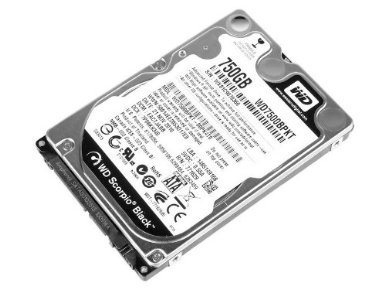
You will need a wd drive that would fit a laptop.
A wd drive that looks similar to this, but not exact.
51z113bJ2rL._SX385_.jpg
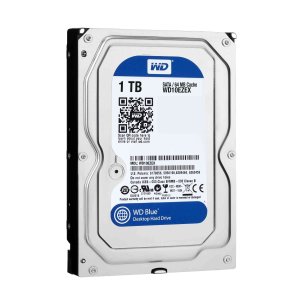
This drive will fit in a desktop computer and won't work on the xbox 360 without any extra modding.
810J3NdIMtL._SL1500_.jpg
 
i searched in many forum and didnt find any hint, info about this drive is moddable, only 120BEVS and 250BEVS or different 160GB products... :(
 
I might give this a shot. Has anyone been banned for doing this? I imagine no since so many people have done so, but can't ever be sure.
 
Hello all,

this worked perfectly. Just writing a follow up to the process.

System Configuration details:
Motherboard: ASUS M4A88T-M LE
USB: Transcend 4GB USB 2.0
HDD: Western Digital Scorpio Blue 320GB 3200BEVT

Since the USB was a 4GB one, had to partition is at FAT32 and not FAT. Apart from this, everything went as described. When the drive was inserted into the Xbox 360S, the drive was unformatted, the Xbox dashboard asked me to enter the console serial number to format the drive. Now checking the functionality by installing a game onto the HDD. Will post updates after checking.

Edit 1: Games installed on HDD are working without any problem so far. :)
 
I read through a lot of posts in this thread, Microsoft do not ban for using custom hard drives.

Nope Microsoft dont ban for it, it doesn't enable you to play pirated games so don't really care.

If anything it helps Microsoft, the more people who have larger hard drives the more games / content that person can purchase from the Xbox Marketplace.
 
I need some serious help please, I am at a loss for what to do. I followed the instructions in Insanenutters guide to hack my WD 3200BEKT, followed everything exactly using HDDHACKR 1.4, but I kept getting the following error: bad wrong serial number offset!. No idea what the error is and I can't find any information on it. So I tried with version 1.35 and 1.25, and both gave me the same error.

Then I tried to restore with "r", typed in undo.bin, which it said was not valid, even though it is clearly on my flash drive.

In a panic, I went into windows Disk Management, the device is recognized and the drive spins, so I decided to format it into a simple NTFS volume, which worked, however, the drive doesn't show up under "my computer", I can't open it although I do see it under device manager.

I am at a loss for what to do now, can someone please help me!! Thanks


Edit: I assigned the drive a letter and now it mounts fine, can see it under my computer, still curious why this didn't work. Why do I get the serial number error?

 
I need some serious help please, I am at a loss for what to do. I followed the instructions in Insanenutters guide to hack my WD 3200BEKT, followed everything exactly using HDDHACKR 1.4, but I kept getting the following error: bad wrong serial number offset!. No idea what the error is and I can't find any information on it. So I tried with version 1.35 and 1.25, and both gave me the same error.

Then I tried to restore with "r", typed in undo.bin, which it said was not valid, even though it is clearly on my flash drive.

In a panic, I went into windows Disk Management, the device is recognized and the drive spins, so I decided to format it into a simple NTFS volume, which worked, however, the drive doesn't show up under "my computer", I can't open it although I do see it under device manager.

I am at a loss for what to do now, can someone please help me!! Thanks


Edit: I assigned the drive a letter and now it mounts fine, can see it under my computer, still curious why this didn't work. Why do I get the serial number error?
Does the drive show up as WD in device manager?
 

About Digiex

Digiex is a technology and gaming forum, founded in 2004 by InsaneNutter and Nimrod. Digiex has served the internet community with breaking news, detailed guides, exclusive downloads and a popular discussion forum. A small, friendly community of like‑minded people has developed over the years. People are encouraged to register and participate in on‑going discussions.

Get Social

Back
Top Bottom