Hack a 250gb, 320gb or 500gb Sata harddrive to work in the Xbox 360 and Xbox 360 Slim

Ok thanks ill have ago cos the drive is formatted to ntfs. I have a slight problem I deleted my undo.bin file and its not listed on this site. Need help guys I used another undo.bin file now the drive don't work. Anyone know where I can find the undo files. Its a WD2500BEVT-22A23T0
 
Just flashed a WD 500GB BLUE - WD5000LPVX. Went without a hitch. Just to addon. Needed to go into console and format the drive with console serial number. 480GB later, WINNING!

Thanks for everything, InsaneNutter and Rick.
(H)
 
1888715_10154062058590085_1618940916067707880_n.jpg
1781874_10154062064500085_6225434669502106012_n.jpg


Thanks for the help guys but I think I truly killed the drive.
 
Did you unplug the power of the drive and reconnect it?
It could take a few times.
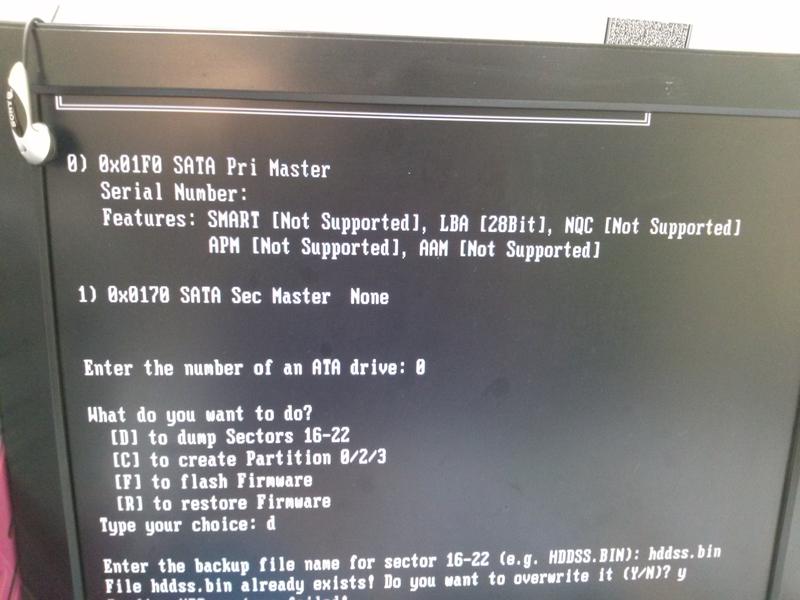
Info about this from the text file.
* Vendor Intro Power Brute for misflashed drives *
To enter the recovery mode you should boot to MS-DOS, connect your hard drive to PC and type
'HDDHACKR R [PORT] A0 UNDO.BIN'. If the hard drive is misflashed you will be prompted with:
"Western Digital Vendor Intro failed on port [PORT]"
"Do you want to resend the command until the drive responds (Y/N)?"
Press YES, disconnect the hard drive from power and connect it again.
You should get Status 0x50 and the drive will be reflashed.
 
Did you unplug the power of the drive and reconnect it?
It could take a few times.
Info about this from the text file.
I did all that. I think its cos when I was flashing it. I installed partition 0/2/3 then I flashed. When it didn't work I used another undo file to flash it back now im getting this.
 
Means I got to go out and buy a new one cos the hdd that I broke wont allow the file to be installed back onto the drive. I don't know why as the ones I have are the same model number. Could it be cos the drive it newer than the files.
 
Last edited:
1972529_10154076819790085_8763224758132575393_n.jpg

Iv managed to download this app. It shows the HDD as a ata and a usb. If this program can pick it up how do I get windows to so I can format it.
 
Flashed WD 500GB Blue, Model# WD5000LPVX using HDDHackr 1.40

I can confirm the 500lpvx worked like a charm.Just finished doing one myself,,

I have successfully flashed WD 500GB Blue, Model# WD5000LPVX using HDDHackr 1.40 without any problem.

Just to share more details...
* Had to select "Large" as SATA Operation mode (from "Auto" mode) while flashing the HDD on PC. No other options on my MoBo.
* Formatted USB drive with FAT32 file system. But it worked without any issue.
* After flashing, connected HDD in XBox and formatted it using Xbox Dashboard function.

Thanks to InsaneNutter, Rick and johnscrub. Appreciate your help guys.

Attached below is Recovery/Undo file (generated by HDDHackr v1.40) for WD5000LPVX HDD.
 

Attachments

Iv just ordered a new 500GB as the 250GB from some reason wont show up in the bios. Once iv done the 500GB I will upload the undo.bin file on here
 
Hi, mod, hi everyone,
- i have a 160gb hdd wd scorpio blue 1600 BEVT - 22ZCT0 date 8 mar 2009 . i flashed drive hddss.bin 120gb and sucessfully to fusjitsu 120gb . i play xbox360 with this hdd ok. Then, i wanted to restore it to default.
- I backed up stock fw by undo.bin but i didnt remember where to put it (undo.bin ). Then, i used undo.bin for hdd wd scorpio blue 1600 BEVT - 22ZCT0 date 28 mar 2009 to restore from forum . PC report " restore sucessfully " turn off the pc .
- Then, i turn on pc and connect this hdd to pc. But PC not recognize it both boot ms-dos
2014c7490e86-6155-41a7-9cc9-3dd49a66eed7.jpeg

I dont know way to save it . please please can anyone help me ? thank. ( today, i found undo.bin back up for default firmware. is it useful ???? )
 
Does your PC's BIOS recognize the drive? you will need to format it after restoring it.

So long as the drive is recognized in the BIOS simply boot in to Windows, load Disk Management up, then create a partition and format the drive.
 
Does your PC's BIOS recognize the drive? you will need to format it after restoring it.

So long as the drive is recognized in the BIOS simply boot in to Windows, load Disk Management up, then create a partition and format the drive.
but disk management not recognize hdd, it dont show in disk management.
 
This is the problem I have. Mines not showing up in the bios or windows. The only way I can get it to show is if I plug it in my usb adaptor and that only shows in disk management.
 
So i bought a 500 GB Scorpio Black (WD5000BPKT) and managed to flash it using the right BIN file, but when I went ahead and checked it on my xbox it wouldn't even read it, like it wouldn't show up on the Storage Devices section on the xbox. I'm not sure but was i supposed to do the "Restoring the Xbox Classic Emulator and User Content" after flashing the drive?
And just in case, i was using a computer with windows 7 and I have the newest 360, i don't even know what it's called, the one after the slim.
Can anyone tell me what I'm doing wrong? Please and Thank You
 
Thanks for replying, and I'll get right on that and report back later with the results. Thanks again, I appreciate it.
 

About Digiex

Digiex is a technology and gaming forum, founded in 2004 by InsaneNutter and Nimrod. Digiex has served the internet community with breaking news, detailed guides, exclusive downloads and a popular discussion forum. A small, friendly community of like‑minded people has developed over the years. People are encouraged to register and participate in on‑going discussions.

Get Social

Top Bottom