• Welcome to the Digiex Download Center, you are welcome to download anything you like here, no registration is required! We offer direct download links with no captchas or wait times.
    We do our best to ensure no content infringes copyrights, and provide a DMCA Takedown Request Form to request the removal of content from Digiex

Pokemon Colosseum Japanese Bonus Disc (Tokusei Disc) Download [NTSC-J / JPN GameCube]

What does this distribution do? I'm not too clear about the process. Unfortunately, I don't have a GameCube or Wii. Is it possible on an emulator? I have both of the authentic Bonus Discs and JPN Colosseum.
 
Last edited:
What does this distribution do? I'm not too clear about the process. Unfortunately, I don't have a GameCube or Wii. Is it possible on an emulator? I have both of the authentic Bonus Discs and JPN Colosseum.
Yes, you only need a complete Pokémon Colosseum JP save file, the one attached here, or this (the same file but with already a free spot in the party).
- Open Dolphin
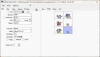
- Go to Tools > Memory Card Manager
- Create a new JAPANESE virtual Memory Card
- Import the Colosseum save file
- Go to Option > Configuration > GameCube and choose your new Memory Card in Memory Card path
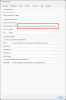
wqerfqwfq4ae.png
- Start the Bonus Disc ROM
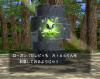
- Press A
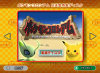
PCSJ01_2022-12-27_19-26-52.png
-Press A
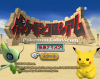
PCSJ01_2022-12-27_19-27-56.png
- Move to the icon on the right and press A twice
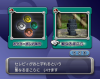
PCSJ01_2022-12-27_19-30-42.png
- Keep pressing A until the transfer is complete
PCSJ01_2022-12-27_19-43-31.png
- Close the emulation tab and reopen Memory Card Manager
- Export the Colosseum save file as GCI
- Open the file with PKHeX
upload_2022-12-27_19-55-46.png
- Now you have a new legit untouched Celebi, you can export it as .ck3, import in you actual gen 3 save files, etc.
 

Attachments

Hey im using Nintendont on my wii to play a Japense copy and have completed the game and purified all 48 pokemon, When i go into the bonus disc, the game doesnt recognize that there is a save file. The save files are a raw file on my sd card. Is there anyway to get the bonus disc to work or would i need to recomplete the game with a GC memory card?
 
Hey im using Nintendont on my wii to play a Japense copy and have completed the game and purified all 48 pokemon, When i go into the bonus disc, the game doesnt recognize that there is a save file. The save files are a raw file on my sd card. Is there anyway to get the bonus disc to work or would i need to recomplete the game with a GC memory card?

Depending how you have Nintendont setup it creates a virtual memory card for every title you play.

You need to take a copy of the raw memory card for the JPN version of Pokemon Colosseum and then rename / move this to the location of the memory card for the bonus disc.

You will probably find Nintendont created a blank memory card, so you are essentially renaming the raw memory card with your completed save on to the same as the blank memory card for the bonus disc and and overwriting it.
 
All the save files are in one folder. So am i just renaming the colosseum save file to the bonus disc save file name and it should work?
 
I change all hex, jap to usa, and I put emerald usa, ruby usa but none connect, only the red X, is there something wrong or this couldnt be done?
 
Hello to everyone! First of all thanks for the guide. Finally, after abour 4 years, I managed to get the Celebi on my PAL version of Colosseum. I needed to do some extra steps not listed here, so I'll explain how I did it in case someone in the future will need some help.

First of all, I am running Colosseum on my original Wii using Nintendont and we will need Dolphin or something else to manage memory cards other than the stuff already mentioned here

Once all the Pokémon are purified here is what we need to do.

For JAP version:

-Take the v1 Bonus Disk from here, v2 gave me a black screen.
-Start the Bonus Disk using Nintendont, a new memory card associated to the bonus disk will be created.
-Go all the way to the Shrine Option in the menu, it will say that there is no Colosseum file in the Slot A memory card.
-We need the Colosseum save file to be on THE SAME memory card as the Bonus Disk, to do so:
-We navigate to the saves folder of our SD card or storage of choice, we should find a RAW file named GC6J, that's the Colosseum-associated memory card, then we should find a PCSJ.raw file, that is the memory card associated to the Bonus Disk.
-We open Dolphin, under the Tools section we select "Memcard Manager (GC)".
-From there we select our GC6J.raw file and we export it as .gci.
-Then we close the Memcard Manager and we open it again, this time we open the PCSJ.raw file. It will look like an empy memory card but it isn't.
-We select import gci and we import the .gci file of our Colosseum save file exported previously.
-We close the Memcard Manager, put the storage back into the Wii, start the Bonus Disk and everything should run smoothly and we get Celebi.
-We open the PCSJ.raw Dolphin once again and we export the Pokemon Colosseum save as .gci
-We need an empty memory card on which we will import this .gci file, one is available here as well as the other Dolphin stuff we need.
-Finally we move this memory card in the saves folder of the storage and we rename it GC6J.raw, removing the previous GC6J.raw file or storing it somewhere for safety.
-These steps are needed since if we just try to rename the PCSJ.raw memory card to GC6J.raw the game will see it as a corrupted memory card and say it needs to be formatted, so we need to extract only the Colosseum save file and print it on a new memory card.


For PAL/US versions:

-Take the v1 Bonus Disk from here, v2 gave me a black screen.
-Open the Bonus Disk in an hex editor and modify the values at the addresses, if you have troubles with this just ask ChatGPT, it gave me a Python script to modify the values since an online hex editor did not work.
-The rest of the steps is the same, the only difference will be that the Colosseum-associated RAW file is GC6P.raw for PAL and GC6E (I think) for US, the Bonus Disk file is still PCSJ.raw.
-For simplicity, if you plan on doing this on both a JAP and PAL/US versions of the game it is better to delete the memory card associated to the previous attempt and reinitialize the process.

I hope this helps! :)

Thank you very much once again, it has not been easy but I have learned a lot and had fun in the process! ^^
 
> I believe you can download up to 48 Celebis, each time you play through and beat the Pokémon league on the GBA you will be allowed to download another.
Somewhat incorrect. There's 49 Celebi total, *per save file of Colosseum.*

The first Celebi is deposited into the Pokémon Colosseum save file. The other 48 are distributed into the party of the post-Elite 5 save file. So, in order to redeem all 48 Celery, you'd need to beat the Elite 5 on 48 different GBA-era save files and send them over. This is a piece of information I'd wished was clearer when I first learned about these bonus disks (and discovered this thread) in 2011. There really wasn't much info back then.

And it makes me happy knowing that my save file has been downloaded more than 10,000 times. I made a friend (Big Mike) back in the day because of it, and I know people also used my save to RNG-abuse the game into giving them a specific Celery. I did it for the glory, thinking that fewer than 15 people would ever find it useful. I've never been more grateful to be wrong.
 
taylordcraig sent me this PM on how to get the disc to provide an Ageto Celebi to a US / Eu version of the game:

"After quite a bit of experimenting, I've successfully found a way to force the Pokémon Colosseum Japanese Bonus Disc to provide a genuine Ageto Celebi to a US (or PAL) Colosseum save file. This Celebi can then be traded to a US/PAL copy of Ruby/Sapphire/Emerald/FireRed/LeafGreen, and even migrated to the current generation of DS games.
You will need the following:
1) ISO of the Japanese Bonus Disc YOU PROVIDED
2) A US or PAL copy of Pokémon Colosseum
3) US/PAL save file with all 48 Shadow Pokémon purified and an empty party slot (if you need one, use NuGaSa to restore one of these: US/PAL) I HAVE A US SAVE
4) A US/PAL copy of a Pokémon GBA game [optional, must match the region of your Colosseum game disc] THIS CAN BE FR/LG/R/S/E
5) A good hex editor and an understanding of how they work (HxD is recommended if you need one, Google it.)
6) A way to run Gamecube backups on your GC/Wii. SD MEDIA LAUNCHER IS $20

Now that you have your materials together, follow these instructions carefully.

Step 1: Open your Japanese Bonus Disc ISO in your hex editor of choice.
Step 2: Replace the following hex offsets with the capital letter 'E' (or 'P' if you have a PAL copy of Colosseum): 29AB8003, 29F4FEBB, 29F50AC3.
Step 3: Save the hacked ISO and run it with whatever backup-running method you use. Your Colosseum memory card should be in Slot A, and should have at least one party slot free in-game.
Step 4: Press A to proceed through the menus until you arrive at a screen with two options. The Shrine should be the right option, select it. A cutscene will play featuring Celebi, and you'll be told in Japanese that Celebi is now in your Colosseum party!
Step 5: Start up Colosseum and check your party. You should have a genuine Ageto Celebi!
Step 6 (optional): Transfer Celebi to Ruby/Sapphire/Emerald/FireRed/LeafGreen as you would any other Pokémon. You can also Pal Park it to the DS games after doing so.

Enjoy!
=================
After receiving your first Celebi in your Colosseum file, revisiting the Shrine in the bonus disc will reveal that you have the option to send up to 48(!) Celebi to copies of Ruby/Sapphire (one per game cart). However, this will require additional hacking to work, which can be stacked with the above in order to have a hack that works in both cases. Please note that this is UNCONFIRMED, and may damage your GBA save file! If you would prefer a safe alternative, just delete your Colosseum save that you used in the previous step and replace it with one of the ones I provided. It will forget that you had your first Celebi, and you can do that as much as you need.

Step 1: Open the ISO in a hex editor again.
Step 2: Go to the following address in hex: 2A1294A0.
Here, you'll see that there are two four-letter game IDs. By default, these are "AXPJ" (Japanese Sapphire) and "AXVJ" (Japanese Ruby). These two games are the only games that Celebi can be sent to normally. In theory, you could replace these IDs with the IDs of any Pokemon GBA games -- however, it's probably not going to work with anything but other regions of Sapphire/Ruby. That being said, replace both four-letter IDs with the following, depending on the region of the GBA game(S) you want to transfer to:
English/USA: AXPEAXVE
PAL: AXPPAXVP
Step 3: After making that replacement, save and run the hacked ISO.
Step 4: Go to the Shrine button and answer the first choice to Eagun's question. A GBA connection prompt will come up. Connect a GBA with the GBA-GCN link cable to controller slot 2, and power the game on. Make sure you've saved inside the Pokémon Center on the GBA game, and that you have at least one free party slot.
Step 5: The Celebi should be transferred, and you will be prompted (in Japanese) to turn off the GBA's power. Check your party in-game, you should have an Ageto Celebi!
Please note that the above part about the 48 Celebi hack is UNCONFIRMED, but there's no reason in theory why it wouldn't work out. I'm not responsible if your game gets screwed up.

Edit 1: Confirmed that it can be traded to Emerald/FireRed/LeafGreen, too.
Edit 2: Added (UNTESTED but theoretically working) instructions for hacking the 48 Celebi transfers into working.
Edit 3: Safe alternative to the 48 Celebi transfers until it can be confirmed.
Edit 4: Save files updated to work a little better. Don't ask.

I want the Celebi, but i don't had idea how edited the ISO.
You can upload the already modified ISO?
 
I want the Celebi, but i don't had idea how edited the ISO.
You can upload the already modified ISO?

You can try to do this

Yes, you only need a complete Pokémon Colosseum JP save file, the one attached here, or this (the same file but with already a free spot in the party).
- Open Dolphin
- Go to Tools > Memory Card Manager
- Create a new JAPANESE virtual Memory Card
- Import the Colosseum save file
- Go to Option > Configuration > GameCube and choose your new Memory Card in Memory Card path
View attachment 18081
- Start the Bonus Disc ROM
- Press A
View attachment 18075
-Press A
View attachment 18076
- Move to the icon on the right and press A twice
View attachment 18077
- Keep pressing A until the transfer is complete
View attachment 18079
- Close the emulation tab and reopen Memory Card Manager
- Export the Colosseum save file as GCI
- Open the file with PKHeX
View attachment 18082
- Now you have a new legit untouched Celebi, you can export it as .ck3, import in you actual gen 3 save files, etc.
 
You can try to do this
I ended doing something like this because i just had a Wii too.
Hello to everyone! First of all thanks for the guide. Finally, after abour 4 years, I managed to get the Celebi on my PAL version of Colosseum. I needed to do some extra steps not listed here, so I'll explain how I did it in case someone in the future will need some help.

First of all, I am running Colosseum on my original Wii using Nintendont and we will need Dolphin or something else to manage memory cards other than the stuff already mentioned here

Once all the Pokémon are purified here is what we need to do.

For JAP version:

-Take the v1 Bonus Disk from here, v2 gave me a black screen.
-Start the Bonus Disk using Nintendont, a new memory card associated to the bonus disk will be created.
-Go all the way to the Shrine Option in the menu, it will say that there is no Colosseum file in the Slot A memory card.
-We need the Colosseum save file to be on THE SAME memory card as the Bonus Disk, to do so:
-We navigate to the saves folder of our SD card or storage of choice, we should find a RAW file named GC6J, that's the Colosseum-associated memory card, then we should find a PCSJ.raw file, that is the memory card associated to the Bonus Disk.
-We open Dolphin, under the Tools section we select "Memcard Manager (GC)".
-From there we select our GC6J.raw file and we export it as .gci.
-Then we close the Memcard Manager and we open it again, this time we open the PCSJ.raw file. It will look like an empy memory card but it isn't.
-We select import gci and we import the .gci file of our Colosseum save file exported previously.
-We close the Memcard Manager, put the storage back into the Wii, start the Bonus Disk and everything should run smoothly and we get Celebi.
-We open the PCSJ.raw Dolphin once again and we export the Pokemon Colosseum save as .gci
-We need an empty memory card on which we will import this .gci file, one is available here as well as the other Dolphin stuff we need.
-Finally we move this memory card in the saves folder of the storage and we rename it GC6J.raw, removing the previous GC6J.raw file or storing it somewhere for safety.
-These steps are needed since if we just try to rename the PCSJ.raw memory card to GC6J.raw the game will see it as a corrupted memory card and say it needs to be formatted, so we need to extract only the Colosseum save file and print it on a new memory card.


For PAL/US versions:

-Take the v1 Bonus Disk from here, v2 gave me a black screen.
-Open the Bonus Disk in an hex editor and modify the values at the addresses, if you have troubles with this just ask ChatGPT, it gave me a Python script to modify the values since an online hex editor did not work.
-The rest of the steps is the same, the only difference will be that the Colosseum-associated RAW file is GC6P.raw for PAL and GC6E (I think) for US, the Bonus Disk file is still PCSJ.raw.
-For simplicity, if you plan on doing this on both a JAP and PAL/US versions of the game it is better to delete the memory card associated to the previous attempt and reinitialize the process.

I hope this helps! :)

Thank you very much once again, it has not been easy but I have learned a lot and had fun in the process! ^^
Just i loaded a virtual memory card with the japanese save of Colosseum and i downloaded Celebi in the Colosseum save, later i downloaded one of the 48 Celebi copies in a japanese copy of Emerald with my US Emerald save (Just only changing the save file name to load it with my EZ Flash Omega Definitive Edition)
 
Top Bottom