PSP 6.61 Custom Firmware Install on any PSP - PSP, PSP Slim, PSP 3000, PSP Go & E1000

Hi, i have tried to copy games and run them from ISO folder, unfortunately i cannot see them, on menu, may be i am doing something wrong?

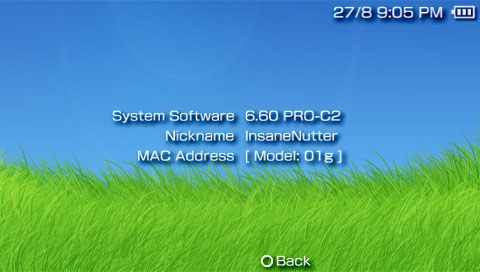
IS the PSP custom firmware enabled, you should be able to tell by looking at the system settings:

13150d1377635351-psp-6-61-custom-firmware-install-any-psp-psp-psp-slim-psp-3000-psp-go-e1000-psp-6.60-pro-c2.jpg
 
edit:

The custom firmware worked! The issue was with my ISO files.
Thank you so much for this tutorial! It was so extremely helpful!!
 

Attachments

  • Capture.PNG
    Capture.PNG
    17.8 KB · Views: 1,369
Last edited:
PSP 2001 star \wars edition

charge on usb when its on and usb mode USB
doesnt charge when off USB
when its off charge ok AC Adapter
close fast when Using ON ---next line
close when trying to put it on with out using hold
stays {{ON}} like a usual PSP after using Hold button for Like 2 min
what is the problem is it the power button or a sencor
 
When I tried this this on a psp 3001, I knew I couldn't flash it. But when I update it with the CFW, no ISO folder is created. Do I have to create my own folder? If so, where do I put it? Please help. Thanks!
 
No, you need to create the folder manually:


  1. Connect the PSP to your PC and enable USB mode
  2. Go to Computer > PSP's Memory card
  3. Right click and select New > Folder
  4. Name the new folder ISO
  5. Place all ISO's in this folder
 
:S so is that psp thing u mentioned for this custom firmware?? i been looking for plugins and trying to understand y my isos aint working on it?? would it be better to convert em into a .cso?? i want to make this custom firmware understandable. i guess ill never get it.:'((6)

oh do u know where i can find emulators that work on this custom firmware?? sorry to bother.

i got the dadgum thing working now. just giving an update. i was so confused when i first was doing this junk. omg. so funny. now to figure out how to play psp iso's on it. since i got the ps one eboots working. still no good sign on a legend of dragoon eboot. but maybe it was me. idk. im tired. ill retry that later. now to figure up how to do the psp iso's and ill be all set. aside from buying a bigger gb micro sd card ofc. XD:D
 
So I've done quite a bit of reading around the net, and gone through this thread, but im strugging to get a definitive answer, hence this post :)

My PSP slim 2002 (yellow Simpsons edition) was sitting unloved on a shelf for a few years, and i recently dusted it off and re-discovered the joy :D However, some of the more recent games I've tried to run are throwing the dreaded 80020148 error. So I am assuming i need to perform an update to get these games to run

I'm currently running 5.50 GEN-D2. I did find some websites that said i could just go to Network Update via Settings on the XMB to get updated, or there are some options in the recovery menu ("Use M33 network update" for example). But I'm wary of just jumping in and doing this - one never likes to tinker too much with a system thats working (for the most part). But i'm also quite keen to play these newer games :D

i did already notice that my version.txt was set to 9.90 - ive since gone and changed that back to 5.50

So i guess the real question is, whats the best/easiest/safest way for me to get this CFW updated? should i just follow the procedure at the start of this thread? Or is there a better path one should take?

Though i cant be 100% certain (as i first loaded the CFW on this PSP many many years ago) I'm pretty sure this PSP is perma-hacked with a Pandora Battery - not sure if that makes a difference or not...

Thanks in advance for the help!

 
So i guess the real question is, whats the best/easiest/safest way for me to get this CFW updated? should i just follow the procedure at the start of this thread?

Follow the tutorial on the first page of this thread from start to finish, then enjoy the hacked PSP (Y)
 
Hi,

Came across this guide recently.

I had the old prometheus firmware 5.00 M33-6 on my PSP-2004. I have installed the latest official firmware 6.61 and tried to install the custom firmware but when it reboots to launch the cfw my PSP hangs and crashes afterwards. (You know the sudden loss of power beep you hear) while its on the charger. Anyone who had the same issue/know any solutions?
 
@InsaneNutter,

Thanks so much for the guide & the rest of the stuff. I created my account just to thank you...I just recently got 2 PSP-1000's, one with firmware 6.20 and the other with 5.50 GEN-D3. I couldn't use any emulators with the regular 6.20 fw, so I followed your guide and now have it up and running 6.60 PRO-C2, and enjoying it! I was also able to use the CIPL flasher to permanently update the firmware!

The other one plays the emulators I need, so I don't see a need to update the firmware on that (unless you know something I don't...)

Thanks again! The PSP is so much fun! Now I can relive the games of my youth...on the road! Woo-hoo!
 
No need to update if the other works as intended, it's nice you took the time to register just to say thanks!

Stick around you might like Digiex, you never know! I'm always trying to post new console guides where I think i might be able to help.

Either way enjoy the PSP!
 
Hey Insane Nutter! I just want to thank you for making this awesome guide! Now I'm back playing with my old PSP Slim which wassitting on a drawer for 4 years now.

Have a good one!
-Luckyboyx
 
Corrupted data on Emulators?

I followed the instructions and when I look at the emulators all they say is corrupted. (PSP 3000) Please help.
 
@insanenutter

i have a psp e1003, 6.60

I followed the instructions(installed 6.60 pro c2) and it worked for a day, while playing 'shriek' the game froze and i restarted it

NOW the buttons stops responding whenever i run fastrecovery but on OFW all buttons responds(guess this rules out hardware problem)

it is only the volume buttons that works once i boot into fast recovery and sometimes the select buttons which brings up the VSH menu but i cant do anything because no other button will respond


I have uninstalled the pro c2 pro update and reinstalled it, its the same thing

I have installed the pro b-10 proupdate, same results

please help
 
Is their like a key symbol on the PSP after you have booted in to the fast recovery mode? that could indicate the PSP is locking its self for some reason. If so I believe to unlock you just need to slide the power button up.
 
I am running ProB on 6.60 on my E-1004.
I have three questions for the experts here.

1. As I understand from your instructions, to update to ProC on 6.61, I need to uninstall the ProB, update OFW to 6.61 and then install ProC 6.61. Is this correct? Or can I update OFW without un-installing the previous CFW?

2. Same procedure if I want to install LME 6.61 as well?

3. Can ProC 6.61 and LME 6.61 both be installed simultaneously on the E-1004?
 
Just install the 6.61 OFW and then install ProC 6.61. I'm not sure about LME I have never used it.
 

About Digiex

Digiex is a technology and gaming forum, founded in 2004 by InsaneNutter and Nimrod. Digiex has served the internet community with breaking news, detailed guides, exclusive downloads and a popular discussion forum. A small, friendly community of like‑minded people has developed over the years. People are encouraged to register and participate in on‑going discussions.

Get Social

Back
Top Bottom