Hack a 250gb, 320gb or 500gb Sata harddrive to work in the Xbox 360 and Xbox 360 Slim

I have a 250GB Scorpio Blue bought on ebay from a laptop. The Hack seem to take just fine with v1.30. My only problem is the step to format the hard drive in the xbox 360 slim. After I enter my serial number the screen reports back that it is formating the drive. When it is finished my storage screen still says the drive is unformated. I know the drive works and is formated on the PC but the xbox is not seeing it as formated and will not format. I did not do the explorer 360 because I do not have plans to play Xbox 1 emulator games.


I have 2 more questions:

* What is the file format the Xbox 360 slim uses to format the hard drive?
* Can the hard drive be formated in a PC and the xbox show its already completed without formating again?
 
1.I think it is fatx.
2.No.Formatting any xbox 360 hard drive in a PC will make the drive not usuable in the xbox 360.

To fix your problem you can try this.
1.Undo your drive with hddhackr
2.Format that drive to ntfs in disk management.
3.Move your old undo file to a different folder.
4.Run hddhackr again and try the format in the console.
 
velociraptor 300GB as 250Gb xbox 360 hard drive

So, I worked all day but finally got my 300gb velociraptor to be seen as a 250GB drive. Works nicely...ish.
Note: hddhackr does NOT work on an HP ENVY14.  Be warned. Had to dig up and use an older lenovo to flash.
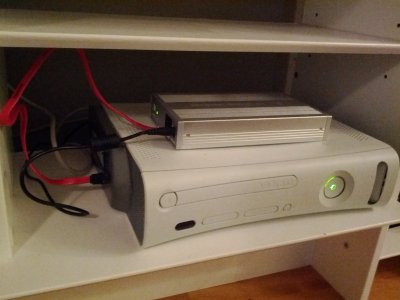
So, for those that want to try this, you should know that the older Xboxes (not sure about the new ones) do not send enough power to the harddrive for the velociraptor to run. When I first plugged it in, I was giddy with excitement until I saw that the xbox thought there was no harddrive in there. I was thinking of soldering (Saw another post where someone did that) but didn't feel like opening my xbox and taking on the risk of soldering. So instead I did the following:
1. Took out the old 20GB HDD form the xbox enclosure
2. Drilled a little of the enclosure so that I could expose the sata connector from the outside.
3. Put my flashed velociraptor in a separate enclosure (which supplies 12V)
4. Feed a SATA cable from the separate enclosure and plug it in to the exposed connector on the xbox.

14id6zd.jpg
 
How is the performance of the drive with games installed?
The enclosure might overheat the drive,if it does you may need to find a different power source or modify the enclosure itself.
 
Notice much difference in load times with the 10,000 rpm velociraptor? almost double the speed of a 5,200 Western digital.
 
1.I think it is fatx.
2.No.Formatting any xbox 360 hard drive in a PC will make the drive not usuable in the xbox 360.

To fix your problem you can try this.
1.Undo your drive with hddhackr
2.Format that drive to ntfs in disk management.
3.Move your old undo file to a different folder.
4.Run hddhackr again and try the format in the console.


I will try this when I get home today.....
Seems close to what I have tried already but I will give it another try.
 
how long should it take to format a 250GB hard drive on the xbox? Its been over 15 Min. and I am still on the "formatting in progress" screen.
This is the first time this has happen when trying to format, any other time it would have finished and still show formatted as its status.
 
Just a minute.Turn off the console and wait for it to turn off.And try again.If it still doesn't format try this.
undo the drive with hddhackr and do some tests using your pc

Use this tool under dos for some tests WD Support / Downloads / WD Scorpio & AV-25 / WD Scorpio Blue
extract this file to the usb and run dos and type this DLGDiagv519.exe to start the program with your wd drive connected

full instructions
Instructions


  1. Download the DLGDiagv519.zip.
  2. Extract the DLGDiagv519.exe file and copy to a DOS bootable diskette.
  3. Boot from this diskette. Make sure that your boot order in your Bios is set to boot from the floppy drive first.
  4. At DOS prompt type DLGDiagv519.exe to run the program.
  5. You will see the following options:
    • SELECT DRIVE - Always choose this option first, as it determines which drive you will be working on.
    • QUICK TEST - This option tests your drive quickly for any major physical problems. (Please note: Although this option is safe and does not alter the data on your hard drive, Western Digital recommends that you have a current backup of your data).
    • EXTENDED TEST - This option checks your drive thoroughly and it can repair any correctable errors. (Please note: Although this option is safe and does not alter the data on your hard drive, some data loss may occur, depending on the errors found and the errors corrected. Western Digital recommends that you have a current backup of your data).
    • WRITE ZEROS TO DRIVE - The Write Zeros option, wipes all data off your drive. This option used when your data is no longer usable or recoverable. If you no longer need any data from your drive and would like to start over, run this option to set your drive to an as new condition. NOTE: Please make sure that you have selected the correct drive to perform this function on as once ran, no data will be recoverable.
    • VIEW TEST RESULTS - You can see the results of the test you just performed
    • PRINT TEST RESULTS - Test results can be printed with this option. USB printers are not supported
    • LOG FILE OPEN/CLOSE - You can access the log file which is generated automatically
    • ENTER AND PRINT RMA INFORMATION - Information pertaining to each drive tested can be customized and printed with this option.
    • HELP - Brief descriptions of each option in addition to explanations of error codes are available in this option.
    • QUIT - Reboot your system once you have completed the selected tasks
  6. Select the task you wish to perform.
 
Dont retry hddhackr,see if you can return it to a store or contact western digital for for replacement.
 
I didn't run across any problems. but I will document this to (hopefully) help someone with their troubles if they come across any:

followed this guide exactly and it worked as it should. on my PC I had to hit ESC when it started to get into the BIOS. set SATA config to IDE (from AHCI). saved settings , it restarted, booted from the USB drive (pressed ESC at startup to access), flashed the drive, though it didn't create partition 0/2/3. I thought it did this automatically. I then put the drive back in my xbox and formatted it, thinking it made those partitions for whatever reason...? it didn't. so I put the drive back in my computer, used the undo.bin (just as a precaution since I am stupidly new to hardware/firmware modifications), and then reflashed it and then manually made the partitions. I was then *finally* able to restore my XB1 emulator to the drive. then I put it back in my xbox and all is well so far.

I used a Western Digital Scorpio Blue 250GB drive (WD2500BEVT).


Edit: when I did a test run in Halo 2, I noticed the sound was a bit... "tin-y". like the SFX were in a bathroom or a trash bin of some sort. not a big concern for me. though if you're a sound purist I can see where this might be a little unsettling (I should express that the sound was in no way degraded. it just had that effect to it) maybe it's just because of the hack?
 
Last edited:
In case of RGH 4gb console,can i use ANY:) laptop sata hard drive like you said in your tutorial for fat jtag xbox hdd upgrade???


 
can i get any SIZE and type of WD scorpio blue drive ??

i mean like 500GB WD scorpio blue [or black]
 
In case of RGH 4gb console,can i use ANY:) laptop sata hard drive like you said in your tutorial for fat jtag xbox hdd upgrade???

rgh or jtag basically the same thing it should work

can i get any SIZE and type of WD scorpio blue drive ??

i mean like 500GB WD scorpio blue [or black]

Any size will work,you will be only able to use 320gb of the drive.Make sure to keep the undo.bin so you can use the full 500gb.
 
Concerning the performance difference of a velociraptor (10000x) vs the traditional drive (5400x), I'm afraid that it is not too noticeable.

I tested only forza 4 installed on the HDD. All numbers are averages of about 3 tries per drive at each test. 5.4K = traditional drive, 10K = velociraptor
These are all hand timed figures using an android phone stop watch so the margin for error is pretty high. However, even the figures I came up with are pretty consistent at showing improvement.

Load from hitting "Play Now" from dashboard. (18% speedup or 85% of orig. time)
5.4K: 33 secs.
10K: 28 secs.

Selecting Harddrive to load the game after start screen (23% speedup or 81% of orig. time)
5.4K: 5.4 secs
10K: 4.4 secs

Start Race after selecting 1980 Abarth 131 Abart car, on Bernese Alps track, Festival circuit. (13% speedup or 88% of orig. time)
5.4K: 39 secs
10K: 34.5 secs

Continue after the game is finished and the game starts "loading the menus". (23% speedup or 81% of orig time)
5.4K: 9.1 secs
10K: 7.4 secs

There is consistent improvement, but no where near 50%. Now, I didn't expect 50%. There's a lot more going on than loading, obviously. After it loads the data it needs to set up the graphics scene, load the gpu with shaders, data tables, etc. And my guess is that games are optimized for the slower HDDs...or rather they are not optimized for faster drives. Additionally, the improvement of a 10K drive exists primarily in reading contiguous chunks of data. If many random files needed to be accessed, I dont believe a velociraptor improves seek times. An SSD would be more helpful with that.

I could do another test with another game that is more HDD reliant but I honestly don't know which game that would be. If you all have any suggestions...feel free to let me know.
 
Xbox 250 GB Hack

Hi All,

Xbox 360 Slim version
I have just followed the step mentioned in the post to hack WD Scorpio Blue BEVT 250 GB HDD.
Successfully hacked the HDD. I want to use 250 GB HDD as extra space for my 4 GB Xbox Slim Version


My question is

1. Is this enough i.e. hacking the HDDHACKR process to use the HDD in xbox 360
2. Should i again re-format the HDD on xbox?

Please suggest me what is the next step to use the 250 GB in xbox.
 
Afternoon

I have a few questions regarding this mod. I currently have a Arcade console with a 20gb hard drive installed.

Can i run HDDHACKR by booting from the usb and puting the WD ScorpioSeries BEKT 320gb in place of my laptop hard drive? This is an old hard disk from my HP laptop that i upgraded. so will it need to be formatted first? Or will HDDHACKR do this?

Also can i use xplorer360 with my hard drive in a usb enclosure to copy/restore the partition 2

How do you copy your game saves etc.... how do you dump the folders? is it via a drag and drop method and by having both hard drives connected at the same time? or can you drag to desktop and drag back when i have the 320gb in the enclosure.

Thanks in advance!!
 
Afternoon

I have a few questions regarding this mod. I currently have a Arcade console with a 20gb hard drive installed.

Can i run HDDHACKR by booting from the usb and puting the WD ScorpioSeries BEKT 320gb in place of my laptop hard drive?Yes This is an old hard disk from my HP laptop that i upgraded. so will it need to be formatted first? No Or will HDDHACKR do this?Yes,you can also format in xbox 360.

Also can i use xplorer360 with my hard drive in a usb enclosure to copy/restore the partition 2 Yes

How do you copy your game saves etc.... how do you dump the folders? is it via a drag and drop method and by having both hard drives connected at the same time? or can you drag to desktop and drag back when i have the 320gb in the enclosure.
You can dump the folders with one drive connected to your hard drive and then inject the folders with the 320gb connected.

Thanks in advance!!

see my answers in blue
 

About Digiex

Digiex is a technology and gaming forum, founded in 2004 by InsaneNutter and Nimrod. Digiex has served the internet community with breaking news, detailed guides, exclusive downloads and a popular discussion forum. A small, friendly community of like‑minded people has developed over the years. People are encouraged to register and participate in on‑going discussions.

Get Social

Back
Top Bottom