Hack a 250gb, 320gb or 500gb Sata harddrive to work in the Xbox 360 and Xbox 360 Slim

what trouble are you having?
 
Console Update Prompt with new HDD

Hi,

I have followed the guide to the letter and have upgraded my 20GB drive to a 250GB. Whenever, I try and play a old game (Pro Evo 2010 for example) with the new hdd attached I am prompted to update the console.

If I put my original hdd back in I can play the game without being prompted to update it... any ideas please? :)
 
Does it still ask to update even after you have updated? If not then you probably didn't copy over your cache data/folder.
 
Sorry guys...I was going to move my post but can't see how to ??

I bought a new Western Digital Scorpio Black WD2500BEKT 250GB 7200 RPM 16MB Cache SATA 3.0Gb/s Hard Drive...converted it to the 360 image but messed up during the transfer...so I now need to take it from the Hitachi 360 format back to the orginal Western Digital format, so that I can start over....can anyone help me with this task....ive searched the WD web site and found nothing, and tried a standard format...but its still showing to be an Hitachi.
Thanks for any help !!
TxRider
 
How do you mean messed up during the transfer?
Copying your content back from your old drive? if so just format the drive in the Xbox 360.

Taken from the Hddhackr read me:

Restoring your WD to original state:
If you don't want to use your modded WD HDD in your XBOX360 anymore and you want to
flash it back to its original size/state, then you can now do so. Boot to MS-DOS and
run 'HDDHACKR R [PORT] A0 UNDO.BIN'. This will use the UNDO.BIN file you created before to
restore the drive to its original state.

You would find the port here: https://download.digiex.net/static/users/insanenutter/guides/360hddhack/hddhackr4.jpg

For example I would have to run HDDHACKR R 0960 A0 UNDO.BIN from the dos prompt.
 
Hi, I followed your steps and they worked great, except for transferring where my DLc is located. Some one my DLC I can't get cuz I don't own the discs that pertained to them, IE Rock Band 1, Lego Rock Band and ACDC Track Pack. Do you know whcih folders pertain to them and I cna just copy that particular folder?
 
Hey, I made an account just to post this :P

This tutorial has made me a very happy man. My 20gb hdd just wasn't cutting it anymore. Now I re-downloaded all of my dlc as well as installing a few games and I have 198gb left.

One thing to note is that the tutorial worked 100% for me until I started using xplorer 360. Files weren't transferring properly and nothing was showing up on my new drive. I fixed this by turning my UAC off. I'm running Windows 7 64bit (which has various demons hidden within).

I saw a few people mentioning the same problem I had in this thread as well as other threads on the interwebs. So, turning UAC off could fix the issue of transferring with xplorer 360. Make sure to turn it back on after you are finished though.
 
I just wanted to say there was a way to get the Forza 3 profile to work without a memory card.

1. Create your custom hard drive and copy everything from your old partition 3 to the new one.
2. After this is done go into the new HDD with Xplorer and navigate to Partition 3 -> Content -> EBFCD05D81D3715F -> 4D53084D -> 00000001 (this is the folder where forza 3 files are stored and you should know if your in the right folder because you will see a file called ForzaProfile and some other files too like replay, photo ect)
3.Copy all the files inside to a folder somewhere on your computer (to make it easy create a folder on your desktop called forza and place them inside) then delete all the files from the HDD.
4. Place the HDD into the xbox and boot up forza and create a new save game and after this is done shut the xbox down and place the HDD back into the computer.
5. Go into windows open Xplorer and navigate to the same directory as before. There should only be one file in there (ForzaProfile) and copy that to the desktop or another folder but not the same folder where other forza files were copied.
6. Open up Concept Resigner, click open and select the ForzaProfile file that is on the desktop (the one that was just copied over from the HDD) Open up notepad and copy Profile ID and Device ID to it (these are the numbers that are the key to getting this working)
7.Now open any file file from the Forza folder and paste Profile ID and Device ID to the program and click Resign (you must do this to all the files inside to get this working NOTE: the file 'movies' will not open for some reason so just skip it)
8. After all the files have this new Profile ID and Device ID open up Hash Block Calculator and open each files one by one and make sure that under Proper? everything is set to True. If there is a file with False under Proper? then go to tools and select Calculate Hash Blocks.
9. After this is all done copy all the files now back to the HDD in the same directory it came from and place it in the xbox and enjoy your Forza 3 save =D

You might get prompted for a update. This will probably work for any game but don't hold me responsible for your mistakes or if you get banned. I don't know if this will ban you. I hope this works for other people as it did for me.

Would anyone be able to give a rough estimate of how likely a ban resulting from this would be. Does a save game treated this way appear as a hacked save game or something? Or does it end up the same way as if I had transferred it with a memory card?
 
Hi,

Thanks for the effort put in making the thread and helping us not so clever when it breaks.

I have formatted the drive and everything, quite easily again thanks to the guide.

But upon plugging it back in the drive is read with 220gb free but is showing up as empty.

I backed up partition 2 and used the options to restore it on the new hdd. But its partition 3 I think I'm struggling with.

Could you please go in to a bit more detail on how to "dump" the content folder. Is that the only one I need to put on the new one? The old drive had things like titleupdate but the new one just has content. Is that right?

The way I did it was to drag and drop from xplorer 250gb in to a windows explorer window and then "inject" that folder back in...

Any idea why it isn't showing any of my data?

If anyone could help I'd be extremely thankful.

Once again great guide :D
 
No trouble with the new drive works great. I didn't have any luck injecting folders in the program just had to export folders then on the new drive drag and drop folders. But my trouble is in viva pinata TIP saved games will transfer but game won't see them from what I have read on the issue witch is very limited this is normal. But has anyone seen or done this and have it work?
 
You can save the other folders if you wish, however anything in them will just be re downloaded when you connect to xbox live, such as title updates for example.

Partition 2 is the avatars and Xbox 1 emulator, Partition 3 > Content is all your stuff e.g downloads from live, save games and so on.

Anything else can be left, you can save the cache folder if you wish however title updates take a few seconds to download from live so I didn't see the point as xplorer can be buggy at times, if you want to then go for it.

No trouble with the new drive works great. I didn't have any luck injecting folders in the program just had to export folders then on the new drive drag and drop folders. But my trouble is in viva pinata TIP saved games will transfer but game won't see them from what I have read on the issue witch is very limited this is normal. But has anyone seen or done this and have it work?

Viva Pinata is one of the games that can have problems with transferring the save to a new hard drive, if you look back at the guide ive started a little FAQ at the bottom of the page, ive linked to a post some one made about getting his Forza 3 save to work on the new drive, that should work for most saves that have problems.
 
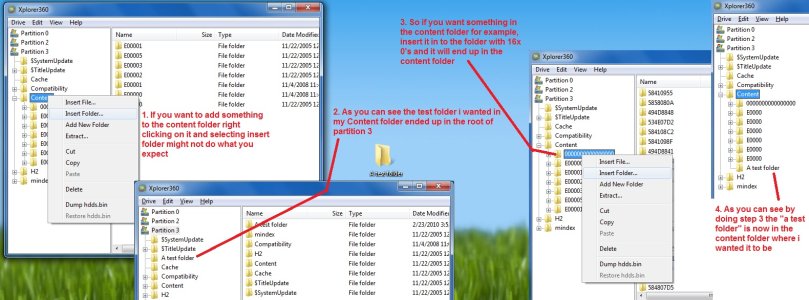
Also here is a little image guide on problems ive found with Xplorer 360 when right clicking and inserting files, hope thats of some use to people having problems copying there saves and content back.
 

Attachments

  • Xplorer Problems.jpg
    Xplorer Problems.jpg
    316.6 KB · Views: 5,451
Having problems with this

All is well intill after i hit f and it asks me to type hddss.bin and it returns that hddss.bin is not present.....

Here is a screen of the flashcard directory

Yfrog - 44506694

Tried 2 flash drives, same problem

Can any1 help?

Thanks in advance
 
Would anyone be able to give a rough estimate of how likely a ban resulting from this would be. Does a save game treated this way appear as a hacked save game or something? Or does it end up the same way as if I had transferred it with a memory card?


not very likely, they would have to be looking for it, all it does it make the save think it is native, so unless you are editing the save game to do impossible things they probably will never notice. Even if you got caught it probably wouldnt be a perm ban or a system ban, probably just a temp live ban from that game.

I havnt seen any reports of people being banned for this. and i wasnt/havnt been
 
not very likely, they would have to be looking for it, all it does it make the save think it is native, so unless you are editing the save game to do impossible things they probably will never notice. Even if you got caught it probably wouldnt be a perm ban or a system ban, probably just a temp live ban from that game.

I havnt seen any reports of people being banned for this. and i wasnt/havnt been

That's basically what I figured, cheers.

Bozl1n, just a guess but maybe it's case sensitive?
 
Hi,

Thanks for the effort put in making the thread and helping us not so clever when it breaks.

I have formatted the drive and everything, quite easily again thanks to the guide.

But upon plugging it back in the drive is read with 220gb free but is showing up as empty.

I backed up partition 2 and used the options to restore it on the new hdd. But its partition 3 I think I'm struggling with.

Could you please go in to a bit more detail on how to "dump" the content folder. Is that the only one I need to put on the new one? The old drive had things like titleupdate but the new one just has content. Is that right?

The way I did it was to drag and drop from xplorer 250gb in to a windows explorer window and then "inject" that folder back in...

Any idea why it isn't showing any of my data?

If anyone could help I'd be extremely thankful.

Once again great guide :D

I had the same problem which was fixed by turning off my UAC. To do this you:

1. Click the Start Menu.
2. Click on Control Panel.
3. Scroll down to User Accounts and click on it.
4. Now click Change User Account Control settings.
5. Scroll the slider down to "Never Notify Me When".

Now you should be able to drag and drop the desired folders onto your new hard drive and it should work. You may also need to pop the new 250gb drive into the xbox and format before it will work. If you do this make sure to turn your UAC controls back to default when you are done.

Also remember only use xplorer 250gb with the new drive.
 
than alot for the very helpfull guide :)

i do have a question , is it possible to use a WD 320GB HDD and flash it with the 250GB firmware u have ? i cant find any 250GB where i live

in other words:

i mean convert a 320GB hdd to a 250GB HDD , as 250GB HDD's are not available
 
anyone know where i could find the original xbox emulator to copy onto this hard drive? i was thinking of just buying an empty case and this HDD for my 360 Arcade, but don't want to do that if i can't get the backwards compatibility.
 
than alot for the very helpfull guide :)

i do have a question , is it possible to use a WD 320GB HDD and flash it with the 250GB firmware u have ? i cant find any 250GB where i live

in other words:

i mean convert a 320GB hdd to a 250GB HDD , as 250GB HDD's are not available

No, you must use a 250GB Hard Drive.

anyone know where i could find the original xbox emulator to copy onto this hard drive? i was thinking of just buying an empty case and this HDD for my 360 Arcade, but don't want to do that if i can't get the backwards compatibility.

Can we post our Emulator files? If so i'll post mine up, just newly updated.
 
I had the same problem which was fixed by turning off my UAC. To do this you:

1. Click the Start Menu.
2. Click on Control Panel.
3. Scroll down to User Accounts and click on it.
4. Now click Change User Account Control settings.
5. Scroll the slider down to "Never Notify Me When".

Now you should be able to drag and drop the desired folders onto your new hard drive and it should work. You may also need to pop the new 250gb drive into the xbox and format before it will work. If you do this make sure to turn your UAC controls back to default when you are done.

Also remember only use xplorer 250gb with the new drive.


This worked for me, thanks! For some reason inserting the folder using the programs own options (with uac) on didn't work. It would take up space on the drive but was not recognised by the program or the xbox. All is well now.

Thank you again for the guide and the help.(Y)
 

About Digiex

Digiex is a technology and gaming forum, founded in 2004 by InsaneNutter and Nimrod. Digiex has served the internet community with breaking news, detailed guides, exclusive downloads and a popular discussion forum. A small, friendly community of like‑minded people has developed over the years. People are encouraged to register and participate in on‑going discussions.

Get Social

Back
Top Bottom