Hack a 250gb, 320gb or 500gb Sata harddrive to work in the Xbox 360 and Xbox 360 Slim

can i add 32GB

dears
can i do this to my old WD 320GB i know i won't use more than 250 can i just use 250 ou of the 320 ??
 
My guess is that your also having chipset issues. I had to try three different laptops before I got a fourth one to work properly. If you want a foolproof way you should look into getting a SATA PCI card with a VIA chipset since those seem to be the only 100% reliable device that can flash M$ hardware easily. A PCI card will set you back about $20 bucks, but if you can find one locally then you could always return it after using it. That is if you never plan on using it again.

Like someone else suggested I say start over from scratch and try it again. If it doesn't prompt you to make partitions after flashing then launch the USB Boot again and manually select the option to create partitions. It's really pretty easy if you follow the steps and improvise if needed.

So something like this with a VIA chipset?

Newegg.com - SYBA SY-VIA-150 PCI SATA / IDE Combo Controller Card, Non Raid
 
Yes you do.

If you create the partitions manually it should work fine, in Dos run the command "HDDHACKR C 0960 A0" where 0960 is the port the drive is on.

This port can be seen when loading Hddhackr like so, in my photo its next to drive 5:

hddhackr4.jpg


OK...So I did exactly as you said to do it....

HDDHACKR recognized drive as the Hitachi....

see screen below....

hdd.jpg

BTW..I have two versions of HDDHACKR on my USB...I renamed V1.3 HDHACKR that is why it says HDHACKR on the screen....
Turned laptop off...unplugged the drive...put it in it's xbox case, slipped it into my 4G Slim and turned it on and then I got E68.....

I must be missing something....omitting a crucial step....

hdd2.jpg
 
Just as a Idea make sure its fully seated in the drive slot if not all the way it can cause that error because of not fully make a connection, if that don't work you can always redo the drive by useing the undo.bin and setting it back as a WD drive then run HDDHACKER again I would also only do it with 1 version of HDDHACKER on the usb drive
 
Just as a Idea make sure its fully seated in the drive slot if not all the way it can cause that error because of not fully make a connection, if that don't work you can always redo the drive by useing the undo.bin and setting it back as a WD drive then run HDDHACKER again I would also only do it with 1 version of HDDHACKER on the usb drive

Thanks...I made sure, and then double, and triple sure it was seated fine...even took a flashlight and inspected the drive bay.....

I reflashed the HDD back to original...wrote zeros to drive and then then reflashed with 250gb bin....but it never prompts to partition....always says succesful! will now work in xbox360...so then I manually partition it it and it says successful too....however the xbox360 4G will always E68....

I've actually done this several times..and the same results.....

Whoever wrote the program should know why it won't prompt you to partition...for some reason something is causing the program to skip over that part of the code.....
 
This can also be caused by a Hard Drive Eprom Error, or it could be the hard drive it self, have you tried to flash it then put it in the 360 with out doing the partitions it should let you format the hard drive through the 360 (it should format the partition 3 that way and not the rest) that way then after that hook it back up to the PC after its been formatted by the 360 and restore the partitions
 
This can also be caused by a Hard Drive Eprom Error, or it could be the hard drive it self, have you tried to flash it then put it in the 360 with out doing the partitions it should let you format the hard drive through the 360 (it should format the partition 3 that way and not the rest) that way then after that hook it back up to the PC after its been formatted by the 360 and restore the partitions

Yes..I tried it that way too....no matter what...I get E68....
 
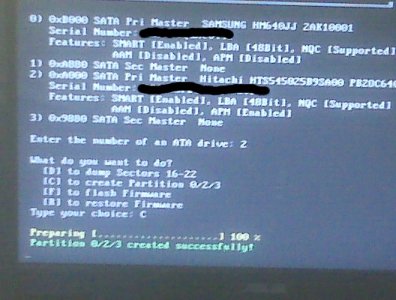
When i tried to use it. It was able to flash my HDD just fine, but it didn't ask me for my partitions that i wanted it to use. So i went back in there, and i attempted to make it do so manually. I went back into it, and told it to create it via C. After doing that it does what it shows here. But it never goes away. After sitting there staring at it for 30min i gave up on it. The flashing seemingly works since when i trid it in my 360 it showed up as an unformatted drive.

attachment.php


But it stays like that and doesn't seem to be working. My BIOS' settings for IDE is compatible since that is the only thing i could find that was close to completely removing sata and able to hopefully work with XP and older without a hitch. And that si the only option in my laptop's bios with things related to that. The second drive is obviously the flashed hdd. It was a WD scorpio blue WD2500BEVT since it says that that drive works here i got it.

Now then, with that said, has anyone else had this issue with it not wanting to create the partitions? If it refuses to create them, then i guess i'm left with an empty drive that I won't use, since the only other way that i can imagine to partition it is via teh 360 itself which will probably lead to tons of problems down the road. It probably would be able to do that, but I'm not going to risk it. Also when i did click on it just to see what it'd do it asked for the console's SN. I instantly left it since i felt like it was MS attempting to get the stupider of people to give them the console ID with which to ban the person for using a non-standard HDD(whcih i don't know how they'd be able to tell that since the firmware apparently makes it think that it is legit.)

the mobo on the laptop is the asusg50 series one, whatever it was i cannot remember the specifics right now but i know it's that series of mobos.


Also, on the 360 S does everyone's HDD really sit that well in it? When i put mine in there, it was sort of leaning up against the top after i placed it all of the way in. The one in the picture shows it hanging perfectly in the middle of the system. I imagine that that is best, but I know that mine at least won't fit like that.

 

Attachments

  • IMG00001.jpg
    IMG00001.jpg
    70.4 KB · Views: 4,705
When i tried to use it. It was able to flash my HDD just fine, but it didn't ask me for my partitions that i wanted it to use. So i went back in there, and i attempted to make it do so manually. I went back into it, and told it to create it via C. After doing that it does what it shows here. But it never goes away. After sitting there staring at it for 30min i gave up on it. The flashing seemingly works since when i trid it in my 360 it showed up as an unformatted drive.

attachment.php


But it stays like that and doesn't seem to be working. My BIOS' settings for IDE is compatible since that is the only thing i could find that was close to completely removing sata and able to hopefully work with XP and older without a hitch. And that si the only option in my laptop's bios with things related to that. The second drive is obviously the flashed hdd. It was a WD scorpio blue WD2500BEVT since it says that that drive works here i got it.

Now then, with that said, has anyone else had this issue with it not wanting to create the partitions? If it refuses to create them, then i guess i'm left with an empty drive that I won't use, since the only other way that i can imagine to partition it is via teh 360 itself which will probably lead to tons of problems down the road. It probably would be able to do that, but I'm not going to risk it. Also when i did click on it just to see what it'd do it asked for the console's SN. I instantly left it since i felt like it was MS attempting to get the stupider of people to give them the console ID with which to ban the person for using a non-standard HDD(whcih i don't know how they'd be able to tell that since the firmware apparently makes it think that it is legit.)

the mobo on the laptop is the asusg50 series one, whatever it was i cannot remember the specifics right now but i know it's that series of mobos.


Also, on the 360 S does everyone's HDD really sit that well in it? When i put mine in there, it was sort of leaning up against the top after i placed it all of the way in. The one in the picture shows it hanging perfectly in the middle of the system. I imagine that that is best, but I know that mine at least won't fit like that.

When you format the drive through the 360 it ask for the serial number that's fine it WON'T get you banned they have never banned for that yet because your not modding you drive or your gamer tag so they don't really care about the hard drive that is just data storage.
 
Also when i did click on it just to see what it'd do it asked for the console's SN. I instantly left it since i felt like it was MS attempting to get the stupider of people to give them the console ID with which to ban the person for using a non-standard HDD(whcih i don't know how they'd be able to tell that

That is fine, you definitely won't get banned because of this, this is just prevention methods so morons don't accidently format their drive.
 
I would go with this one: Newegg.com - SYBA SY-VIA6421-3S1P PCI SATA / IDE Controller Card

It has the VIA 6421 Chipset that is recommended for flashing the DVD Drive Firmware. Should work well for the Hard Drive Firmware as well. My buddy that mods xbox's has one and it has worked great so far.

Nice! You answered my question before I could ask it! I was hoping my local Frys would have this card, but no joy. Oh well, won't take too long from Newegg.

So, I guess for now I just need to wait for this PCI card to show up...and track down a Torx T6. ;) I ordered an el-cheapo Rosewill 45 piece magnetic tool kit off of Newegg.com because it was on sale for $14...assumed that it'd come w/ a T6. Nope! T8 yes. T10 yes. Soooo...need to track down a T6 separately.

Now that I think about it, do any of you have any recommendations for really nice/complete computer tool-kits? The Rosewill one is meant to be more of a portable/travel kit and I don't expect the tools will be of the highest quality given the price, so I'll probably want to buy something a little nicer with more tools sooner or later....

Given that I'm a total noob when it comes to Xbox/Xbox 360 modding, I'm sure I'll be asking more questions in the near future, Thanks for all the help guys!
 
I would go with this one: Newegg.com - SYBA SY-VIA6421-3S1P PCI SATA / IDE Controller Card

It has the VIA 6421 Chipset that is recommended for flashing the DVD Drive Firmware. Should work well for the Hard Drive Firmware as well. My buddy that mods xbox's has one and it has worked great so far.

Just placed the order from Amazon w/ Prime, $12.99 shipped w/ 2 day shipping. In the meantime, I may give this a shot with my laptop...but am not sure I want to bother. I'm impatient and want to ge started now, but my gut tells me to wait until I have that SATA controller and go from there.... Hmmmm....
 
the xbox 360 uses container files and nothing that has plain .wmv if you want to play wmv you could put these on a flash drive that is fat32,stream from computer or on a disk

So the best I can do is to copy the data to an USB stick or an external USB hard drive and play it off of that?
 
hi, i'm new to all this and i know you probably already answered this but i've been looking around the net for the better part of 6 hours. if i buy a 250 WD scorpio hdd i can flash it to work in the 360 slim, and i wont get banned right? i apologize if this question has been answered many times before. i just dont feel like paying m$ anymore then i have too. and truth be told i think 100$ is to much to pay for a small 250HDD. thanks in advance and i'm sorry for the trouble.
 

About Digiex

Digiex is a technology and gaming forum, founded in 2004 by InsaneNutter and Nimrod. Digiex has served the internet community with breaking news, detailed guides, exclusive downloads and a popular discussion forum. A small, friendly community of like‑minded people has developed over the years. People are encouraged to register and participate in on‑going discussions.

Get Social

Back
Top Bottom