Hack a 250gb, 320gb or 500gb Sata harddrive to work in the Xbox 360 and Xbox 360 Slim

I cant use the Xbox Support, Im from Peru and I buy the Xbox 1 year ago. Maybe Hex editing?? how can I restore the partitions? maybe someone can share some links U__U, I have the original Xbox 250GB HDD from the MW2 edition, and I was hoping solve this with my transfer cable, pls help . =(
 
the newest hddhackr can format the 3 partitions just follow the tutorial for opening but when it comes to hddhackr itself select your hdd and type the option for partitions
 
Thanks for the great guide.

I managed to convert a spare 120GB wd drive to use in my xbox 360 slim 4G. I use HddHackr v1.3 to flash the firmware and run the HddHackr 2nd time to create the partition manually. That works great, now I have additional 106GB of free space!!! :)
 
Flash it using the method described in the tutorial. You will notice it didn't ask you to create partitions 0/2/3. Because it didn't! Go ahead and restart your computer as it tells, BUT boot into the drive with hddackr on it again. YOU need to create those three partitions. Do not type in "hddhackr" at the C:\ prompt. Instead, type this and repleace 09E0 with your own port:
~Ibrahim~

i think you just re-run hddhackr select your drive then use the option for creating the partitions
 
EDIT#2: It took me five hours but I finally finished. Turns out my computer couldn't see the drive, so I switched to my dads and it worked perfectly. I had to run it a second time to partition the drive, though.

EDIT: Got it working until it searches for ATA devices and it doesn't find the hard drive. I read the tut and it said switch it to Legacy if you have that, in my BIOS there is a "Legacy IDE" option and if I switch to it and reboot nothing happens.

I get to the part where it says, "Starting Windows Millennium Emergency Boot...", but after that it says, "Your program caused a divide overflow error. If problem persists, contact your program vendor."
I'll try and make the usb boot device again and see what happens.
 
Last edited:
Can u use hddhackr on a hitachi external hard drive?

i bought a Hitachi HTS545050B9A300 External Hard Drive i was wondering if i could us hddhackr on it to make a 250GB storage device for xbox 360.

Can this be done on a Hitachi External Hard Drive?
 
Can u use hddhackr on a hitachi external hard drive?

i bought a Hitachi HTS545050B9A300 External Hard Drive i was wondering if i could us hddhackr on it to make a 250GB storage device for xbox 360.

Can this be done on a Hitachi External Hard Drive?

nope.you can only use a WD drive hooked up via sata connection
 
So I went ahead and followed through these directions with a 250GB WD2500BEKT drive. Everything seemed like it worked fine, but when I put it into my Xbox it only shows up as a 762MB drive? Any ideas what I may have done wrong? I was previously using the drive in a laptop so I'm not sure if it has to be reinitialized somehow before or what. All I did was format it and start the hack instructions.
 
If you used the latest version rerun hddhackr,select your drive,and use the option to create 3 partitions.
 
Hey, flashed it, all works fine. But want to undo it, did it awhile ago so I don't have that undo.bin
WD3200BEKT

Is there any other possible way to restore it to original settings. I can format it for windows but it'll only recognize it as the hitachi 250gb.

What if someone pm'd me the undo.bin file if they have the exact same hdd, will that work? If anyone has it could they send please and thank you.
 
Probably already asked... but there's a lot of pages and i may have missed it

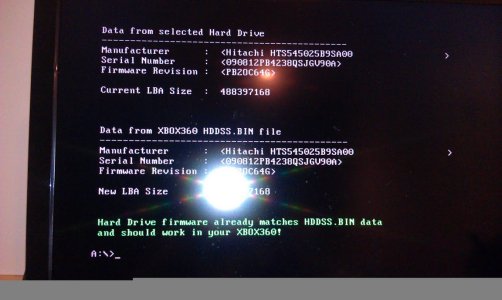
I have a WD Black 2500 BEKT and I have followed the tutorial as carefully as I could but when I put the drive in my Xbox, it wouldn't recognize it and I couldn't even find it in storage devices.

IMAG0076.jpg
I tried re-flashing the firmware and it says it already matches and should work... any ideas?
 
I have a WD Black 2500 BEKT and I have followed the tutorial as carefully as I could but when I put the drive in my Xbox, it wouldn't recognize it and I couldn't even find it in storage devices.
View attachment 6937
I tried re-flashing the firmware and it says it already matches and should work... any ideas?
if you are using the version 1.3 re run it and select create partitions this time and it should work
 
Hey, flashed it, all works fine. But want to undo it, did it awhile ago so I don't have that undo.bin
WD3200BEKT

Is there any other possible way to restore it to original settings. I can format it for windows but it'll only recognize it as the hitachi 250gb.

What if someone pm'd me the undo.bin file if they have the exact same hdd, will that work? If anyone has it could they send please and thank you.


Or what if i bought a new 320gb wd hdd, same model BEKT, and perform hddhackr and kept the undo file. Could it be used to recover both hdd's??
 
Hi i have followed the tutorial and everything was going fine until i tried to restore partition 2 it just takes ages i have left it for 30 mins and still nothing is this normal? If not does anybody have any ideas for how to solve this perhaps a different partition 2 to restore from? or is there a way i can manually copy the files without restoring the partition.
 
Thanks to all your work, especially to InsaneNutter and rick550. For me there is one question left. I've bought a new Xbox 360 4GB Slim and an additional WD Blue BPVT 250GB drive. Do I need (or is it recommended) to create the 0/1/2 partitions for this box (slim)? What about the partition 2 backup/restore procedure only covered by the guide for the original Xbox 360 versions? I'd expect that the Xbox 1 emulator (if even still existing) is already sitting on the 4GB flash drive. That means I neither need partitions nor the partition 2 backup/restore?
 
I'd expect that the Xbox 1 emulator (if even still existing) is already sitting on the 4GB flash drive. That means I neither need partitions nor the partition 2 backup/restore?

run hddhackr and use the create partitions option then try to transfer partition 2
Hi i have followed the tutorial and everything was going fine until i tried to restore partition 2 it just takes ages i have left it for 30 mins and still nothing is this normal? If not does anybody have any ideas for how to solve this perhaps a different partition 2 to restore from? or is there a way i can manually copy the files without restoring the partition.

run hddhackr and use the create partitions option then try to transfer partition 2 *this will erase anything you copied to the hard drive
 
Thanks to all your work, especially to InsaneNutter and rick550. For me there is one question left. I've bought a new Xbox 360 4GB Slim and an additional WD Blue BPVT 250GB drive. Do I need (or is it recommended) to create the 0/1/2 partitions for this box (slim)? What about the partition 2 backup/restore procedure only covered by the guide for the original Xbox 360 versions? I'd expect that the Xbox 1 emulator (if even still existing) is already sitting on the 4GB flash drive. That means I neither need partitions nor the partition 2 backup/restore?

If the 0/1/2 partitions are not created when you hack the drive, re run hddhackr and create them. The Xbox 1 emulator is on Partition 2 of all 360 hard drives, the 4gb slim can not play Xbox 1 games without you adding a proper hard drive to the console. The 4gb of space on the slim is basically an internal memory card.

So if hacking a drive you need to restore partition 2 if you want Xbox 1 support, the slim is no different what so ever.

does it only have to be the wd drives listed and will it work on a caviar wd drive

I don't believe the Caviar series of drives will work, anything in the Scorpio series should work with the latest Hddhackr
 

About Digiex

Digiex is a technology and gaming forum, founded in 2004 by InsaneNutter and Nimrod. Digiex has served the internet community with breaking news, detailed guides, exclusive downloads and a popular discussion forum. A small, friendly community of like‑minded people has developed over the years. People are encouraged to register and participate in on‑going discussions.

Get Social

Back
Top Bottom