Rick
Veteran
I reformatted the drive and it still didn't work with halo 3 but it did work with halo reach
Maybe the disc is scratched? Mine plays fine with my hacked drive.
I reformatted the drive and it still didn't work with halo 3 but it did work with halo reach
Maybe the disc is scratched? Mine plays fine with my hacked drive.
This guide is decent but you make it sound like the switch from AHCI to ATA is as nonchalante as changing the boot order in the BIOS. It isn't, and requires you to do a complete reformat of the boot drive of whatever system you're using to format the XBOX drive. Major fail...XBOX hackers beware of this!

This guide is decent but you make it sound like the switch from AHCI to ATA is as nonchalante as changing the boot order in the BIOS. It isn't, and requires you to do a complete reformat of the boot drive of whatever system you're using to format the XBOX drive. Major fail...XBOX hackers beware of this!
Hi,
I purchased a WD Scorpio WD320BEKT-60PVMT0 Manufactured Sept 4, 2011.
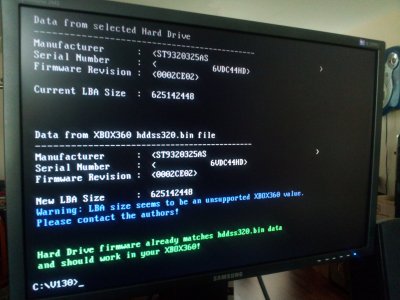
I have tried several versions of hddhackr and controllers with the similar results, but I will explain the issue.
I boot from USB.
I run the hddhackr v1.30.
I choose the SATA channel that the drive is on.
I hit F to flash.
I select the hddss320.bin file downloaded from this thread.
I choose a file name for the backup.
I get "Warning: LBA seems to be an unsupported XBOX360 value. Please contact the authors."
Also I tried with a velociraptor and the hddss250 and that works fine in the xbox, but needed an external power supply.
I can get the extact messages if you haven't seen these before.
I have also tried several motherboards, one being a P5N-D and external cards, they all detect the same and give the same warnings.
The drive is not detected by a brand new sbox 360 S 4gb.
Any thoughts?


Very nice guide! If this would've been out a year and a half ago I would've done that instead of an external HDD.
Managed to get mine going on a WD3200BEVT by plugging it into an Acer Laptop instead of taking apart my desktop PC, but I'm having a little difficulty getting the XBox originals to work properly (Grand Theft Auto: San Andreas)...because I don't have the transfer cable yet. Was able to download previous XBox live purchases to it (Marvel vs. Capcom 2), will try a disc based game next.
Did you complete this step?
https://download.digiex.net/static/users/insanenutter/guides/360hddhack/xplorer4.jpg
Yeah, I didn't run Xplorer360, because for whatever reasons I thought that I would have to connect my Windows PC to the 360 hard drive via the official transfer cable. When you were transferring stuff to the larger hard drive, you connected via the internal connections, right? Actually, in the off-hand chance that I really don't feel like taking my desktop PC apart, has anyone actually done this with a hard drive enclosure instead, using a USB connection?I would guess not as he hacked a drive with a laptop, meaning he can likely not have the drive with windows installed on and the 360 hard drive connected at the same time. Meaning the backwards compatibility partition can not be restored. If thats what you have done then that is why old xbox games do not work.
SUCCESS! I was having issues with my enclosure (was originally intended for a 3.5" drive), but I was able to cannibalize the SATA cable from it. From there, it took me a while to figure out Xbox Explorer, but it worked after I formatted the 320 GB hard drive on the Xbox 360 and ran Explorer again. Just got my old school copy of GTA: San Andreas working. Thanks again!You can use a hard drive enclosure, or use the internal connections.