Hack a 250gb, 320gb or 500gb Sata harddrive to work in the Xbox 360 and Xbox 360 Slim

Can I just ignore the following messages?

Warning: LBA size seems to be an unsupported XBOX360 value.
Please contact the authors!

Many thanks for that quick reply.
Yes. That error is from the program not being updated(by hddhackr creators) to the new hard drive size.
 
Sorry for all the questions but I do not want to hose this up.

Do I need to find and use Xplorer 360 Extreme 2 instead of Xplorer Extreme? If I do can someone provide a working link to 2?

Do I need to put the new HDD that I just dumped the HDDSS.BIN onto and that created the partitions on back into the XBox360 and format it BEFORE I hook it up to my PC and restore what was on the old HDD?

Thanks,
outofwork
 
Sorry for all the questions but I do not want to hose this up.

Do I need to find and use Xplorer 360 Extreme 2 instead of Xplorer Extreme? If I do can someone provide a working link to 2?

Do I need to put the new HDD that I just dumped the HDDSS.BIN onto and that created the partitions on back into the XBox360 and format it BEFORE I hook it up to my PC and restore what was on the old HDD?

Thanks,
outofwork
The first page explains everything you need to do.
I like to format the drives using the xbox 360 then transfer everything back.
 
The first page explains everything you need to do.
I like to format the drives using the xbox 360 then transfer everything back.

Apologies. I somehow missed the link for downloading Xplorer 360 320gb Edition. It's probably because the way I printed out the guide. It's a very narrow column on the paper. It probably took 20 sheets of paper.

I still don't see anything in the guide about actually formatting the new HDD after putting on the BIN, etc. I believe that based on your previous message that you are saying to put the new HDD in the XBOX360 HDD enclosure after removing the old one, put it back in the XBOX360 and format it then take it apart again and take the drive back to the PC and restore what was initially copied from the original HDD. Then following that put the new HDD back in the enclosure and I should be good to go. Is that correct?

Sorry about being so damned specific but I am a bit anal about following instructions to the T except of course when I miss something. <BSEG>

Thanks again for your patience and quick responses,
outofwork
 
Apologies. I somehow missed the link for downloading Xplorer 360 320gb Edition. It's probably because the way I printed out the guide. It's a very narrow column on the paper. It probably took 20 sheets of paper.

I still don't see anything in the guide about actually formatting the new HDD after putting on the BIN, etc. I believe that based on your previous message that you are saying to put the new HDD in the XBOX360 HDD enclosure after removing the old one, put it back in the XBOX360 and format it then take it apart again and take the drive back to the PC and restore what was initially copied from the original HDD. Then following that put the new HDD back in the enclosure and I should be good to go. Is that correct?

Sorry about being so damned specific but I am a bit anal about following instructions to the T except of course when I miss something. <BSEG>

Thanks again for your patience and quick responses,
outofwork
Yes.
I think it's better to format in the xbox 360, but that is completely optional.
 
Temporarily at a stand still

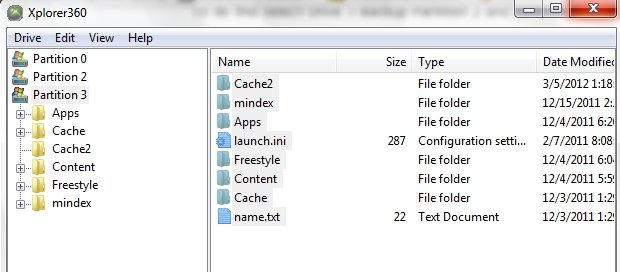
Okay, I ran Xplorer 360 Extreme and backed up Partition 2. But I have attached a file showing what I have in partition 3 of my original HDD which obviously includes FSD, etc. How do I copy these folders because all I see Xplorer 360 Extreme menu is the following:

Open
Close
Backup image
Restore image
Backup partition 2
Restore partition 2

Should I use Backup image and copy everything in partition 3 and then restore partition 2 (using Restore partition 2) and 3 (using Restore image) using Xplorer 360 Extreme 2 for both restores? I'm kind of stuck here and don't want to hose this up.

Also, just for grins, device manager sees the original 360 HDD drive but Windows Explorer does not. That doesn't appear to matter because Xplorer 360 Extreme did successfully backup partition 2.

Thanks,
outofwork
 

Attachments

  • Partition 3 original HDD.jpg
    Partition 3 original HDD.jpg
    103.5 KB · Views: 1,997
I decided to experiment to see if I could copy the folders in partition 3 by dragging and dropping and everything went fine until I tried to copy the Freestyle folder. Several folders prior to that copied fine using drag and drop into a Windows Explorer window. But after the Freestyle copy was running for several minutes I get the following error message:

Error!

Failed to create the destination folder in recursive dump operation!

Xplorer Extreme seems to hang in a loop following that error message.

Any ideas?

Thanks,
outofwork

I know you guys can't wait for the latest update:

Apparently the Xplorer 360 Extreme program has a problem copying very large folders so I broke it up in pieces and the "offending" folder was in the Freestyle folder in the Data subfolder in the GameData subfolder beneath the Data subfolder. IF I broke the copy up into multiple steps in the Data folder it worked fine.

Now, I have only one remaining question and I will hopefully stop pestering you. Why would I need to use Explorer Extreme to restore partition 2 but need to use Xplorer Extreme 2 to restore partition 3? I would have thought that given I am restoring partition 2 and partition 3 onto the new 320 drive that I would need to using Xplorer Extreme 2 for both. I will try it as the guide says but I am curious.

The guide has been invaluable. Many, many thanks for taking the time to create it and answer all of my basic questions. It's been fun.

Thanks,
outofwork

Well it seems that my problems continue.

To step back a few steps for a moment:

I put the new 320 HDD back into the XBOX 360 and formatted it after I successfully ran Hddhackr.
Assuming that Hddhackr created three partitions (0/1/2) does the XBOX360 format program automatically know to format
all three partitions?

I then took the new 320 drive back out of the enclosure hooked it up to my PC and fired up Xplorer Extreme to restore partition 2. When Xplorer opened the 320 drive I believe all it saw was partition 0. That's why I asked about the formatting on the 360. It seems as if it "may" have only created one formatted partition when it formatted the drive.

I then told Xplorer to restore partition 2. It did apparently because Xplorer then displayed partition 2 and 3 even though I only said the restore partition 2. Partition 0 at this point seems to have disappeared.

The problem now is that I can't get the data that I backed up from partition 3 of the old drive into partition 3 of the new drive using Explorer Extreme 2. Dragging and dropping from Windows Explorer will not work even with UAC turned off because Windows Explorer can't see the new drive. I tried "Insert Folder" from Xplorer Extreme 2 and it seemed to work except I do not see the copied folder on the new 320 drive.

So, I seem to have a couple of very basic problems.

1) partition 0 seems to be gone from the new drive following the restore of partition 2 using Xplorer Extreme.
2) I can't copy the data from partition 3 back onto partition 3 of the new drive using Xplorer Extreme 2.

I may fiddle around some more to try and figure something out but I think that something is amiss and I may be pi*sing into the wind at this point. Any of you geniuses out there now what's going on?

Thanks,
outofwork
 
Last edited by a moderator:
This should answer some questions.
Xplorer360 extreme is only used for restoring/backing up partition 2 and for 20gb drives partition 3

xplorer360 has versions for the other size drives also

It is important you just close Xplorer360 after that, massing about with anything else will corrupt Partition 3.

Now Download Xplorer 360 250gb Edition, this works fine with Partition 3 on 250gig drives, however trying to modify anything on partition 0 or 2 will just corrupt the drive!! Trust me save yourself some time and don’t do it.

If you are hacking a 320gb drive then you want to Download Xplorer 360 320gb Edition.

Also don’t use Xplorer 250gig edition on any other sized drive either, it will just corrupt the drive, same with the 320gig edition.

If you do corrupt you drive just connect it to your Xbox 360 and format it.
 
Rick:

That's why I asked in an earlier message about the guide specifically saying to use Xplorer Extreme to restore partition 2 and use Xplorer Extreme 2 (aka for the 320 GB drive) to restore any partition 3 data.

It seems, and I mean no offense here, that the guide needs to be changed in a few places to prevent screwups like I just made.

What about formatting the new drive in the XBox? Did the format wipe out partitions 2 and 3?

Do I have any option here but to start everything over from the beginning or should I just put the new drive back in the XBox 360 and reformat it again? Or do I need to go all the way back to Hddhackr and start over?

Sorry to waste all your time. If it would help I could volunteer to update the guide if I ever get this to work. I have to believe that others may be experiencing similar problems.

Thanks,
outofwork
 
Rick:

That's why I asked in an earlier message about the guide specifically saying to use Xplorer Extreme to restore partition 2 and use Xplorer Extreme 2 (aka for the 320 GB drive) to restore any partition 3 data.

It seems, and I mean no offense here, that the guide needs to be changed in a few places to prevent screwups like I just made.

What about formatting the new drive in the XBox? Did the format wipe out partitions 2 and 3?

Do I have any option here but to start everything over from the beginning or should I just put the new drive back in the XBox 360 and reformat it again? Or do I need to go all the way back to Hddhackr and start over?

Sorry to waste all your time. If it would help I could volunteer to update the guide if I ever get this to work. I have to believe that others may be experiencing similar problems.

Thanks,
outofwork
It's not wasting my time, this guide is a little complex though. You could use hddhackr again and use the create partitions option, not the flash option.
Then transfer back partition 2.
Formatting should not remove partitions 2 & 3.
There is a xplorer 360 320gb edition download here. xplorer-360-320gb-edition-download
You were saying something about fsd? That is about jtags & rgh right, you could ftp your data back to the drive.
 
Okay let me tell you where I am.

I did not use Hddhackr again. I put the drive back in the 360 and reformatted it. I then took it out and put it into the PC and ran Xplorer 360 for the 320 GB drive. I am only seeing partitions 2 and 3. Do I need to reboot from the USB and then recreate the partitions 0/2/3? I would be surprised if formatting on the 360 that it would know that it had 3 partitions to reformat. Apparently it does. Based on what you are saying, I believe, I can simply reboot using the USB stick and create partitions 0/2/3 and not have to reformat after that, correct?

Is it possible to go into chat mode with you by any chance?

Thanks,
outofwork

 
Okay let me tell you where I am.

I did not use Hddhackr again. I put the drive back in the 360 and reformatted it. I then took it out and put it into the PC and ran Xplorer 360 for the 320 GB drive. I am only seeing partitions 2 and 3. Do I need to reboot from the USB and then recreate the partitions 0/2/3? I would be surprised if formatting on the 360 that it would know that it had 3 partitions to reformat. Apparently it does. Based on what you are saying, I believe, I can simply reboot using the USB stick and create partitions 0/2/3 and not have to reformat after that, correct?

Is it possible to go into chat mode with you by any chance?

Thanks,
outofwork
Yes. just recreate the partitions and that should be it.
 
Well my problems and challenges just seem to be getting better and better.

I ran Hddhackr and recreated partitions 0/2/3 again on the new drive. I then ran Xplorer for the 320 and there wasn't any option to backup or restore partition 2 in the drop down. I am at a loss to know what the hell is going on now. I then loaded the older Xplorer 360 and it gave me the option to backup or restore partition 2 on the old HDD. I can try and back up partition 2 again and put the .BIN file win the same folder where I have Xplorer 320 but I tried that with the previous backup and Xplorer 320 doesn't give me the option to backup or restore partition 2. This seems like a catch 22.

Thanks,
outofwork
 
Well my problems and challenges just seem to be getting better and better.

I ran Hddhackr and recreated partitions 0/2/3 again on the new drive. I then ran Xplorer for the 320 and there wasn't any option to backup or restore partition 2 in the drop down. I am at a loss to know what the hell is going on now. I then loaded the older Xplorer 360 and it gave me the option to backup or restore partition 2 on the old HDD. I can try and back up partition 2 again and put the .BIN file win the same folder where I have Xplorer 320 but I tried that with the previous backup and Xplorer 320 doesn't give me the option to backup or restore partition 2. This seems like a catch 22.

Thanks,
outofwork
xplorer 320 is only used for managing partition 3
xplorer extreme is only backing up / restoring partition 2 and also management of 20gb drives' partition 3
 
I wonder about this.

Does Xplorer 320 even give you an option for backing up or restoring partition 2? Or is it simply a backup image and restore image for all three (?) partitions at the same time? So would you backup the old drive using the backup image function and then simply do a restore image of that backed up data (all three partitions?) to the new drive?



outofwork
 
I wonder about this.

Does Xplorer 320 even give you an option for backing up or restoring partition 2? Or is it simply a backup image and restore image for all three (?) partitions at the same time? So would you backup the old drive using the backup image function and then simply do a restore image of that backed up data (all three partitions?) to the new drive?

outofwork
Nope, its only a program for managing the 320gb drives. I believe the backup/restore image function is only for partition 3 only.
I have never used the backup image before, im assuming you use xplorer to restore partition 2 then close and open xplorer 320gb and use the restore image for partition 3.
0 partition is for cache or some other xbox related storage.
2 is for the xbox emulator
3 is where the data is, gamesaves,profiles,maps,fsd,ect
 
ok here is my issue.
i fallow every word to the T
im useing a WD Scorpio Blue 1TB drive wd10tpvt
i have tryed both 250 and 320 hddss bins

well the issue is after running hddhackr i put it in the xbox to format, only option is to format it, and i do but it still says it needs formatter after ive formated it, it doesnt not show a drive size and when i connect to my computer in windows it says i need to format drive e wtf i have even used the hdd hacker for the x360usb pro to create and format the three partitions and the xbox still say needs formatted and doesnt show a hdd size seriously wtf
 
Well I finally successfully restored partition 2 and I know what I was doing wrong. I tried to restore the partition 2 backup that was created with the older Xplorer using Xplorer 320 which obviously doesn't work. I still can't figure out why I can't copy the backed up partition 3 data to partition 3 on the new 320 drive? I could drag and drop going from Xplorer to backup the data in partition 3. I may have outsmarted myself and really hosed stuff up. IF I FTPed this partition 3 data to the XBox new 320 drive can I assume that the FTP function will let me see partition 3 so I can simply copy the data into it?

Thanks,
outofwork
 
ok here is my issue.
i fallow every word to the T
im useing a WD Scorpio Blue 1TB drive
i have tryed both 250 and 320 hddss bins

well the issue is after running hddhackr i put it in the xbox to format, only option is to format it, and i do but it still says it needs formatter after ive formated it, it doesnt not show a drive size and when i connect to my computer in windows it says i need to format drive e wtf i have even used the hdd hacker for the x360usb pro to create and format the three partitions and the xbox still say needs formatted and doesnt show a hdd size seriously wtf
Do not format hddhackr converted drives using windows it messes the drive up. Do you have your original 1tb undo file?
I suggest using the drive as a 320gb though.
If it fails to format right on the xbox 360, undo the drive first, test the drive with this dos tool and even do a full format. If no errors flash with the 320 bin again.
WD Support / Downloads / Mobile & AV-25 / WD Blue

Well I finally successfully restored partition 2 and I know what I was doing wrong. I tried to restore the partition 2 backup that was created with the older Xplorer using Xplorer 320 which obviously doesn't work. I still can't figure out why I can't copy the backed up partition 3 data to partition 3 on the new 320 drive? I could drag and drop going from Xplorer to backup the data in partition 3. I may have outsmarted myself and really hosed stuff up. IF I FTPed this partition 3 data to the XBox new 320 drive can I assume that the FTP function will let me see partition 3 so I can simply copy the data into it?

Thanks,
outofwork
It could possibly only be for that drive,ect a 20gb backup works only for a 20gb drive.
Open your old drive with the right xplorer version and manually copy these folders as shown in the link below. The program may seem frozen or crashed, this is normal. Just wait until it unfreezes.
I don't think you can ftp a backup image of partition 3.
https://download.digiex.net/static/users/insanenutter/guides/360hddhack/xplorer3.jpg
 
"Do not format hddhackr converted drives using windows it messes the drive up. Do you have your original 1tb undo file?
I suggest using the drive as a 320gb though.
If it fails to format right on the xbox 360, undo the drive first, test the drive with this dos tool and even do a full format. If no errors flash with the 320 bin again.


i did the undo and try testing with software from wd useing the bootable cd version, but the test fails and tells me to check my cable but i can still do a full erase, so i put in my vista cd and i can create and delete partons wtf

i didnt format the partions with vista just deleted them and now im runing the full erase with the wd software

im not sure if this is important but the hdd used to be the drive from my old laptop that had windows seven x64 and crashed because the MB would only detect my ram as about 64Mbits even bought new ram
 

About Digiex

Digiex is a technology and gaming forum, founded in 2004 by InsaneNutter and Nimrod. Digiex has served the internet community with breaking news, detailed guides, exclusive downloads and a popular discussion forum. A small, friendly community of like‑minded people has developed over the years. People are encouraged to register and participate in on‑going discussions.

Get Social

Back
Top Bottom