
You are using an out of date browser. It may not display this or other websites correctly.
You should upgrade or use an alternative browser.
You should upgrade or use an alternative browser.
Hack a 250gb, 320gb or 500gb Sata harddrive to work in the Xbox 360 and Xbox 360 Slim
- Thread starter InsaneNutter
- Start date

Rick
Veteran
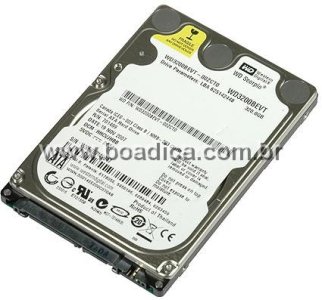
Yes. Its a western digital drive. Hddhackr works with the following drives.Anyone know if this works with such HD? this is a BEVT but is not blue series.
View attachment 11601
Hddhackr will only work with the following Western Digital Drives:
- WD Scorpio Series BEVS/BEAS
- WB Scorpio Blue Series BEVS/BEVT/BPVT
- WD Scorpio Black Series BEKT/BJKT
- WD VelociRaptor Series
- WD AV-25 Series BUDT
Rick
Veteran
ThanksThank you for tutorial.
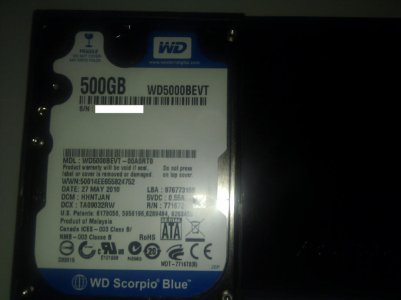
Here is Undo.bin from my hard drive WD5000BEVT (WD Scorpio Blue)
Can you post that here also?
Rick has also created a thread aimed at collecting people's undo.bin files. View: Hddhackr Undo Files Downloads & Uploads Please contribute your undo.bin if you can, Thanks.
I was trying to do this on a 320gb Western Digital Blue (WD3200BPVT) hard drive. But when I in hddhackr and trying to flash the firmware the comupter says file not found for the hddss.bin. I have already done this on a 250gb hard drive and I thought it would been as simple as replacing the original 250gb hddss.bin file for the 320gb file. But for some reason the computer says the file is not thier. I am using the same computer as last time I did this.
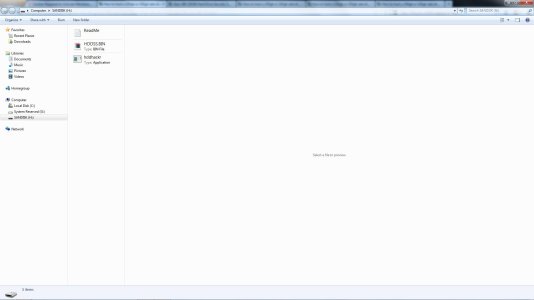
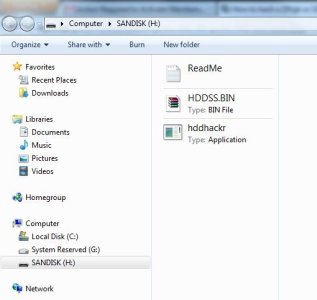 the bootable usb contents
the bootable usb contentsAttachments
Rick
Veteran
Reformat the flash drive and see if it will detect the files in dos.
Mantas Jotautis
Member
- Joined
- Oct 8, 2012
- Messages
- 10
Alright, I did what you said and its a no go..
I took pictures with my camera while I was doing this so I can make it easier.
So Heres what I did.
I took a 2 gb flash drive, Using the USB bootable software I made the file format FAT and selected bootable from DOS. I took shut off my laptop, took out the battery and replaced the hard drive with the one i was going to use on my xbox 360 slim. I then pressed Esc key on boot up and it brought me to a menu about system information, system diagnostic, boot options, BIOS, and system recovery. I pressed Boot Options and it asked me what i wanted to boot from, I pressed CD/DVD as the flash drive never came up. I typed hddhackr when the windows mellenium emergency mode came up. nothing happened. so i tried it from booting from the new hard drive, same thing nothing happened.
I then restarted the computer, I pressed esc key on start up again. I clicked BIOS now. InsydeH20 Setup Utility came up (I took pictures of all the pages I thought was relevent). I believe this is BIOS, I cant find anything else about it. I can't find anywhere on there about RAID, AHCI, or IDE.
EDIT:
I did some research, The menu i went into "Insydeh20" is the BIOS for my system. I guess it does not have the feature to change from SATA to IDE or to change RAID, AHCI, or IDE. If this is the problem, I would have to figure out how to replace this BIOS with one that has this feature.
Welcome. I got the same problem when he wrote HDDHACKR nothing happens it does not show a window where the selected hdd, just by nothing happens. I changed the bios from AHCI to IDE but maybe did not know what would do?
My hdd is WD320BPVT
Rick
Veteran
See if there is a bios update on your manufacturer's website.Welcome. I got the same problem when he wrote HDDHACKR nothing happens it does not show a window where the selected hdd, just by nothing happens. I changed the bios from AHCI to IDE but maybe did not know what would do?
My hdd is WD320BPVT
Mantas Jotautis
Member
- Joined
- Oct 8, 2012
- Messages
- 10
See if there is a bios update on your manufacturer's website.
I upgraded the bios and still the same thing when he wrote HDDHACKR nothing happens.
I'm doing everything by tutorail
Rick
Veteran
Try the other hddhackr. If it still doesn't work see if you can use different computer.I upgraded the bios and still the same thing when he wrote HDDHACKR nothing happens.
I'm doing everything by tutorail
Mantas Jotautis
Member
- Joined
- Oct 8, 2012
- Messages
- 10
Try the other hddhackr. If it still doesn't work see if you can use different computer.
I will try, try running any other?
WD3200BPVT issues when flashing, this may help.
I used a 4 GB Sandisk flash drive using the bootable tool format to Fat32 no other format available. Completed all the steps to prepare the USB, no issues.
NOTE before boot I ensured the USB was connected!
I am using a gigabyte MB to ensure IDE is selected in BIOS, no issues. I then selected boot menu and it comes up with 4 types of bootable USB's. USB-FDD, ZIP, CD, and HDD, will work on HDD OPTION! - depending on MB your selections may be different but your list will show all available boot options even if your USB is not connected - mind had about 10 boot options, if you don't have a USB/FLASH selection you may need to review your MB manual for equivelant.
running HDDHACKR 1.30 is fine and shows the drive, but what I found after a few attempts is that the drive goes to sleep so to speak, came up with the LBA error and the error with sector 16.
What I had to do is when you select the drive then go to FLASH and put the HDDSS.BIN AND UNDO.BIN in don't hit enter after the UNDO.BIN, disconnect the hard drive power supply, reconnect the drive wait about 2 seconds to power up then hit enter, it will then read and flash sectors fine but WON'T write the partitions simultaneously as described in tutorial.
Once the flash is done disconnect the drive, reboot to HDDHACKR and select the partition option C but AGAIN don't hit enter, disconnect and reconnect the WD power supply wait 2 seconds the enter and it will format partitions fine - DON'T WORRY ABOUT THE GREEN CURSOR after the write just disconnect the drive, reboot, reconnect the drive and you should then see it in your device manager DISK DRIVES, if not scan for hardware changes and will show.
It will then appear in XPLORER 360 extreme 2 which I used and restoring PARTITION 2 worked fine, saves under all files not .bin or .img.
I was then able to get it to read in my X360 shows 294GB total available.
If my experience helps anyone great.
Skitzee78
I used a 4 GB Sandisk flash drive using the bootable tool format to Fat32 no other format available. Completed all the steps to prepare the USB, no issues.
NOTE before boot I ensured the USB was connected!
I am using a gigabyte MB to ensure IDE is selected in BIOS, no issues. I then selected boot menu and it comes up with 4 types of bootable USB's. USB-FDD, ZIP, CD, and HDD, will work on HDD OPTION! - depending on MB your selections may be different but your list will show all available boot options even if your USB is not connected - mind had about 10 boot options, if you don't have a USB/FLASH selection you may need to review your MB manual for equivelant.
running HDDHACKR 1.30 is fine and shows the drive, but what I found after a few attempts is that the drive goes to sleep so to speak, came up with the LBA error and the error with sector 16.
What I had to do is when you select the drive then go to FLASH and put the HDDSS.BIN AND UNDO.BIN in don't hit enter after the UNDO.BIN, disconnect the hard drive power supply, reconnect the drive wait about 2 seconds to power up then hit enter, it will then read and flash sectors fine but WON'T write the partitions simultaneously as described in tutorial.
Once the flash is done disconnect the drive, reboot to HDDHACKR and select the partition option C but AGAIN don't hit enter, disconnect and reconnect the WD power supply wait 2 seconds the enter and it will format partitions fine - DON'T WORRY ABOUT THE GREEN CURSOR after the write just disconnect the drive, reboot, reconnect the drive and you should then see it in your device manager DISK DRIVES, if not scan for hardware changes and will show.
It will then appear in XPLORER 360 extreme 2 which I used and restoring PARTITION 2 worked fine, saves under all files not .bin or .img.
I was then able to get it to read in my X360 shows 294GB total available.
If my experience helps anyone great.
Skitzee78
Yes. Its a western digital drive. Hddhackr works with the following drives.
thank you so much, I bought my xbox 360 this week and already tested worked perfectly with me.
Mantas Jotautis
Member
- Joined
- Oct 8, 2012
- Messages
- 10
PLYZ Help
Welcome. I got the same problem when he wrote HDDHACKR nothing happens it does not show a window where the selected hdd, just by nothing happens. I changed the bios from AHCI to IDE but maybe did not know what would do?
My SATA CONTROLLER - Intel Mobile Express Chipset SATA AHCI Controller
My hdd - WD320BPVT
05 Aug 2012
Welcome. I got the same problem when he wrote HDDHACKR nothing happens it does not show a window where the selected hdd, just by nothing happens. I changed the bios from AHCI to IDE but maybe did not know what would do?
My SATA CONTROLLER - Intel
Mobile Express Chipset SATA AHCI ControllerMy hdd - WD320BPVT
05 Aug 2012
Rick
Veteran
Try this version of HddHackr_v1.25_Build_20101114.rar. If that doesn't work try a different computer or see if there are any raid settings in the bios as well.PLYZ Help
Welcome. I got the same problem when he wrote HDDHACKR nothing happens it does not show a window where the selected hdd, just by nothing happens. I changed the bios from AHCI to IDE but maybe did not know what would do?
My SATA CONTROLLER - Intel
My hdd - WD320BPVT
05 Aug 2012
Mantas Jotautis
Member
- Joined
- Oct 8, 2012
- Messages
- 10
I tray and stil nothing  The other way is to do xbox 360 hdd???
The other way is to do xbox 360 hdd???Mantas Jotautis
Member
- Joined
- Oct 8, 2012
- Messages
- 10
hddhackr v0.91B work but can not find hdd
About Digiex
Digiex is a technology and gaming forum, founded in 2004 by InsaneNutter and Nimrod.
Digiex has served the internet community with breaking news, detailed guides, exclusive downloads and a popular discussion forum. A small, friendly community of like‑minded people has developed over the years. People are encouraged to register and participate in on‑going discussions.
Get Social



