Hack a 250gb, 320gb or 500gb Sata harddrive to work in the Xbox 360 and Xbox 360 Slim

So there's nothing I can do to fix it but sit around and wait? Ugh... I guess I'll have to make a trip to my parents' house and try out the 3 different types of desktops that are there... Funny, you'd think between a Gateway laptop and an emachines laptop, one of them would have worked <.<
A possible bios update could fix it. If not then the other desktops should work.
 
Ok, so this is an issue I haven't seen posted yet...if it has been, I must have just missed it.

I don't have a USB flash drive, so I'm using a Boot CD, so I cannot save the undo.bin, which isn't a big deal.

Took me awhile to get the CD to work so I could access the files in DOS but I finally got it working.

Anyway, I go through the process, flashing and partitioning using hddhackr and all seems ok, just like in the tutorial.

Problem is, Xbox doesnt see the drive and in bios and in hddhackr, the drive still shows as a WD drive, not a Hitachi or whatever.

I'm using this drive... WD3200BEKT-00A25TO manufacture date of Jan 28, 2010

I have tried using the 320G and 250G bin files, as well as the method for flashing in Windows, also tried using different versions of hddhackr including 1.30, 1.25, and 1.24

No matter what I try, even though all seems to go fine, the drive still shows as a WD drive and the Xbox wont read it...I dont have any undo.bin files, so thats not an option.

Ive read through this entire forum, and just cant seem to figure out why it seems like hddhackr worked fine, yet drive doesnt seem as if it got flashed....btw i do get that LBA message in hddhackr if I use the 320G bin, but not if I use the 250G bin.

 
Ok, so this is an issue I haven't seen posted yet...if it has been, I must have just missed it.

I don't have a USB flash drive, so I'm using a Boot CD, so I cannot save the undo.bin, which isn't a big deal.

Took me awhile to get the CD to work so I could access the files in DOS but I finally got it working.

Anyway, I go through the process, flashing and partitioning using hddhackr and all seems ok, just like in the tutorial.

Problem is, Xbox doesnt see the drive and in bios and in hddhackr, the drive still shows as a WD drive, not a Hitachi or whatever.

I'm using this drive... WD3200BEKT-00A25TO manufacture date of Jan 28, 2010

I have tried using the 320G and 250G bin files, as well as the method for flashing in Windows, also tried using different versions of hddhackr including 1.30, 1.25, and 1.24

No matter what I try, even though all seems to go fine, the drive still shows as a WD drive and the Xbox wont read it...I dont have any undo.bin files, so thats not an option.

Ive read through this entire forum, and just cant seem to figure out why it seems like hddhackr worked fine, yet drive doesnt seem as if it got flashed....btw i do get that LBA message in hddhackr if I use the 320G bin, but not if I use the 250G bin.

The drive is still showing as a WD, when it's flashed correctly the drive will show in the bios as a different drive.
Try looking through these other solutions.Also do a bios update if available.
FAQ:

HDDHackr doesn't work for me:
99% of problems are caused by the SATA chipset on your motherboard or BIOS configurations such as Legacy IDE not been enabled, AHCI been enabled or Raid been active.

If you still have problems try using another computer with a different SATA chipset. It might also be an Idea to check the official Hddhackr release thread on Xbox Hacker too.

HDDHackr still doesn't work for me, can i try anything else?
You can have a look at Harcrofts tutorial on How to Flash Your HDDSS.bin in Windows. Read the tutorial very carefully and do so at your own risk.
 
I've tried the Harcroft tutorial, and I am able to change to IDE in my bios...like I said everything seems to work fine, just it doesnt change what drive the system and xbox sees it as.

Also, this PC i tried the hack on is the only one in the house that will allow me to change the SATA to IDE mode so hddhackr will work....well not totally true, another 2 PCs will too, but they have the same chipset as mine. Also that link to the XboxHacker site doesnt work, it always says database not available.

Oh yea, and BIOS has long been updated to the newest version, with no updates currently available.
 
I've tried the Harcroft tutorial, and I am able to change to IDE in my bios...like I said everything seems to work fine, just it doesnt change what drive the system and xbox sees it as.

Also, this PC i tried the hack on is the only one in the house that will allow me to change the SATA to IDE mode so hddhackr will work....well not totally true, another 2 PCs will too, but they have the same chipset as mine. Also that link to the XboxHacker site doesnt work, it always says database not available.

Oh yea, and BIOS has long been updated to the newest version, with no updates currently available.
With the desktop i have used, it didn't show any options for ide or ahci it worked anyways though.

You could also try this then try using hddhackr again.
I flashed my drive and it doesn't show in the xbox 360.
Use this tool in this thread to test/wipe the drive. Data Lifeguard Diagnostic For Western Digital Drives
 
yea, i tried that tool in windows once, gave an error during the test but wiped the drive fine...ill try it again in dos though in a bit...also gonna try seeing if i can do it on one other pc we have in the house(havent actually tried on that pc since i finally got the boot cd working correctly).

Hopefully something works, otherwise I may just have to get an official drive.

UPDATE: ran the full scan test, it says it fixed any errors, then wiped the drive and tried hddhackr again...no luck...so then i tried one of the other pc's, has no options for ahci in bios but tried it anyway...wont even read the drive as ATA....at this point I either convince my roomies to let me try it with both their computers or I just wait till the end of the month when I can buy an official drive.
Best Buy has some available for about $60 or so, but i wont have the money for one for awhile.
 
ok, I apologize for the double post...just wanted to let you all know I got it working using a boot cd.

I remade the boot cd, putting a copy of the hddss.bin file onto it, but renaming it to undo.bin so it sees theres already one there.

One part I didnt realize...in hddhackr, when you type the filenames, the .BIN part of the filename has to be in caps...once I did that, told it to overwrite undo.bin and hit f for fail when it gave an error since it couldnt write to the cd, then it gave me the message about it being successful and telling me to power off my computer.

I then tried the drive immediately in my xbox, and lo and behold, it worked...its a 320G drive though and i used a 250G bin file to test so now im gonna redo it using the 320G bin file.
Thx all for the help, and figured id post this here in case anyone has same issue i had...btw i did it using same computer i tried doing it on before and had no success with then.
 
ok, I apologize for the double post...just wanted to let you all know I got it working using a boot cd.

I remade the boot cd, putting a copy of the hddss.bin file onto it, but renaming it to undo.bin so it sees theres already one there.

One part I didnt realize...in hddhackr, when you type the filenames, the .BIN part of the filename has to be in caps...once I did that, told it to overwrite undo.bin and hit f for fail when it gave an error since it couldnt write to the cd, then it gave me the message about it being successful and telling me to power off my computer.

I then tried the drive immediately in my xbox, and lo and behold, it worked...its a 320G drive though and i used a 250G bin file to test so now im gonna redo it using the 320G bin file.
Thx all for the help, and figured id post this here in case anyone has same issue i had...btw i did it using same computer i tried doing it on before and had no success with then.
You would need to find an exact undo file if you want to change the drive to 320gb. See these.
I lost my undo.bin, do you have one i can use?

Using an Undo.bin from someone else is very risky, your drive must be the exact same as the drive the undo.bin is from, otherwise you risk bricking it. Member Robide has found a collection of undo.bin files for various drives: Download Western Digital Undo.bin collection.
Thread:Hddhackr Undo Files Downloads & Uploads
You will then need to undo the drive,then flash using the 320gb file.
 
didnt need to, just reflashed using the 320G bin file and it worked fine....i only used a renamed file for the undo.bin so itd see i already had one, just in case.

Seems only reason it wasnt working for me before was cuz I was typing it as hddss.bin and not as hddss.BIN...once i typed it as hddss.BIN it worked fine.
 
Have to check your motherboard manufacturers website, or possibly the site of the company that made your PC...they should have an executable file thatll walk you through it
 
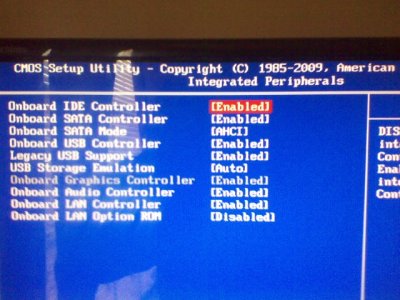
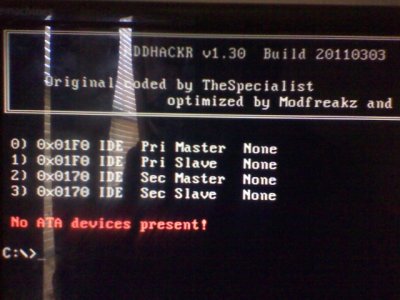
P010713001.jpgP010713002.jpg Hey sorry for the late response....but i broke my phone...anyways...this is what i see in my bios and when i run hddhackr....HELP!!!
 
Try changing onboard sata from ahci to ide

ok i just did that...no go
i have three options when i try to change that....achi, native ide and raid....i changed it to native ide and im still getting the same message as the picture i posted....no ata devices present
But i noticed something....when i leave my main hard drive (the one the pc runs off) connected to the motherboard it will be detected by hhdhackr but my 250gb will not
i know my drive is good because im currently using it as an external 16gb for my xbox
 
others have mentioned that disconnecting everything and only having one drive (the xbox drive) connected may work.. but everyone milage will vary
 
so you think i should leave the pc drive connected and try again? im nervous cuz i dont want to format the wrong drive...but ill try it
 
nah i think he meant disconnecting the main drive and leaving only the drive u wanna flash hooked up

oh and when u changed to ide in bios, make sure u saved settings...ive done that a couple times where i accidentally just exited without saving
 
nope....its a no go....still see my pc drive....wondering dies that mean its compatible for the hack?
Because if i cant get this soon enough i think i might backup my pc to the drive im trying to hack....smh
 

About Digiex

Digiex is a technology and gaming forum, founded in 2004 by InsaneNutter and Nimrod. Digiex has served the internet community with breaking news, detailed guides, exclusive downloads and a popular discussion forum. A small, friendly community of like‑minded people has developed over the years. People are encouraged to register and participate in on‑going discussions.

Get Social

Back
Top Bottom