Hack a 250gb, 320gb or 500gb Sata harddrive to work in the Xbox 360 and Xbox 360 Slim

awesome...its such a good feeling when ya finally get it to work and you can finally have a bigger hard drive in your xbox.

I re downloaded all my old games, installed what disc games i have, and all dlc i had previously bought for the games i have, and still have 200+ G of space left lol...feels good to have lots of space

I also wanna thank the OP and Rick, along with others for all their information here on the previous pages....without them, I would not have figured out how to get it working for me.
 
Yea, I'll definitely stick around...even if only to help ppl in here that have problems at first with it like I did.
 
Hi. Great tutorial! Congratulations.
I have a question for you: I would like to know if this procedure only works for internal HD. I have an external WD USB hard-drive and would like to know if I can proceed with the hacking for this HDD as the same way you describe for an internal HDD.
By the way, I have a Xbox 360 4GB Slim bought brand new last year.
Thanks in advance. Nilson
 
Hi. Great tutorial! Congratulations.
I have a question for you: I would like to know if this procedure only works for internal HD. I have an external WD USB hard-drive and would like to know if I can proceed with the hacking for this HDD as the same way you describe for an internal HDD.
By the way, I have a Xbox 360 4GB Slim bought brand new last year.
Thanks in advance. Nilson
You probably can, you would need to open the external enclosure though.
 
Hello, I have been trying to perform this hack with a WD Blue WD3200BPVT Manf: 09 DEC 2012 and just can't get it to work. I get the Sector 16 error every time. I have completed this hack with a different WD Blue drive I bought at Best Buy a while ago and I just got this one brand new from eBay and was hacking it for a friend. I am using all of the same settings I used when I hacked the other drive a few weeks ago but this one just wont work. I have tried the Hex editing method to reflash the drive and I have used the MHDD fix method and still nothing works. I have tried all of this on 3 different computers and I get the same error every time. I then ordered another one of these exact same drives to see if I had a bad drive and I still have the same problems. I am now sitting on two drives that wont work with this hack. (both drives work fine in Windows) HELP ME!!!
 
Last edited by a moderator:
You may need to partition manually BEFORE flashing if you receive the sector 16 error.

Hey! Thanks for the tutorial. I finally got it working, but it didn't go as smooth as the description above. I followed the directions to the letter reading each step over and over again. When I got to the step where you press F to flash the hard drive I got this message:


Eventually, I decided to try and partition the drive, using HDDHACKR | selection C, BEFORE flashing it. This worked fine, but afterwards the program stopped with blinking green cursor right after the message that said the partitioning was completed successfully. At that point I just rebooted and ran hddhackr again. I was then able to flash the drive without any problem. The drive is in the Xbox and it seems to be working great.

Update: Yes, I mean partition in HDDHACKR, and not by any other means before trying to flash it. This is what finally worked for me. Although I find this strange since, the tutorial says that hddhackr should ask you if you want to partition before flashing. Hard to figure, but it did work for me by doing it this way.
 
Last edited:
That's the same drive I used. I bought it on amazon.... anyway I finally got it working by partitioning the drive first.

20130114_205313.jpg

Partion using hddhackr, restart computer (since the program seems to freeze at that point), then flash. It worked for me with that exact same drive. (It's the one that doesn't actually say Scorpio on it I think)
 
Last edited:
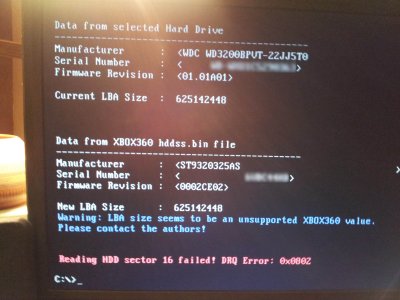
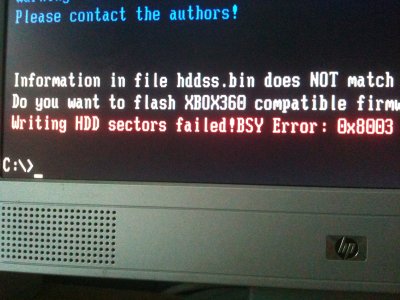
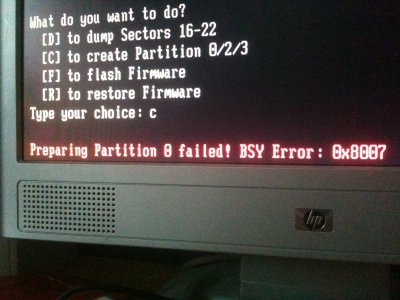
Okay, I partitioned my drive and it still didn't work. I will enclose some pictures showing my problems but basically I partition the drive and I am about to flash the drive and I get an error.
IMG_1023.JPG
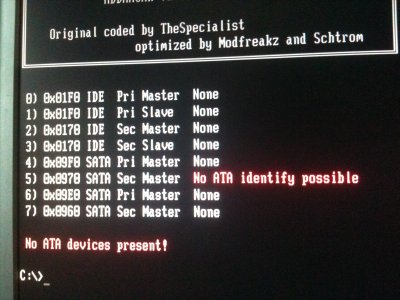
Then if I immediently try to reload hddhackr it wont detect the drive at all.
IMG_1024.JPG
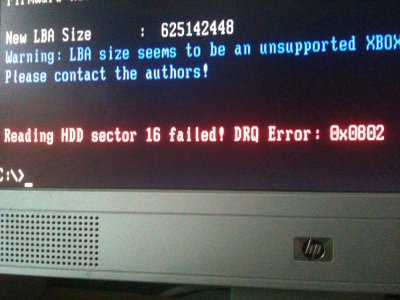
If I reset the computer and then load hddhackr I get sector 16 error again.
IMG_1025.JPG
Then after getting the sector 16 error I repartition the drive and the whole thing just repeats.

UPDATE:
I tried partitioning the drive in hddhackr (thought you might of meant that) and now I get this new error.
IMG_1026.JPG
Any other ideas anyone?
 
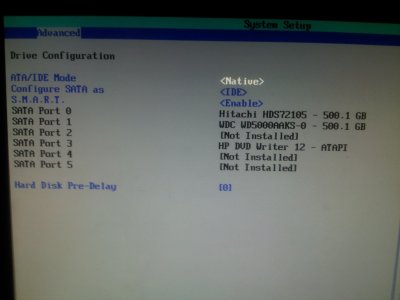
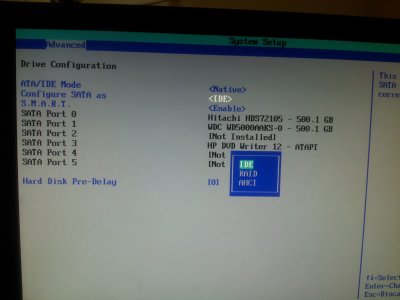
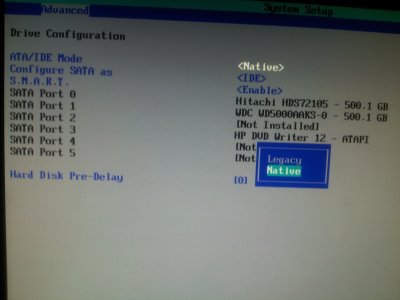
Okay. I am on the latest bios and my Motherboard doesn't appear to have any legacy settings and it also doesn't have AHCI. I have tried the WD Drive Health thing already and did the write zeros and other tests. Anything else?
 
I've just registered to thank the OP for this guide. Had a 320gb WD drive around and used it to upgrade my 4-year old 120gb drive.
 
@oreoellie,

Yes, I meant partition in hddhackr before flashing in hddhackr.

If HDDHACKR is seeing the drive, then you should be set up right in the BIOS. Some things to look for in there are: SATA mode is IDE, not AHCI, and not RAID (RAID probably isn't in your BIOS anyway since it only shows up if your motherboard is capable of RAID), I actually used the BIOS setting "Native", not "Legacy".... anyway, all of that is probably not what is wrong if HDDHACKR is seeing the drive you should be good.

My steps were: 1, booted computer using my bootable USB device; 2, ran hddhackr; 3, selected the drive from the list (there was only one since I disconnected my other drive as described in the tutorial); 4, partition the drive right there in hddhackr using the C choice; 5, since hddhackr seemed to hang after saying the partitioning process was successful, I rebooted the computer from the bootable USB device; 6, started hddhackr; 7, selected the drive, same as before; 8, used the F option to flash the drive, and that was it.

Are you saying that you partitioned the drive some other way?

20130116_093741.jpg20130116_093823.jpg20130116_093800.jpg20130116_093843.jpg

I speculate what might be happening is the drive out of the box is partitioned for windows and the like. A specific type of partitioning is required for Xbox 360. So the drive must be RE-partitioned. This avoids the sector 16 error... but as I say this is speculation.

I hope this helps you. As I said it did finally work for me and I was happy.
 
Last edited:
@80h
Still didn't work and I didn't see any options for things like legacy or IDE in my BIOS.

Anyone else out there seeing this that might have any other ideas?
 
I'm sure at this point you, (oreoellie), have exhausted all ideas on what to do with that particular drive. I certainly can't think of anything further to try. It could be the drive, the motherboard's characteristics, or perhaps just the hddhackr program. I can only say that I'm sure that it can be done with that drive that you have because that's the same one I used. Where to go from here?

** If you have a friend with a computer, see if he/she will let you try it on there.
** Return your drive to the store. And just start over with the exact same drive as what is in the picture in the tutorial. You can get one on Amazon, Fry's, Microcenter, Best Buy, even Walmart. Make sure it's the one that says Scorpio right on the drive. Make sure you type the word Scorpio in when you search.
** Break down and just pay the price for a "real" Xbox 360 drive. (but what fun would that be, right?)
** Perhaps look for a different security sector dump file somewhere on the internet. When I was in the same boat as you I did find other HDDSS320.BIN files out there, but I never got around to finding out if it was an identical file. I'm suspicious of the message that's printed in blue when you try to flash because it seems to pertain to the file, but who knows?
** Locate on the internet information from the creator of hddhackr or just try to get closer to the source to see if you can find information about that message, or about either of those error messages, but especially the one in blue.

Sorry it hasn't worked out. I'm sorry if in any way I've steered you wrong. Reply when you find a solution. I know you will.

Here's a link to that Scorpio drive on Amazon.
 
I finally broke down and took the HDD to my parent's house and used my old (and when I say old, I mean like 2005ish) desktop and it managed to work! Not sure what was wrong, but it was something to do with my computer. Also, I couldn't transfer any partitions from my old HDD until I put the HDD into my xbox and formatted it, then took it out and restored partition 2. I didn't even mess with partition 3, since I had the transfer cable and 99% of everything transfered... Anyway, all is working now. Thank you!
 
@80h
You have been incredibly helpful and I am disappointed that my drive wont work but I think I am just going to sell it on eBay and get a different one, I found a scorpio series brand new on eBay for $38 so I think I will get that. Anyways thank you for all of your help.
 

About Digiex

Digiex is a technology and gaming forum, founded in 2004 by InsaneNutter and Nimrod. Digiex has served the internet community with breaking news, detailed guides, exclusive downloads and a popular discussion forum. A small, friendly community of like‑minded people has developed over the years. People are encouraged to register and participate in on‑going discussions.

Get Social

Back
Top Bottom