Hack a 250gb, 320gb or 500gb Sata harddrive to work in the Xbox 360 and Xbox 360 Slim

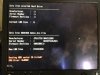
HI, I Just have done this and nothing is happening on the drive. Flashed; everything I would like to know what to do when i get error 16 but the words at the end are different "Reading HDD sector failed 16 failed! DRQ Error: 0x0802" This is a pain because i just done this with another one about 4 months ago. And now i have a friend that needed more room and i got him the drive as a birthday present. The only thing different i did was create a parttion first instead of flashing it right away. I am PISSED PLEASE HELP!!! and i can't find an undo.bin file, i deleted it by accident. Trying to find an recovery drive file. The drive is WD1200BEVS-08UST0.
PLEASE HELP!!!! I WANT THIS TO WORK!!!!!
WIll POST IMAGE LATER.


Here is the image
 

Attachments

  • image.jpg
    image.jpg
    1.8 MB · Views: 2,889
Last edited by a moderator:
Have you set disabled AHCI or set the Sata operation mode to IDE / Legacy? you might be out of luck without your undo.bin unfortunately.

However from your photo it doesn't look like the drive is been read at all, so i question if it even flashed it.
 
response

Have you set disabled AHCI or set the Sata operation mode to IDE / Legacy? you might be out of luck without your undo.bin unfortunately.

However from your photo it doesn't look like the drive is been read at all, so i question if it even flashed it.
Yes all the setting are set as said, I have done this before but with a Scorpio blue series. I had the drive flashed with undo.bin before in the winrar undo file that u provided. Now i don't know how to flash it again, it came up with that error. IS THE WHOLE DRIVE CORRUPTED IN DOING THIS UNDO.BIN FILE.
reply please

Is it possible that if the whole drive is corrupted, it won't show the serial on HDDHACKR, as well as many other thing in the drive?
Info about the drive is not showing up and i can't do anything of it, I know how to rewrite code so tell me what line to rewrite to get the hddss.bin to work.

Nevermind i never seen that type of coding.

I just checked with this other website and it said "FAQ

Q. I get an error when I try to dump hddss.bin from a 120 gb HDD.
A. This version can't dump from an elite drive yet. You'll have to dump sectors
16-22 manually with a tool like winhex, save them as 'hddss.bin' and then continue
like normal, with the hddhackr."
 
Last edited by a moderator:
If the drive was detected before you used hddhackr then you can try undoing the drive.
Use this program to recover the undo file.
Download Recuva 1.50.1036 - FileHippo.com

If you are able to get the undo.bin then proceed to the instructions below.

Bricked drive? See more here bricked.drive.txt
Look for this.You will also need the correct undo file.
**text file modified by rick,DIGIEX.NET**
note:This may or may not work, i have not tested it personally.
 
If the drive was detected before you used hddhackr then you can try undoing the drive.
Use this program to recover the undo file.
Download Recuva 1.50.1036 - FileHippo.com

If you are able to get the undo.bin then proceed to the instructions below.
Thanks will try it, I though it was going to be lost.

Nope the undo file on the usb i used doesn't show the undo.bin file i need, but thanks though, anymore ideas? Can I take the bin file from the HDD, is there a way to do that with rewriting its code? Like a program that does that.
Was I suppose to look at the usb files to recover or HDD files?
- Thanks for helping me on this situation.
 
Last edited by a moderator:
ok will

I have another question after this process is finished. After I thought the flashing was good, I saw it only reads 12gb of the HDD was recognized in the xbox. What could be the problem with the drive in that matter?

I did a deep scan no undo file was found. Anything else or do i call WD to get a recovery file from them?
 
You can try formatting the drive in the xbox if it shows a different capacity than the drive itself. This may or may not fix it.
from xbox.com
Important When you format a storage device, all of the information saved on that device is erased and cannot be recovered. Make sure that you either do not want the information stored on that device or have backed up the information to another device before you continue.

To format a storage device

  1. Press the Guide button on your controller, go to Settings, and select System Settings.
  2. Select Storage or Memory.
  3. Select the storage device that you want to format, and then press Y on your controller.
  4. Select Format. You will see the following message:
    This will delete all content on this device. Do you wish to continue?
  5. Select Yes to format the storage device.
  6. If you are asked to enter your console serial number, do so, and then select Done. This step helps to guard against accidental formatting.
The console serial number is located on the back of the console and behind the oval door on the front of the console.
WD has no recovery files.
 
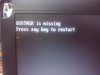
Hello, when I tried hacking my JHDD, I got this:
0


and I don't know what I did wrong, can someone help me?
 
Image is broken. Can you attach the image via go advanced>manage attachments>upload.

Im sorry for that

EDIT: I only get this when I put the HDD into my laptop but when I connect it as external drive it tells me there are no ATA devices present

 

Attachments

  • CAM00256.jpg
    CAM00256.jpg
    900.2 KB · Views: 1,204
Im sorry for that

EDIT: I only get this when I put the HDD into my laptop but when I connect it as external drive it tells me there are no ATA devices present

Looks like the flash drive wasn't selected for booting. You will need to connect the flash drive with dos & hddhackr on it and connect the the hard drive internally. To select the usb drive for booting press the button for selecting boot device or you can change it in the bios.
When you're done you can change the boot priority(if you changed it) after you have hacked the hard drive.
 
Top Bottom